
How we moved one industry segment of an ACT! database into HubSpot, cleaned, de-duplicated, validated and fully traceable
Summary
Key results: 37,050 contacts, 12,480 companies, 3,860 deals and 13,300 contacts' notes moved from ACT! to HubSpot with 0 load errors and 0 missing records.
How: a scoped export with every ACT! ID kept, rule-based de-duplication (1,985 contacts, 1,140 companies, 74 opportunities merged), 17 ACT! groups rebuilt as HubSpot segments, and NeverBounce validation of every email before any send.
A B2B company selling into industrial manufacturing had years of customer data in ACT! CRM and wanted it in HubSpot. Not all of it, and not as it was. We moved one industry group of 46,350 contacts and delivered 37,050 clean contacts, 12,480 companies, 3,860 deals and 13,300 consolidated notes, with 0 load errors and 0 missing records.
Every record kept its original ACT! ID, every contact, company and deal was de-duplicated and linked, and every email was validated before marketing sent a single message. This is how our HubSpot migration team ran it.
What did the ACT! to HubSpot migration deliver?
The migration delivered 37,050 contacts, 12,480 companies and 3,860 deals into HubSpot, with every count reconciled against ACT!.
| Measure | Result |
|---|---|
| Source and target CRM | ACT! (Act! CRM) to HubSpot |
| Contacts in scope in ACT! | 46,350 |
| Contacts loaded to HubSpot | 37,050 |
| Companies loaded | 12,480 |
| Opportunities loaded as HubSpot deals | 3,860 |
| Contacts with migrated notes | 13,300 |
| Duplicates merged | 1,985 contacts, 1,140 companies, 74 opportunities |
| ACT! groups rebuilt as HubSpot segments | 17 |
| Load errors / missing records | 0 / 0 |
| Email validation | NeverBounce, every contact |
| Name enrichment | HubSpot enrichment, then ZoomInfo |
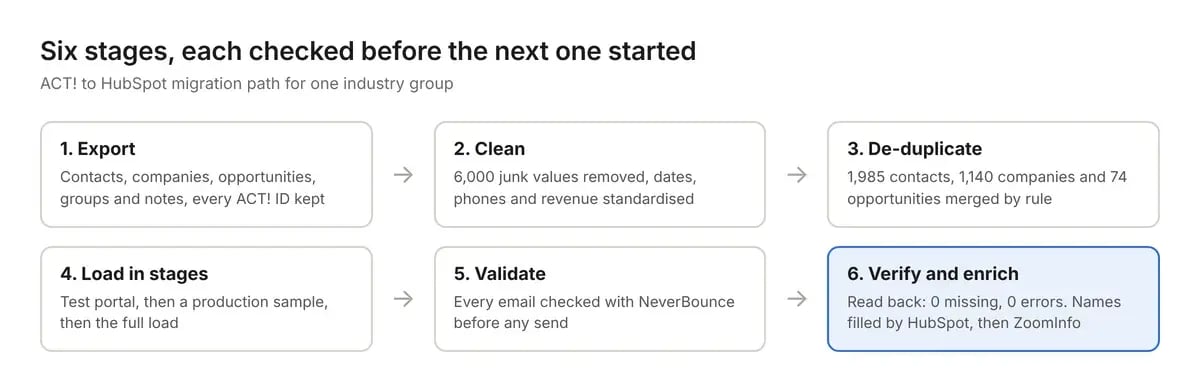
Figure 1. The six stages of the ACT! to HubSpot migration. Each stage was signed off before the next began.
How do you export data from ACT! for a HubSpot migration?
Export it yourself and keep every record ID. We exported the ACT! database directly, so every HubSpot contact can be traced back to its ACT! source. Without IDs you cannot check counts, merge duplicates safely or fix a single record after go-live.
What we exported from ACT!:
- Contacts with their ACT! Contact ID and ACT! Company ID
- Companies with their ACT! Company ID, domain and profile fields
- Opportunities with their ACT! Opportunity ID, stage, amount, close date and owner
- Group memberships, including every sub-group
- Notes, linked to each contact by its ID
- Original dates: create, edit and last letter dates
- Email flags: ACT! opt-out and bounce status
- Record manager, the original ACT! owner
Tasks and activity history were left behind, as agreed at the start, because the business no longer used them.
In HubSpot, the ACT!-specific values sit in their own ACT! Migration property group, apart from the standard fields. Name, email, job title, phone, address, company, website and revenue were mapped one to one, and the client approved the field map before anything was loaded.
Example: tracing a record after go-live
Three months after launch, a sales rep finds a contact whose job title looks wrong. Because the HubSpot record carries its ACT! Contact ID, the team can look up the original ACT! record in seconds and check whether the error came from the source or was introduced later. Without the ID, that question has no answer.
How do ACT! groups become HubSpot segments?
HubSpot has no ACT!-style groups, so we rebuilt them. We migrated a single industry group and its sub-groups, then recreated those 17 groups as HubSpot segments. Moving one focused audience kept old and unrelated records out of the new CRM.
- Set the scope. We pulled every contact in the industry group and its sub-groups: 46,350 contacts. All 17 group counts matched the agreed figures exactly.
- Kept memberships on one property. Each contact's ACT! groups are stored on a single HubSpot property, so a person in five groups is still one contact.
- Built a segment per group. Each of the 17 groups has its own HubSpot list, and every migrated contact also sits in a shared migration segment. Marketing can email one group or all of them without extra workflows.
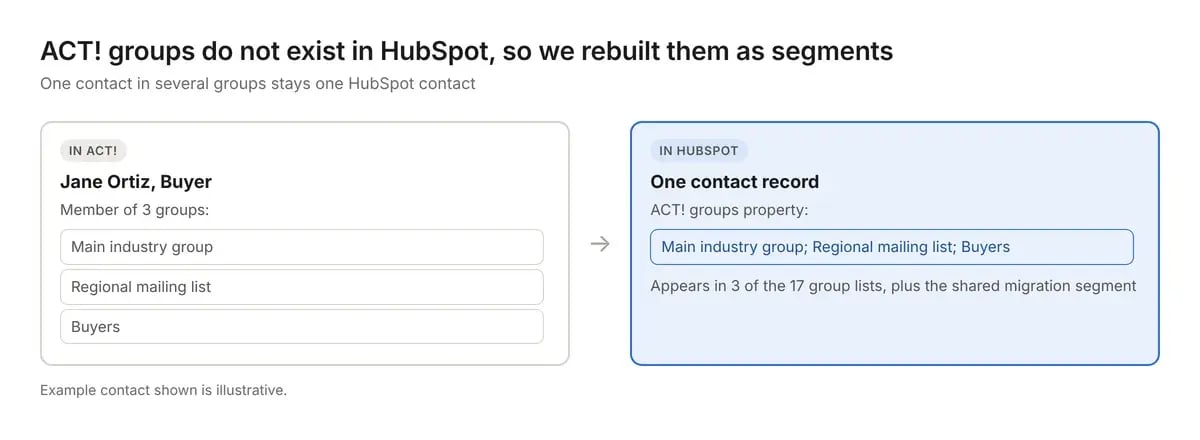
Figure 2. One contact in three ACT! groups becomes one HubSpot contact that appears in three segment lists.
| Example segment | ACT! contacts | HubSpot contacts |
|---|---|---|
| Main industry group | 46,160 | 36,940 |
| Regional mailing list | 14,660 | 12,350 |
| Buyers | 5,690 | 5,195 |
| Fabrication / welding | 2,450 | 2,265 |
| CNC / machining | 1,780 | 1,655 |
HubSpot counts are lower than ACT! counts because duplicates were merged and contacts without a usable email were not loaded.
How do you clean ACT! data before importing it into HubSpot?
Clean, merge and consolidate before you load, so HubSpot starts with one tidy record per person.
- Data cleanup. We removed 6,000 junk "#####" values and 1,400 misplaced codes, converted every date to one format, standardised phone numbers and countries, and turned revenue written as text into numbers.
- Duplicates. We merged 1,985 duplicate contacts that shared an email, or a name and company. The surviving record was chosen by rule: valid email first, then most recent edit, then most complete. Groups, notes and ACT! IDs from merged records were combined, never overwritten, and every merge was logged.
- Notes. Each of the 13,300 contacts with notes has one consolidated HubSpot note, oldest to newest, with low-value entries such as "left voicemail" removed. The full original history is kept on the contact as well.
- Note summaries. AI summaries were checked against the original notes. Errors found in the first sample were fixed before the full run, and the final sample check passed in full.
Example: what the cleanup actually changed
A revenue field reading "$10M" became the number 10,000,000, so it can be filtered and reported. A phone stored as "(555) 010 2233 ext" became one standard format. Two ACT! records for the same buyer, one with a work email and one with only a name and company, became one HubSpot contact holding both sets of groups and notes.
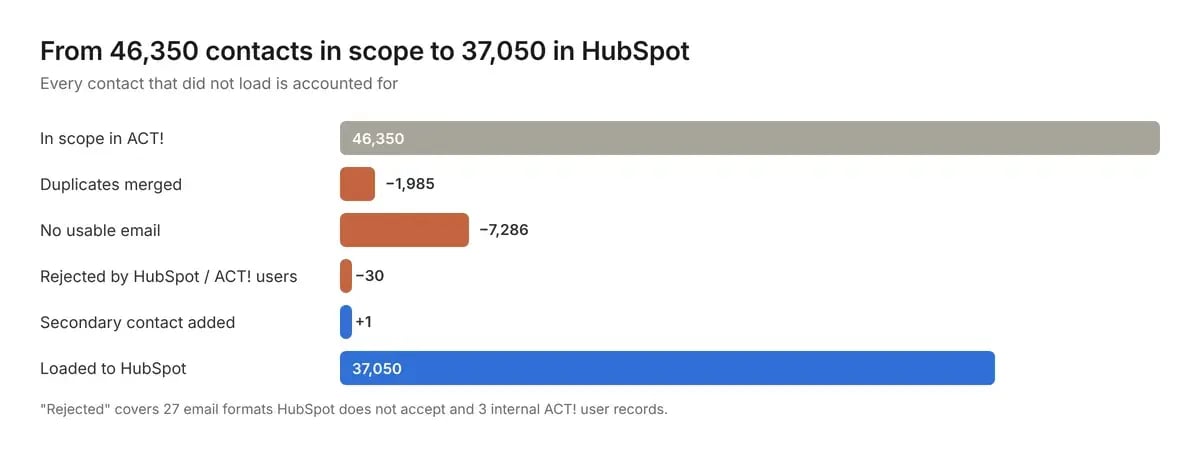
Figure 3. How 46,350 contacts in scope became 37,050 loaded contacts. Every difference is explained.
| Step | Contacts |
|---|---|
| In scope in ACT! | 46,350 |
| ACT! user records removed | -3 |
| Duplicates merged | -1,985 |
| No usable email address | -7,286 |
| Secondary contact added | +1 |
| Email format HubSpot does not accept | -27 |
| Loaded to HubSpot | 37,050 |
How do you migrate ACT! companies and opportunities to HubSpot?
Load ACT! companies as HubSpot companies and ACT! opportunities as HubSpot deals, de-duplicate both, and link every deal to its contact and company. Each record keeps its original ACT! ID.
Companies
- De-duplication. Companies were matched by website domain first, then by cleaned company name. 1,140 duplicates were merged, and their ACT! Company IDs were kept on the surviving record.
- Associations. Contacts were linked to companies using the ACT! Company ID, so 36,210 contacts arrived already associated with a company.
- Profile fields. Industry, SIC and NAICS codes, employee count, revenue and year established came across on the company record.
| Company step | Companies |
|---|---|
| Companies in ACT! | 13,620 |
| Duplicates merged | -1,140 |
| Loaded to HubSpot | 12,480 |
Opportunities to deals
- Pipeline mapping. Each ACT! opportunity stage was mapped to a stage in a HubSpot deal pipeline, with closed-won and closed-lost kept as they were.
- Deal fields. Amount, close date, owner and product details came across with the ACT! Opportunity ID.
- De-duplication. 74 duplicate opportunities (same contact, name and amount) were merged, and 281 empty or test records were removed.
- Associations. Every deal is linked to its contact and company, so sales sees the full history in one place.
| Opportunity step | Opportunities |
|---|---|
| Opportunities in ACT! | 4,215 |
| Duplicates merged | -74 |
| Empty or test records removed | -281 |
| Loaded to HubSpot as deals | 3,860 |
Example: matching companies by domain
"Acme Fabrication Ltd", "ACME Fab" and "Acme Fabrication" all shared one website domain. They became one HubSpot company carrying all three ACT! Company IDs, and every contact and deal from the three records now sits under it.
Pipelines and properties need to exist before the data arrives. If HubSpot is new to your team, HubSpot onboarding can run alongside the migration so both are ready on the same day.
How do you validate and enrich contacts after an ACT! migration?
Use three tools in order: NeverBounce to check every email, HubSpot enrichment to fill missing names, and ZoomInfo for the contacts HubSpot cannot enrich.
1. NeverBounce email validation
All 37,050 emails were checked with NeverBounce, and the result is stored on each contact in a Data Quality property group that lists and sends can filter on. We ran a small sample first and confirmed the results displayed correctly in HubSpot before validating every contact.
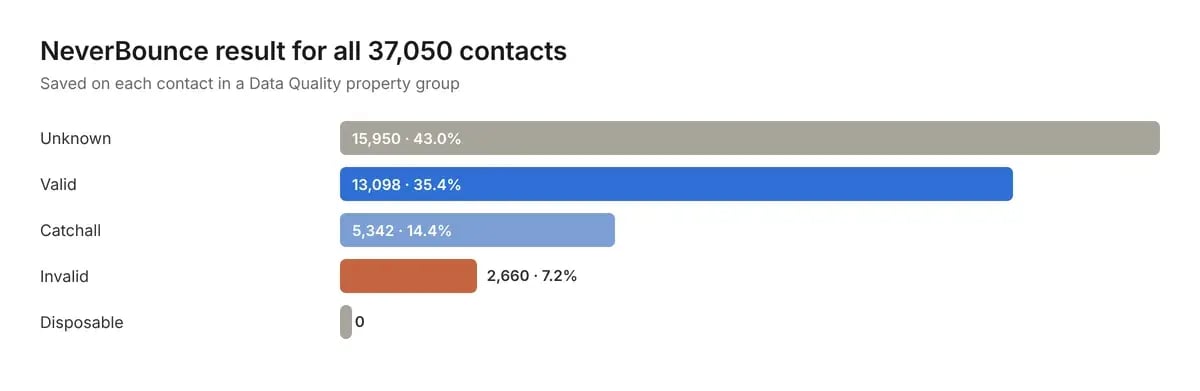
Figure 4. NeverBounce results across all 37,050 migrated contacts.
| NeverBounce result | Contacts | Share |
|---|---|---|
| Unknown | 15,950 | 43.0% |
| Valid | 13,098 | 35.4% |
| Catchall | 5,342 | 14.4% |
| Invalid | 2,660 | 7.2% |
| Disposable | 0 | 0% |
Contacts with valid, unknown or catchall emails are subscribed to marketing information but stay non-marketing contacts until the team chooses to market to them. The 2,660 invalid contacts are flagged, noted and kept in their own segment so they can be removed whenever the team decides.
2. HubSpot enrichment
We ran HubSpot's built-in enrichment on the 1,820 valid and unknown contacts that had no name. It added names and other fields to 210 of them. Contacts still without a name receive emails that open with "Hi there".
3. ZoomInfo
The next stage runs the remaining 1,610 nameless contacts through ZoomInfo to find the person behind each email.
How do you verify an ACT! to HubSpot migration had zero errors?
All 37,050 contacts were read back from HubSpot after the load and compared with the ACT! source: 0 missing, 0 errors.
- Staged rollout. A test portal first, then a small production sample, then the full load.
- Existing data protected. 135 contacts already existed in HubSpot with the same email. They were updated without overwriting their HubSpot values; the other 36,915 were created new.
- Full traceability. Every contact carries its ACT! Contact ID, and every merged duplicate's ID is kept on the surviving record.
- Email safety. ACT! opt-out and bounce flags carried over, and every contact had a NeverBounce result before any send.
- One owner. All migrated contacts were assigned to a single HubSpot owner, ready for follow-up.
ACT! to HubSpot migration FAQ
Can you migrate ACT! notes to HubSpot?
Yes. We moved notes for 13,300 contacts into HubSpot as one consolidated note per contact, and kept the full original history on the record as well.
Do ACT! groups transfer to HubSpot?
Not directly. HubSpot has no ACT!-style groups, so we stored each contact's groups on one property and built a HubSpot list for each of the 17 groups.
How do you handle duplicates when moving from ACT! to HubSpot?
Merge them before the import using fixed rules. We merged 1,985 duplicates by email, or by name and company, and kept every merged record's ACT! ID and notes.
Should you validate emails before importing into HubSpot?
Yes. Validating with a tool such as NeverBounce protects your sender reputation. In this project 7.2% of emails were invalid and were flagged before any send.
What if migrated contacts have no names?
Start with HubSpot's built-in enrichment, then use a data provider such as ZoomInfo for the rest. Until a name is found, emails can use a general greeting.
Can you migrate only part of an ACT! database?
Yes. We migrated one industry group and its sub-groups (46,350 contacts) and left the rest of the ACT! database behind.
Can ACT! opportunities be migrated to HubSpot deals?
Yes. We moved 3,860 ACT! opportunities into HubSpot as deals, mapped each ACT! stage to a HubSpot pipeline stage, and linked every deal to its contact and company.
How are ACT! companies de-duplicated in HubSpot?
Match by website domain first, then by cleaned company name. We merged 1,140 duplicate companies this way and kept every ACT! Company ID.
Planning your own move off ACT!?
A migration is only as good as the data that lands. If your ACT! database has years of duplicates, half-filled records and groups nobody has reviewed, that is normal, and it is fixable before it reaches HubSpot.
Our HubSpot migration services start with a scoped export and a field map you approve before anything is loaded. Talk to our team about your ACT! database, or browse more Amwhiz case studies.
Related case studies

With huge passion for reading fiction novels and international political relations, Vijay is currently a full-time Copywriter & a digital marketer. He loves traveling & listening to stories.
Leave a comment
Your email address will not be published. Comments are reviewed before they appear.