
Brochure-grade proposals that rebuild themselves from the deal record, beyond what native quotes or CPQ content sections could do
Summary
Key results: zero manual document assembly, one rule set instead of a template library, and product content read live from HubSpot product records at render time.
How: a Claude-built artifact reads the deal, line items and product records over MCP, picks the right sections by rule, renders a branded PDF with product images, and attaches it to the deal on a button click or schedule.
A HubSpot client wanted every proposal to look like a company brochure and work like a priced quote, and to be different for every deal. Native HubSpot quotes could not reach that level of personalisation, and CPQ content sections still left the sales team assembling documents by hand.
We built a Claude-built proposal engine that reads the deal, its line items and the product records straight from HubSpot over MCP, decides which content sections apply, renders a fully branded PDF with product imagery and a layout that adapts, and attaches the file back to the deal. It runs on a button click or on a schedule. Sales writes nothing: they choose products and set deal properties, and the document follows.
The one gap today is signature and online acceptance, because the output is a PDF. Phase 2 closes it with a magic-link proposal viewer emailed to the buyer.
What does the HubSpot proposal engine do?
It turns each HubSpot deal into a branded proposal automatically, with no one assembling the document by hand.
| Measure | Result |
|---|---|
| Platform | HubSpot, connected to a Claude artifact over MCP |
| Output | Branded PDF proposal attached to the deal |
| Trigger | A button on the deal, or a scheduled run |
| Manual document assembly | None |
| Template library | Replaced by one rule set |
| Product content | Read from the product record at render time |
| Next phase | Magic-link web viewer with engagement tracking, then accept and sign |
What did the client need from their HubSpot proposals?
One document that works as a brochure and a priced quote at the same time, assembled per deal rather than per template.
In practice that meant:
- A company story section (who they are, credentials, proof) rendered to brochure standard, not as a plain quote header.
- Only the products on that deal, each with its own imagery, description and specification content pulled from the product record.
- A layout that reflows: spacing, page breaks and section order adapt to how many products are quoted and how much content each carries.
- A priced quote block with line items, discounts, totals and payment terms.
- Terms and conditions that resolve dynamically, so the clauses match what is being sold and to whom.
The constraint behind all of it was scale. One beautiful proposal is a design job. Hundreds of them, each different, is a data job.
Why can native HubSpot quotes not produce brochure-style proposals?
HubSpot quote templates are built to present a price, not to present a company and a product catalogue around that price.
- Personalisation does not scale. Token substitution handles a name and a number. It cannot handle "show these three sections because this deal is enterprise, in this region, buying this product family".
- Product imagery is effectively unavailable. Pulling an image from each product record and rendering it, correctly sized, inside a quote template's line-item area is the hardest single thing to do natively.
- The layout is fixed, the content is not. Real deals range from one line item to fifteen, with short or long content behind each. A fixed template either overflows or leaves dead space.
- Every variant becomes a new template. Once sections differ by product or segment, the team is maintaining a template library instead of a document.
Example: where a template breaks
A deal with one product needs a tight, focused document. The next deal has nine products, three of which carry two pages of specifications each. A single template cannot serve both, so the team ends up with "short", "long", "enterprise" and "EU" versions, and somebody has to pick the right one every time.
Why not use HubSpot CPQ content sections, PandaDoc or Zoho?
Both alternatives move the problem rather than solve it.
Content sections in HubSpot's newer CPQ. They add narrative blocks to a quote, which is closer to the goal. But someone on the sales team still decides which sections belong on which quote, every time. Product images rendered from product records remain out of reach. The result is a quote with more blocks to manage, not a proposal that assembles itself.
PandaDoc, Zoho and similar tools. These can do conditional content, so the capability exists. Three things made them a poor fit here:
- Conditional logic sits in the expensive tiers, and the cost scales with seats rather than with proposals sent.
- The document lives in a second system, so branding, content, logic and the audit trail drift away from HubSpot.
- Deep conditions that read both line items and deal properties are still awkward to express, and harder to change once a non-technical team owns them.
What did we build instead?
We stopped treating the proposal as a template to fill and started treating it as a document to generate. The build is a Claude artifact connected to HubSpot through MCP, and it has four layers a template does not:
- A live read of the CRM. Deal, company, contacts, line items and the full product records behind them, including image fields, long descriptions and spec content, arrive as structured data rather than merge tokens.
- A rules layer. Which sections appear, and in what order, is decided from the products on the deal and the deal's own properties. The rules live in one place and apply to every proposal.
- A rendering layer. The artifact composes the document and produces a PDF with brand typography and colour, product imagery placed and sized from the records, and spacing that reflows around the content.
- A write-back. The finished PDF is attached to the deal, so the document the buyer receives is the document the CRM holds.
The trigger is a single button or a scheduler that keeps proposals current as deals change. Connecting HubSpot to an external engine like this is the kind of work our HubSpot custom integration team does every week.
How does automated proposal generation work in HubSpot?
It works in five steps: trigger, read HubSpot over MCP, resolve the rules, render the PDF, and attach it to the deal.
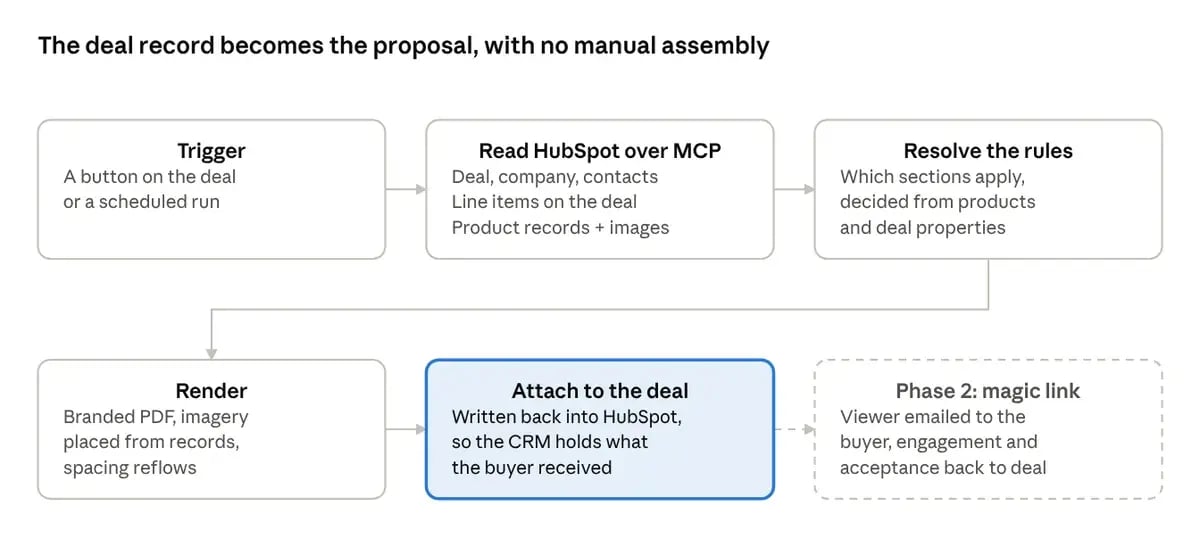
Figure 1. Proposal generation in five steps, plus the Phase 2 extension.
No step in the chain is typed by a person. The only human input is the deal itself, the products chosen and the properties set, and the document is a function of that input.
How do conditional sections decide what goes in each proposal?
Every section in the proposal carries a condition, and the condition reads the CRM instead of asking a person. Two inputs drive it: the line items on the deal, and the deal's own properties. A section can depend on either, or on both together, which is where this approach pulls ahead of token-based personalisation.
| Rule input | Example condition | What changes in the document |
|---|---|---|
| Product selected | A product family is on the deal | That family's imagery, description and spec pages appear; the others never render |
| Product count | One line item vs. many | Section order and page breaks reflow; a single-product deal gets a focused layout |
| Segment | Enterprise vs. SMB | Credentials, case-study and security sections swap to the matching set |
| Region | Buyer's country or entity | Legal entity, currency, tax wording and jurisdiction clauses resolve |
| Term | Contract length or payment schedule | Payment terms and matching commercial clauses render |
| Combined | Product family × segment | Implementation and support scope come from the intersection, not one axis |
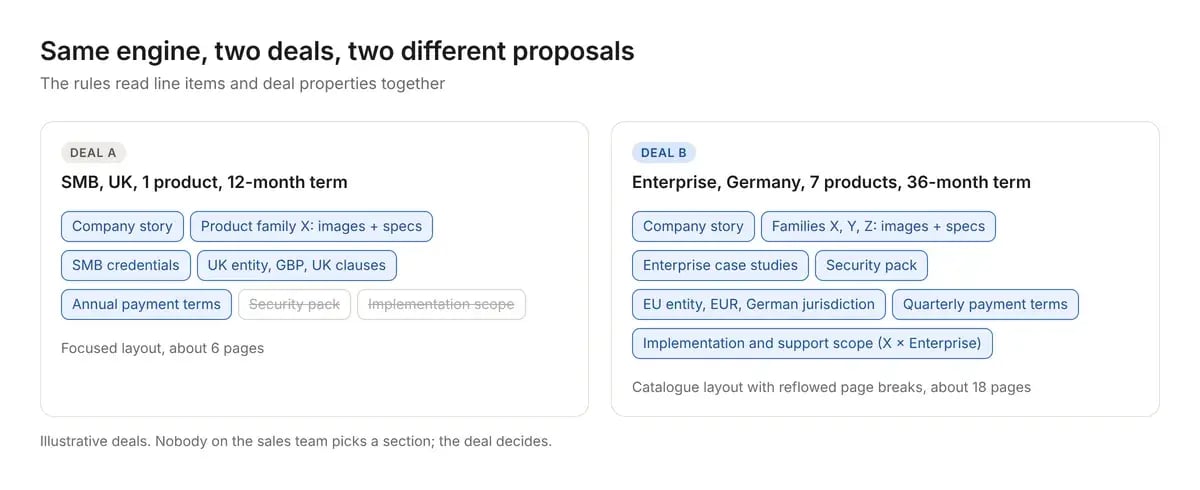
Figure 2. Two illustrative deals run through the same rules produce two very different proposals.
Example: one change on the deal, a different document
A rep moves a deal from SMB to Enterprise after a discovery call and adds a second product family. On the next run, the proposal gains the enterprise case studies, the security pack and an implementation scope for the new family. Nobody opened a template.
The team maintains the rules once. Sales changes the deal, and the document changes with it.
How does this compare with native quotes, CPQ and PandaDoc?
The advantage is not that nobody else does conditional content. It is where the logic lives and what it costs to use.
| Capability | Native quote | CPQ content sections | PandaDoc / Zoho-class | This build |
|---|---|---|---|---|
| Conditional sections | No | Manual per quote | Yes, higher tiers | Yes, rule-driven |
| Rules read line items and deal properties | No | Partly, by hand | Limited | Yes, including combinations |
| Product images from product records | Very hard | Very hard | Manual upload per template | Yes, automatic |
| Layout reflows to content | No | No | Within template limits | Yes |
| Where content lives | HubSpot | HubSpot | A second system | HubSpot |
| Cost driver | Included | Included | Seats and tier | Build once, run per proposal |
| Native e-signature and online accept | Yes | Yes | Yes | Not yet (see below) |
The honest reading of this table: we win on generation and currently lose on acceptance.
What are the limitations of a PDF-based proposal?
The output is a PDF attachment, and a PDF cannot be accepted or signed in place. Three native capabilities sit outside the current build:
- E-signature. HubSpot quotes carry it; the attachment does not. Deals that need a signature go through a separate signing step.
- Online accept. There is no "Accept" button for the buyer, so the acceptance moment is not captured as an event.
- Quote-object behaviour. Anything HubSpot keys off the native quote object, such as quote-level reporting, published quote links and state tracking, does not fire for an attachment.
This is a deliberate trade, not an oversight. We took full control of the document in exchange for the interaction layer, and we are building that layer back.
What is the Phase 2 magic-link proposal viewer?
The next phase makes a web proposal the primary delivery. The same generated proposal is published to a private viewer and emailed to the buyer as a unique link.
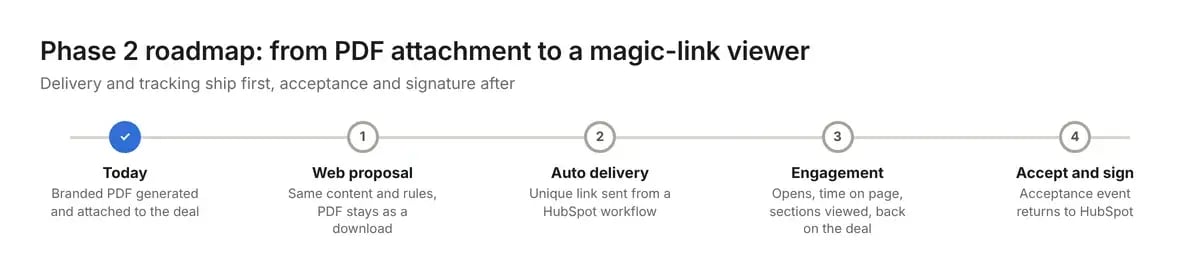
Figure 3. The Phase 2 roadmap, in the order it will ship.
- A branded web proposal built from the same content and rules: one source, two renderings. The PDF stays available as a download.
- Automatic delivery. The link is generated and sent from a HubSpot workflow, with no manual send step.
- Engagement signal. Opens, time on page and section views are written back to the deal, visibility a PDF never gave.
- Accept in place, then signature, bringing the acceptance event back into HubSpot.
Delivery and tracking come first because they are useful immediately. Acceptance and signature come after because they carry the compliance questions. If you want a custom card or button for this inside the HubSpot record, HubSpot UI extensions are one way to put it there.
What results has the proposal engine delivered so far?
Three outcomes are already provable, before the client's before-and-after figures are in:
- Zero manual document assembly. No proposal is typed, copied or laid out by a person.
- One rule set instead of a template library. A change to a clause or a section happens once and applies to every future proposal.
- Product content that cannot go stale. Images, descriptions and specifications are read from the product record at render time, so a product update reaches the next proposal automatically.
What other documents can HubSpot generate this way?
The proposal was the first document. The pattern of reading the CRM, resolving rules, rendering branded output and writing it back fits any document a CRM should be able to produce itself:
- Statements of work and implementation plans, scoped from the same line items.
- Renewal and upsell packs generated on a schedule from contract end dates.
- Onboarding or handover documents built at closed-won from what was actually sold.
- RFP and tender responses, where the content library is large and selection is the hard part.
The qualifying question is always the same: is the content already in the CRM, and is a person currently assembling it by hand?
Frequently asked questions
Can HubSpot quotes show product images from the product record?
Not in any practical way. Rendering each product's image, correctly sized, inside the line-item area of a native quote template is very hard. This build reads image fields from the product records and places them automatically.
How is this different from HubSpot CPQ content sections?
Content sections add narrative blocks, but someone still chooses them for each quote. Here, rules read the line items and deal properties and choose the sections automatically, including combinations such as product family by segment.
Do we need PandaDoc or a similar tool?
Not for generation. Those tools can do conditional content on higher tiers, but the document lives outside HubSpot and costs scale with seats. This build keeps content, rules and the finished file in HubSpot.
Can buyers sign or accept the proposal?
Not yet. Today the output is a PDF, so signature runs as a separate step. Phase 2 adds a magic-link web viewer with online acceptance and then signature.
What triggers a new proposal?
A button on the deal, or a scheduler that regenerates proposals as deals change.
Want proposals that build themselves?
If your team is still picking templates, pasting product descriptions and fixing page breaks before every send, the content you need is probably already in HubSpot.
Talk to our HubSpot consultants about which of your documents could be generated from the CRM, or contact Amwhiz to scope a proposal engine of your own. You can also browse more Amwhiz case studies.
Related case studies

With huge passion for reading fiction novels and international political relations, Vijay is currently a full-time Copywriter & a digital marketer. He loves traveling & listening to stories.
Leave a comment
Your email address will not be published. Comments are reviewed before they appear.