
How a refrigeration manufacturer put real production capacity in front of its sales team and cut goodwill credits by 77%
Summary
Key results: slipped delivery dates cut from about 1 order in 4 to 1 in 14, goodwill credits down from around £96,000 to £22,000 a year, same-day order acknowledgement, and forecast variance down from 18% to 4%.
How: a direct integration between HubSpot and Dynamics 365 Finance and Supply Chain Management, bypassing Dataverse, that shows live lead times while quoting, creates the sales order at win, and alerts the salesperson when the confirmed date moves.
A refrigeration manufacturer took around 70 orders a month, averaging £38,000 each, and every one was sold with a delivery date the salesperson had essentially guessed. The production schedule lived in Dynamics 365 Finance and Supply Chain Management. The sales team lived in HubSpot. One promised date in four was wrong, and the customer usually found out before the salesperson did.
We built a direct two-way integration that puts real production capacity in HubSpot before the quote goes out, creates the sales order in Dynamics the moment a deal is won, and sends every production and dispatch milestone back. Here is what changed.
| Measure | Before | After |
|---|---|---|
| Order acknowledgement to the customer | 3 working days | Same day |
| Promised dates that slipped | About 1 in 4 orders | About 1 in 14 |
| Goodwill credits for missed dates | Around £96,000 a year | Around £22,000 a year |
| Order entry into the ERP | Rekeyed from a PDF by two coordinators | Created automatically at win |
| Monthly sales and finance reconciliation | 4 people, 3 hours | Not needed |
| Forecast against recognised revenue | 18% variance | 4% variance |
| Lead time visible to sales | A spreadsheet updated on Mondays | Live, by product line and entity |
Who was the client?
A manufacturer of commercial refrigeration and cold room systems, selling to supermarket groups, food processors and hospitality contractors in three countries. Three legal entities, two factories, around 70 orders a month. Nothing is off the shelf: every unit is configured, most are installed by a contracted engineering partner, and lead times run from six to fourteen weeks depending on the product line and the compressor supplier.
Two systems, each entrenched for good reasons:
- HubSpot ran marketing and sales: specifier campaigns, trade show capture, the pipeline for eleven salespeople and three channel partners, quoting, and the forecast the board saw monthly.
- Dynamics 365 Finance and Supply Chain Management ran the company: sales orders, product configuration, master planning, production scheduling, supplier purchase orders, dispatch, installation scheduling, invoicing and revenue recognition across three entities and two currencies.
The company also owned a small Dynamics 365 Sales footprint that nobody used. It came with the licensing bundle and was quietly abandoned when sales chose HubSpot. That detail turns out to matter.
The gap was not information. Dynamics knew exactly when every order would be built and shipped. That knowledge simply never reached the people making promises about it.
Why were salespeople promising delivery dates they could not see?
Because production capacity lived in Dynamics 365 Finance and Supply Chain, and sales only had a lead-time spreadsheet updated on Mondays.
A salesperson stands in a supermarket distribution centre. The customer wants four cold room systems and one answer before signing: when will they arrive?
Production emails a lead-time spreadsheet every Monday. It is a week old by Wednesday and fiction by Friday, because a compressor shipment slipped or a rush order took a slot. The salesperson knows this, and says fourteen weeks anyway, because "I will find out" loses the moment.
The deal closes. The salesperson exports the quote as a PDF and emails it to sales coordination with configuration notes, the site address, the install contact and the agreed date. A coordinator works out which legal entity the order belongs to, keys the order into Dynamics and runs master planning. About three days later, the real date comes back: eighteen weeks, because two units need a compressor on allocation.
Nobody owned that moment. Sometimes the coordinator emailed the salesperson. Sometimes the customer rang to ask why the acknowledgement said May when the quote said March. Then came a difficult conversation, often a goodwill discount, and a customer who remembered it at the next tender. This happened on roughly one order in four.
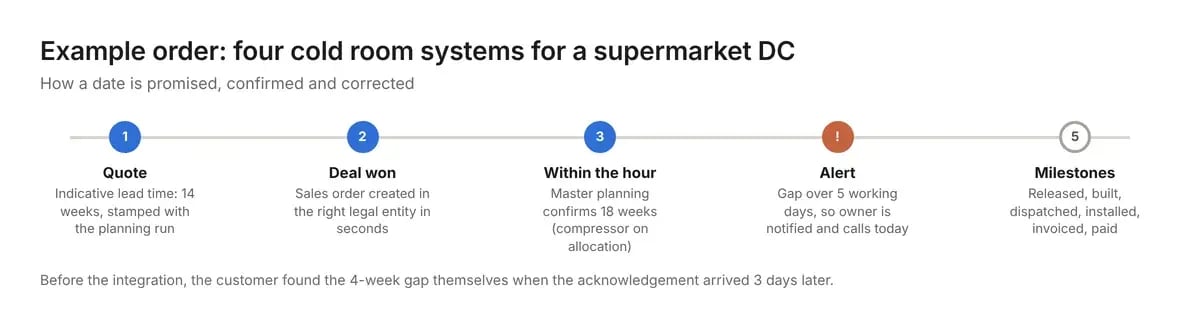
Figure 1. The same four-unit order after the integration: the gap is caught within the hour, not by the customer.
What did inaccurate delivery dates cost the business?
Unusually for an integration project, the biggest cost was not hours. It was money handed back.
- Goodwill credits ran to around £96,000 a year. When a date slipped, the customer had usually booked an install crew or a store closure, and a discount was the cheapest way out. Finance recorded these as commercial discounts, so nobody had totalled them by cause. When we did, almost all traced back to a date promised before anyone checked the production schedule.
- The three-day acknowledgement lost tenders. On competitive bids, the first supplier to confirm a firm date often won. The business was structurally three days behind.
- The reconciliation meeting. Sales forecast from HubSpot; finance recognised revenue in Dynamics at dispatch. A deal won in March might be recognised in June and July. Four people spent three hours a month mapping one list onto the other, and variance ran at 18%.
- Marketing could not prove anything. A specifier campaign aimed at consulting engineers produced leads that took nine to fourteen months to become revenue, in a system marketing could not see.
Two coordinators typing orders that already existed as structured data was the obvious waste, and still the smallest line on this list.
Why do off-the-shelf HubSpot Dynamics 365 connectors fall short for Finance and Supply Chain?
When people say "the HubSpot Dynamics 365 integration", they almost always mean a connector for Dynamics 365 Sales, which stores data in Dataverse. Those connectors sync accounts, contacts, leads and opportunities, and if your Dynamics estate is Sales, they will serve you.
This company's orders, production schedule, dispatch and invoices were in Finance and Supply Chain Management: a different application with a different data model, API surface and release cadence. The two Dynamics apps are linked, where they are linked at all, by dual write, which is its own project to configure and maintain.
| What a Sales-focused connector gives you | What this business actually needed |
|---|---|
| Accounts and contacts in Dataverse | Customers in three Finance and Operations legal entities |
| Opportunities | Sales orders with configured line items |
| Opportunity products from a Dataverse price list | Entity-specific trade agreements and currency |
| Nothing about fulfilment | Master planning dates, production status, dispatch, installation |
| Dataverse as the far end | Finance and Supply Chain as the far end |
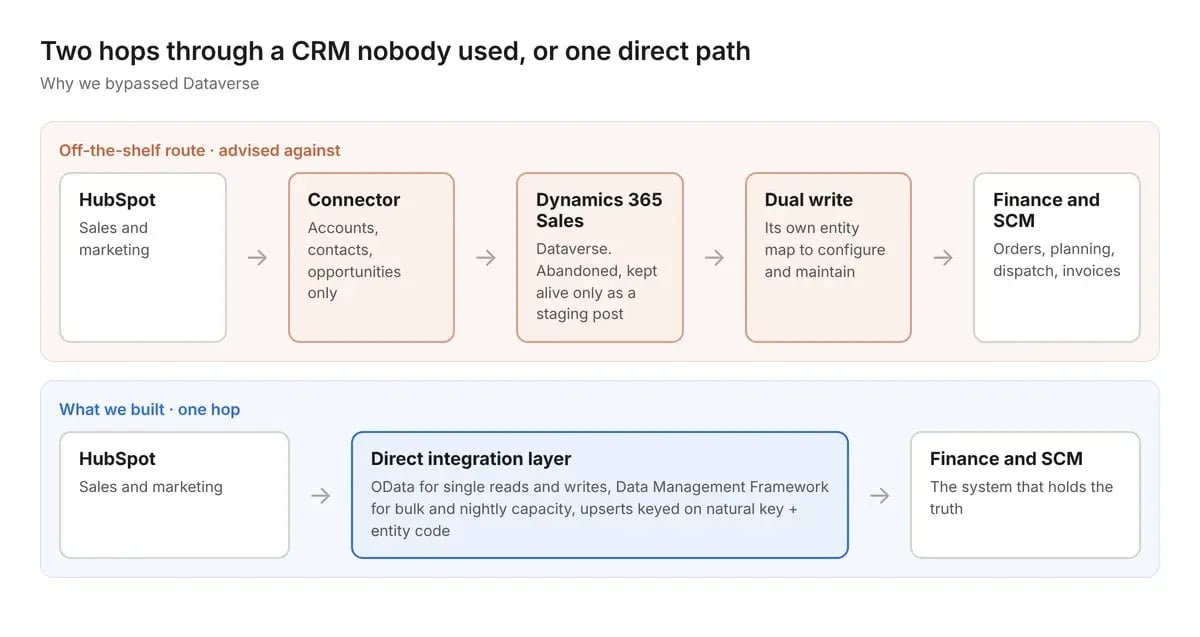
Figure 2. The two-hop route through an unused CRM, compared with the direct path we built.
The off-the-shelf route meant two lossy hops and keeping an abandoned Dynamics 365 Sales deployment alive purely as a staging post. We priced it honestly and advised against it. Instead, we integrated HubSpot directly with Finance and Supply Chain through its OData endpoints and the Data Management Framework, bypassing Dataverse completely. This is the kind of decision our HubSpot custom integration work starts with: connect to the system that holds the truth.
How does the HubSpot Dynamics 365 Finance and Supply Chain integration work?
A direct integration layer with no Dataverse in the middle. It does four things, and the order they happen in is the whole design.
1. Capacity reaches the salesperson before the promise. Every night, and on demand, the layer pulls the planned lead time by product line and legal entity from master planning and writes it onto HubSpot product records. A salesperson building a quote sees an earliest dispatch window beside each configured item, marked as indicative and stamped with the planning run that produced it.
2. The sales order is created in Dynamics the moment the deal is won. No PDF, no email, no retyping. The layer resolves the legal entity, finds or creates the customer under it, applies that entity's trade agreement and currency, and writes the order with every configured line. The order number comes straight back to the deal.
3. Master planning answers within the hour, and the answer goes to the salesperson. The confirmed ship date is written to the deal, and if it differs from the quoted date by more than five working days, a workflow alerts the owner immediately. The salesperson calls the customer that day.
4. Production and dispatch milestones flow back. Scheduled, released, in production, completed, packed, dispatched, delivered, installed, invoiced and paid each land on an order record in HubSpot with a timestamp.
Example: the five-day alert in action
A salesperson quotes 14 weeks for four cold rooms. The order is created at win, and within the hour master planning returns 18 weeks because two compressors are on allocation. The deal owner gets an alert that afternoon, calls the customer, and moves the install booking before anyone has committed a crew. No credit is issued.
The transport is deliberately boring. Single reads and writes use OData. Bulk work, such as the nightly capacity refresh and the historical load, runs through the Data Management Framework in batches, because pulling thousands of records one at a time through OData is how teams discover throttling. Every record carries the Dynamics natural key plus the entity code, and every write is an upsert.
How do you handle multiple legal entities between HubSpot and Dynamics 365?
The real risk was never the API. HubSpot saw one company; Dynamics saw three, with two currencies, three sets of trade agreements, three tax treatments and three numbering sequences. The same supermarket group bought from two entities at different negotiated prices, and the right entity depended on delivery country and which factory built the line. Getting it wrong means an invoice from the wrong company.
We spent the first two weeks on that question alone, before writing any code:
- Entity became a first-class field on the deal, set by rule from delivery country and product line when the deal is created, visible to sales and editable only by sales management.
- Customers were keyed on entity plus account number, not company name. One supermarket group became two Dynamics customer records, both associated to one HubSpot company so the salesperson still sees one relationship.
- Pricing was never copied into the CRM. Trade agreements stay in Dynamics, and the quote fetches the entity-specific price at configuration time. A stale price on a £38,000 order is a real loss.
- Currency was stored twice on purpose: transaction currency for the customer and group reporting currency for the forecast, both converted at the rate Dynamics applied.
Revenue timing was the second hard problem. Sales think in won deals; finance recognises at dispatch; on a fourteen-week lead time those fall in different quarters. Instead of forcing one definition, each deal carries three dated values: won value with close date, order value with confirmed ship date, and recognised value with dispatch date. The forecast reports on the first, the board pack on the third, and the monthly argument stopped.
Example: one deal, three numbers
A £152,000 deal for four systems is won on 28 March. The order is confirmed to ship on 1 August, and £114,000 is recognised at dispatch in August with the final unit recognised in September. Sales and finance now read all three figures and dates on the same HubSpot record, instead of reconciling two lists.
Historical load covered three years of orders, run per entity in a sandbox and reconciled against a Dynamics trial balance extract that the finance director signed off before anything touched production.
What results did the Dynamics 365 integration deliver?
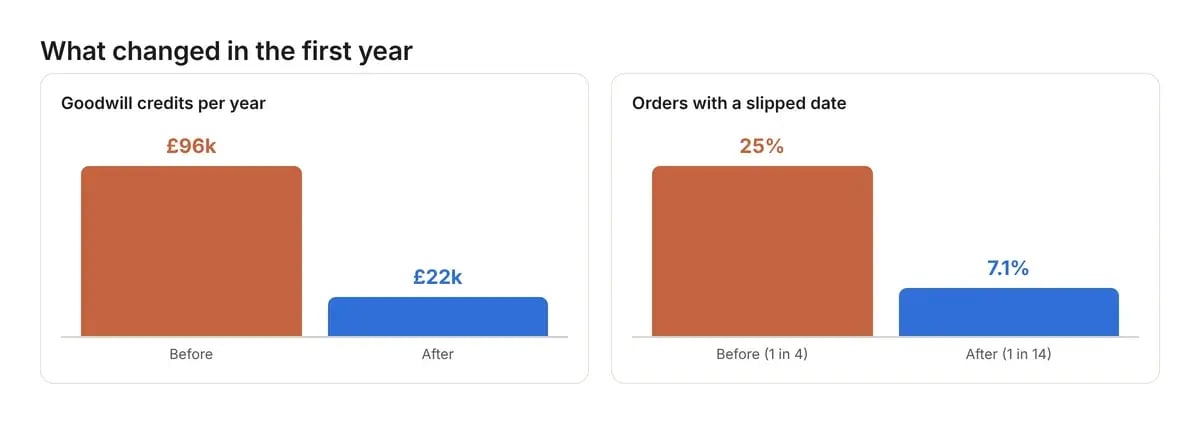
Figure 3. Goodwill credits and slipped dates, before and after.
- Order acknowledgement went from three working days to same day. On tenders decided by confirmation speed, the business went from structurally last to first.
- Date slippage fell from about one order in four to about one in fourteen, mostly because capacity data now reaches the salesperson before the promise.
- Goodwill credits dropped from around £96,000 a year to around £22,000. That alone paid for the project within five months. What remains is genuine supply chain failure.
- Two coordinators stopped rekeying orders and moved to order quality and customer scheduling. Configuration errors from manual entry fell to effectively zero.
- The reconciliation meeting was cancelled. Forecast variance against recognised revenue fell from 18% to 4%, and most of what remains is real timing.
- Marketing finally saw the long tail. The specifier campaign had the longest cycle and the highest average order value. Once the first line questioned in every budget review, it is now protected.
What made this Dynamics 365 integration succeed?
We integrated with the system that holds the truth, not the one with the convenient connector. Routing through Dynamics 365 Sales would have been faster to start and permanently worse.
We put the data in front of the decision. Capacity reaches the salesperson before they quote, not after they win. A dashboard of slipped dates would have measured the problem and fixed none of it.
We sent the bad news early and automatically. The variance alert is about thirty lines of workflow and did more for customer relationships than anything else we built.
We settled the legal entity question before writing code. Two weeks of rules, ownership and edge cases, signed off by finance. Projects that skip this spend the same two weeks later, in production.
The principle: let the ERP own capacity, money and entity; let the CRM own the customer conversation; and make sure the CRM knows what the ERP has committed to, early enough for a person to act. Our HubSpot consulting team applies the same rule to every ERP project.
Frequently asked questions
Is there a native HubSpot integration for Dynamics 365 Finance and Supply Chain?
Not in any meaningful sense. Available connectors are built for Dynamics 365 Sales (Dataverse) and cover accounts, contacts, leads and opportunities. Sales orders, production, dispatch and invoicing live in Finance and Supply Chain, which no off-the-shelf connector reaches from HubSpot.
Could we use dual write to bridge the two Dynamics applications?
Sometimes, particularly if Dynamics 365 Sales is in daily use. If sales runs in HubSpot, it means maintaining an unused CRM as a staging post, plus the dual write map, plus the connector: three moving parts where one would do.
Can HubSpot show real production lead times?
Yes. Planned lead times from master planning are written to product records nightly and on demand, and the confirmed date replaces the estimate once the order is scheduled. Both carry the timestamp of the planning run behind them.
How do you handle multiple legal entities in one HubSpot portal?
Entity is a deal field set by rule, and customers are keyed on entity plus account number. One HubSpot company can map to several Dynamics customers, each with its own trade agreement, currency and tax treatment.
Does this change how finance recognises revenue?
No. Dynamics recognises revenue exactly as before. The deal simply carries won, ordered and recognised values with their dates.
What happens if Dynamics is unavailable or throttling?
Writes queue and retry with backoff, and nothing is lost. Bulk work runs outside business hours through the Data Management Framework; interactive writes go through OData immediately. If an order cannot be created, the deal owner gets a task.
How long did it take?
Around fourteen weeks: two on entity rules and data ownership, six on the build, two on capacity and planning, two on a three-year historical load, and two on training and parallel running.
What does it cost to run?
No per-record licensing. A small service and queue run in the client's own Azure tenancy, in a repository they own. Maintenance follows the Dynamics release cycle, twice a year.
Promising dates you cannot see?
If your sales team quotes lead times from a spreadsheet while the real schedule sits in Dynamics, you are paying for it in discounts you have probably never totalled by cause. Start by adding up a year of goodwill credits and asking what caused each one.
We scope this as a fixed piece of work, beginning with a short discovery that settles legal entity, pricing and date ownership. Tell us which Dynamics applications you run and we will say honestly whether a connector will do the job. Explore our integration services or browse more Amwhiz case studies.
Related case studies

With huge passion for reading fiction novels and international political relations, Vijay is currently a full-time Copywriter & a digital marketer. He loves traveling & listening to stories.
Leave a comment
Your email address will not be published. Comments are reviewed before they appear.