
How a lab supplies business made every dispatch and delivery visible to the people who sold it, and cut order-chasing by 85%
Summary
Key results: order-status enquiries to sales cut from around 900 to 130 a month, order-chasing time down from about 70 to 10 hours a month, and marketing attribution moved from closed-won to invoiced revenue.
How: an event-driven layer beside the native HubSpot Salesforce connector syncs Salesforce orders, shipments, invoices and payment status into new HubSpot Order and Shipment objects within seconds.
A laboratory supplies business shipped around 400 orders a month, and the people who sold those orders could not see a single one leave the building. The deal closed in HubSpot, the order was raised in Salesforce, and from that moment the salesperson was just another person asking a colleague for an update.
We built a custom fulfilment sync that carries every order, shipment and delivery event into HubSpot as structured data, while Salesforce stays the operational and financial system of record. Here is what changed.
| Measure | Before | After |
|---|---|---|
| Answering "where is my order?" | 20 to 40 minutes, two people | Immediate, in the CRM |
| Status enquiries reaching the sales team | Around 900 a month | Around 130 a month |
| Sales and service time spent chasing orders | Around 70 hours a month | Around 10 hours a month |
| Order detail visible in the CRM | Nothing after closed won | Order, line items, shipments, delivery dates |
| Revenue used for attribution | Closed-won value | Dispatched and invoiced value |
| Gap between closed-won and invoiced value | Unknown (later found to be 11%) | Measured monthly |
Who was the client?
A supplier of laboratory consumables and small scientific instruments, selling to universities, hospital pathology labs and private research companies. Around 400 orders a month ship from three warehouses, mixing next-day consumables with instruments on eight-to-twelve-week lead times. Many orders ship in parts, because one purchase order routinely combines stock items with something that has to come from the manufacturer.
The split between systems was deliberate:
- HubSpot carried marketing and sales: campaigns, forms, email, lead scoring, the pipeline, quoting and forecasting, used daily by fourteen salespeople and a marketing team of four.
- Salesforce carried everything after the handshake: orders, order products, warehouse allocation, dispatch, carrier tracking, proof of delivery, invoices, credit notes and payment status. Operations and finance worked in it, and the warehouse management system wrote into it.
Neither team wanted to move. Marketing had years of history and automation in HubSpot; operations had custom dispatch logic in Salesforce that nobody sensible would rebuild. The business had two halves of one customer story and no thread between them.
Why could salespeople not see orders after closed won?
Because orders, shipments and invoices lived in Salesforce, and HubSpot held nothing after the deal was marked Closed Won.
A lab manager emails her account manager on a Tuesday. She ordered eleven items three weeks ago and four have arrived. Where is the rest, and will the incubator land before her technician starts on the ninth?
The account manager opens HubSpot. The deal says Closed Won, 18 February. That is all. No order number, no line items, no carrier, no sign that four of eleven items ever shipped.
So she messages customer operations. Operations opens Salesforce, sees two shipments gone and a third allocated, and finds the incubator on a purchase order with a revised manufacturer date. They write it all back. That round trip takes twenty minutes if operations is at their desk and most of a day if not. The account manager retypes it to the customer, the customer asks one follow-up, and the loop runs again.
Multiply that by around 900 enquiries a month. The quieter damage was worse: salespeople stopped promising dates because they had been burned guessing, and customers learned the fastest answer came from calling the warehouse directly. That is how a sales relationship turns into an admin relationship.
What did the post-sale blind spot cost the business?
About 900 enquiries a month at roughly ten minutes of combined time each came to around 70 hours a month. Three deeper problems sat underneath:
- Marketing reported on money that had not arrived. Attribution ran on closed-won value, the only number HubSpot held. When finance compared a quarter of closed-won value with what was actually dispatched and invoiced, the gap was 11%, and it was uneven: one product family had a far higher cancellation rate than the rest.
- Nobody could see repeat behaviour. A lab that ordered pipette tips every six weeks and then stopped is the clearest buying signal in the business, and it was invisible because order history was not in the CRM.
- Service problems never reached the account owner. Late deliveries, short shipments and credit notes all happened in Salesforce, so salespeople walked into meetings unaware.
When post-sale events never return to the CRM, the CRM slowly stops describing the customer and starts describing only the sale.
Why does the native HubSpot Salesforce connector not sync orders?
The business already ran the native connector, and it ran well. Contacts, accounts and the deal-to-opportunity mapping all worked, and the inclusion list was configured sensibly. Nothing was broken.
The issue is where the connector draws its boundary. Its world ends at the opportunity. In Salesforce, the opportunity is where fulfilment begins: Order, Order Product, shipment, invoice and warehouse dispatch records all sit below it, out of the connector's reach.
| What the native connector handles well | Where it stops |
|---|---|
| Contacts and accounts, two way | Orders and order products |
| Deals mapped to opportunities | Shipments, carrier tracking, proof of delivery |
| Standard and custom field mapping | Invoices, credit notes, payment status |
| HubSpot activity logged to Salesforce | Writing into HubSpot custom objects |
| Inclusion lists to control what syncs | Partial shipment and backorder structure |
There is a second limit. The connector maps fields between two records, but this business needed events: a dispatch at 14:06, a carrier scan, a delivery date that moved. Flattening events into fields on a deal loses the sequence and timestamps, which is exactly what customers ask about. Bridging that gap is what our HubSpot custom integration services are for.
How do you sync Salesforce orders and shipments into HubSpot?
A thin, event-driven layer beside the native connector, not on top of it. The connector kept contacts, accounts and deal-to-opportunity. The new layer handled only fulfilment, and mostly in one direction.
Two new HubSpot custom objects: Order and Shipment. Order holds the Salesforce order number, status, ordered value, dispatched value, invoiced value, payment status and delivery address, and associates to the company, contact and deal. Shipment holds the carrier, tracking reference, items, dispatch date and delivery date, and associates to the order. Order lines are HubSpot line items, so they report like any other.
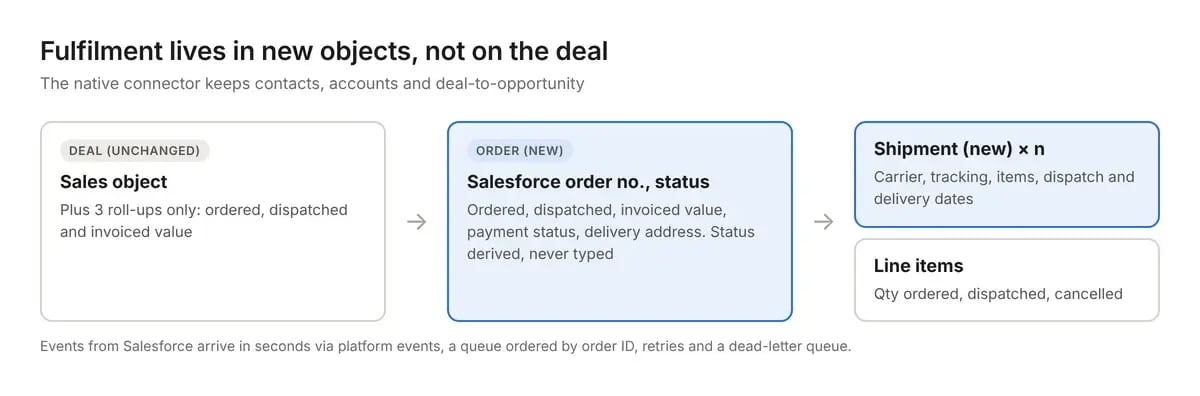
Figure 1. The data model. Fulfilment detail lives in new objects; the deal stays a sales object.
The order appears in HubSpot the moment Salesforce creates it. Operations raise orders in Salesforce exactly as before, which is why they agreed to the project. A platform event fires on creation, and the order with every line appears against the right deal within seconds.
Dispatch and delivery arrive as events, not overwritten fields. Allocation, pick, dispatch, carrier scan, delivery, failed delivery and return are published from Salesforce as platform events and written to HubSpot as timeline events on the order plus an update to its current status. The salesperson sees the current state at a glance and the full timestamped history underneath.
Financial status closes the loop. Invoice raised, invoice value, payment received and credit notes update the order and roll up to the deal as three figures: ordered, dispatched and invoiced.
One narrow write-back to Salesforce. Delivery contact and address changes captured by the salesperson write back to the open Salesforce order until allocation. After allocation the field locks, because the warehouse already has the label.
Every object carries the Salesforce record ID as an external identifier, so every write is an upsert. Events pass through a queue ordered by order ID, with retries, backoff and a dead-letter queue a person reviews. An event that cannot be matched is held, never guessed.
How do you show an order that ships in several parts in HubSpot?
The interesting problem was shape, not plumbing. A HubSpot deal is one thing with one value. An order here is often several things arriving at different times: consumables on Thursday, glassware next week from another warehouse, the instrument in March, one line cancelled as discontinued.
Put a single status field on the deal and it breaks within a week. An order that is 60% delivered, 30% awaiting a purchase order and 10% cancelled is not Delivered, Pending or Cancelled. So we modelled it properly:
- The order holds totals and an overall state that is derived, not typed. "Partially dispatched" is a real status with a percentage behind it.
- Each shipment is its own record with its own items, dates and tracking. Five shipments means five records.
- Each line item carries quantity ordered, dispatched and cancelled, so a short shipment is visible at the line.
- The deal gets three rolled-up figures and nothing else: ordered, dispatched and invoiced value.
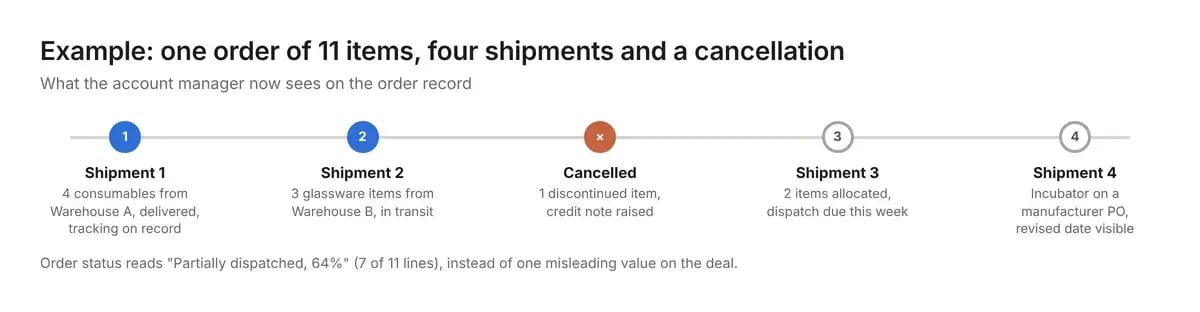
Figure 2. The lab manager's eleven-item order as the account manager now sees it in HubSpot.
Example: the same Tuesday email, after go-live
The lab manager asks where the rest of her order is. The account manager opens the company record and sees the order at 64% dispatched: shipment 1 delivered, shipment 2 in transit with tracking, one item cancelled with a credit note, two items allocated, and the incubator on a manufacturer PO with a revised date before the ninth. She replies in two minutes without messaging anyone.
Keeping fulfilment off the deal protected the pipeline. Forecasts, deal reports and the sales team's views behave exactly as before.
We also backfilled eighteen months of order history so replenishment patterns were visible from day one. Backfill ran warehouse by warehouse in a sandbox, reconciled line by line against a Salesforce report on a client-approved sample, then ran in production outside business hours, in batches, with a reconciliation pass after each.
What results did the Salesforce order sync deliver?
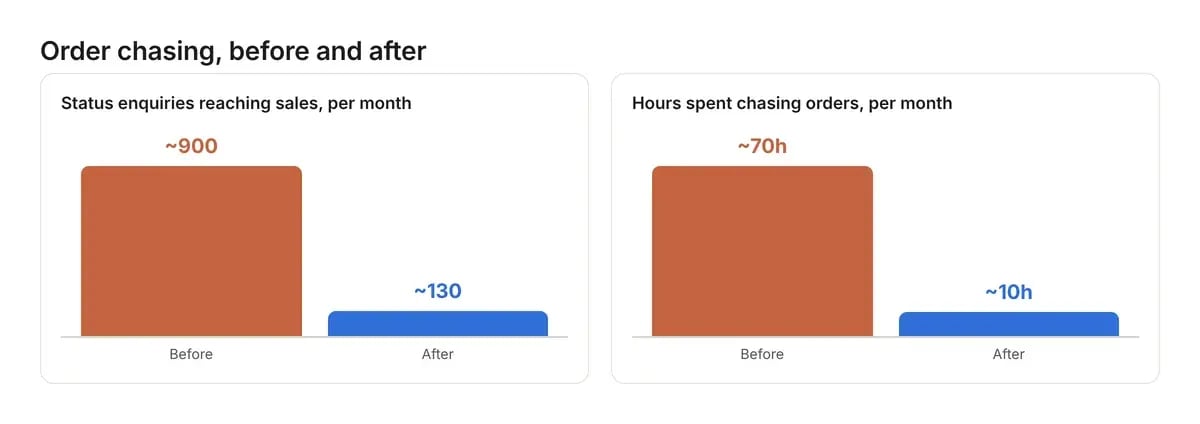
Figure 3. Status enquiries and order-chasing hours, before and after.
- Status enquiries to sales fell from around 900 a month to around 130. What remains are genuine exceptions, such as carrier problems or manufacturer delays.
- Around 60 hours a month came back to sales and operations. Operations stopped acting as a lookup service. No role changed; the capacity returned.
- Attribution moved to money that actually arrived. Marketing now reports dispatched and invoiced revenue by campaign, channel and source. In the first quarter, budget moved away from a channel that looked strong on closed-won value and much weaker once cancellations counted.
- Replenishment became a campaign, not a memory. With eighteen months of order history in HubSpot, marketing built lists such as "bought a consumable every six to eight weeks, nothing in twelve".
- Service problems reach the account owner the same day. A failed delivery or credit note lands on the record the salesperson opens before every call.
- Promised dates came back. Salespeople give delivery dates again because they can see the shipment and carrier. The sales director mentioned this first.
Example: a replenishment list that did not exist before
A university lab that bought pipette tips every six weeks for a year has not ordered in twelve weeks. It now appears automatically on a HubSpot list, and its account manager gets a task to call before the lab finds another supplier.
What made this Salesforce integration succeed?
We changed nobody's process. Operations raise orders in Salesforce exactly as before; the warehouse team never noticed the project. All new behaviour landed on the side that wanted it.
We moved events, not fields. Platform events gave second-level latency, true history and no polling bill, and a missed message can be replayed rather than lost.
We kept the sync read-only almost everywhere. One narrow write-back, agreed in writing, with a hard stop at allocation. Most two-way sync horror stories come from two systems owning the same field.
We put complexity in new objects, not on the deal. When a sales team says its pipeline reports became unreliable after an integration, someone usually hung operational data on the deal.
The principle: the CRM does not need to run fulfilment. It needs to know what fulfilment did, in enough detail that nobody has to ask. If Salesforce is part of your stack, see how we work across both platforms on our Salesforce services page.
Frequently asked questions
Does the native HubSpot Salesforce integration sync orders and deliveries?
No. It covers contacts, accounts, the deal-to-opportunity relationship and field mapping. It does not carry Salesforce Orders, Order Products, shipments, invoices or payment status into HubSpot, and it does not write into HubSpot custom objects.
Why does the native connector stop at the opportunity?
It was designed around the sale rather than fulfilment. The opportunity is the natural match for a HubSpot deal, so the mapping ends there, which is exactly where fulfilment begins in most Salesforce setups.
Can salespeople see delivery status in HubSpot without a Salesforce licence?
Yes. Order and shipment data lives in HubSpot custom objects, visible on company, contact and deal records and usable in lists, reports, workflows and dashboards. No extra Salesforce seats were needed.
How do you handle an order that ships in several parts?
Each shipment is a separate record linked to the order, with its own items, carrier, tracking and dates. Line items track quantity ordered, dispatched and cancelled, and the order status is derived from its shipments.
Does this slow Salesforce down?
No. The sync subscribes to platform events instead of polling, and a small service consumes them asynchronously.
What about data that should never leave Salesforce?
It stays there. A field-level ownership matrix was agreed before the build. Financial figures are read-only in HubSpot, and cost prices and margin were excluded from the sync entirely.
How long did it take?
Around ten weeks: two of discovery and ownership mapping, five of build, two of backfill and reconciliation for eighteen months of orders, and one of training and handover.
What does it cost to run?
No per-record licensing. A small containerised service and managed queue in the client's own cloud account cost around $40 to $60 a month at this volume.
Dealing with the same blind spot?
If your salespeople have to ask someone else where an order is, you pay twice: once in hours, and again in the credibility a customer loses every time the answer takes a day.
We scope this as a fixed piece of work, starting with a short discovery that settles which system owns which field. Send us your current connector setup and we will tell you plainly what it covers and where it stops. Explore our HubSpot custom integration services or browse more Amwhiz case studies.
Related case studies

With huge passion for reading fiction novels and international political relations, Vijay is currently a full-time Copywriter & a digital marketer. He loves traveling & listening to stories.
Leave a comment
Your email address will not be published. Comments are reviewed before they appear.