
How an industrial distributor let salespeople quote from HubSpot while NetSuite stayed the source of financial truth
Summary
Key results: quote turnaround cut from 1 to 2 working days to under 15 minutes, around 50 hours a month returned to accounts, and zero double entry across 120 quotes a month.
How: a custom sync layer beside the native NetSuite connector lets salespeople build quotes in HubSpot with customer tier pricing, writes each quote into NetSuite instantly, and returns order, invoice and payment status to the deal.
An industrial equipment distributor produced around 120 quotes a month, and not one of them was created by the person who owned the customer relationship. Salespeople gathered requirements and emailed them to accounts. Accounts keyed each quote into NetSuite, exported a PDF and emailed it back. The salesperson forwarded it to the customer.
We built a custom sync between HubSpot and NetSuite that lets salespeople create quotes themselves, in their own CRM, while NetSuite stays the source of financial truth. Here is what changed.
| Measure | Before | After |
|---|---|---|
| Quote turnaround | 1 to 2 working days | Under 15 minutes |
| People involved per quote | 2 | 1 |
| Accounts time spent on quoting | Around 50 hours a month | Close to zero |
| Quote data visible in the CRM | A PDF attachment | Full line items, categories and values |
| Revenue attributable to marketing source | None | Every closed deal |
Who was the client?
A national industrial equipment distributor selling through a field sales team of eight and an online store. The catalogue runs to thousands of items across dozens of categories, from low-value consumables ordered weekly to high-value equipment that takes months to close.
Two systems carried the business:
- NetSuite was the finance and accounting engine. It held customers, the product catalogue, pricing, stock, quotes, sales orders, invoices and payments, and every online store transaction landed there. If a number mattered to the accountant, NetSuite owned it.
- HubSpot was the CRM. Salespeople lived there, marketing ran campaigns there, and deals were worked and forecast there. If a conversation mattered to the salesperson, HubSpot held it.
Both systems did their job well. The problem sat in the gap between them.
Why did every quote take two days and two people?
Because salespeople could not quote in HubSpot, every quote had to be emailed to accounts and retyped into NetSuite.
A salesperson finishes a site visit. The customer wants pricing on fourteen line items across four product categories, some on their negotiated tier pricing and some not. The salesperson writes it up in HubSpot and emails it to accounts. Then they wait.
Accounts picks it up that afternoon or the next morning, finds the customer in NetSuite, checks which pricing tier applies, keys in fourteen lines by hand, applies the discount conditions, generates the quote, exports a PDF and emails it back. The salesperson forwards it to the customer. If the customer changes three items and one quantity, the whole loop runs again.
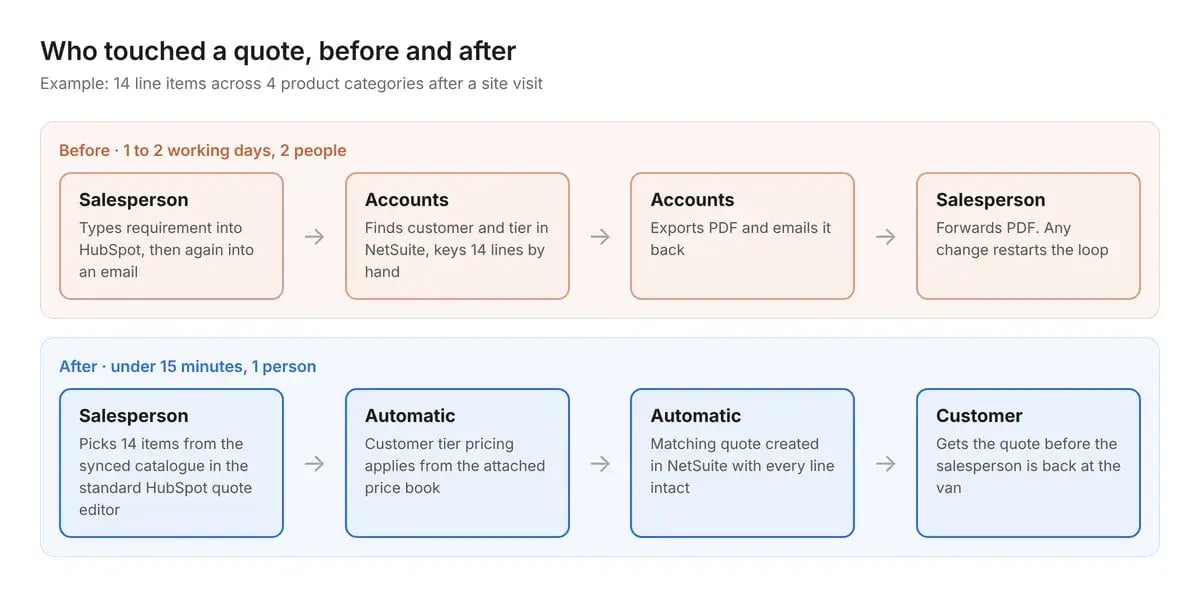
Figure 1. The same 14-line quote, before and after the integration.
By then the salesperson had typed most of that information twice: once into HubSpot for the pipeline, once into an email for accounts. The quote itself existed only as a PDF in an email thread and an attachment on the deal. Nobody could report on what was inside it, and the accounts team was spending a large part of every week doing data entry for sales.
What did the quote handoff cost the business?
At 120 quotes a month and about 25 minutes of accounts time each, the handoff consumed around 50 hours a month, most of a full-time role spent retyping information that already existed in another system.
The delay cost more than the hours. A quote that takes two days arrives after the customer has already called a competitor, and nobody could say how many deals that lost. Three other things broke quietly:
- Forecasting was guesswork. HubSpot knew a deal existed and roughly what it was worth, but not what was actually quoted.
- Reporting stopped at the PDF. Nobody could ask which products were quoted and lost, which categories won most often, or which customers were quoted but never bought.
- Marketing was flying blind. Revenue landed in NetSuite and never found its way back to the campaign that started it, so marketing could not show which activity produced money.
Why was the native NetSuite HubSpot integration not enough?
The business already ran the native NetSuite integration, and it was working correctly. It is good at what it covers: companies, contacts and products sync reliably, invoices come across, and field mapping is configurable. What it does not do is carry the commercial documents a sales team works with.
| What the native integration handles well | Where it stops |
|---|---|
| Companies and contacts, two way | Quotes, in either direction |
| Products and the catalogue | Quote line items and their detail |
| Invoices | Customer-specific price tiers applied at quote time |
| Standard field mapping | Anything written from the CRM back into the ERP |
Native connectors sync records. They do not sync transactions. Once a business wants to originate a commercial document in the CRM and have the ERP accept it, it needs a workflow, not a field map. That is where custom HubSpot integration comes in.
How does the custom NetSuite HubSpot quote sync work?
It works in four steps: catalogue and pricing sync into HubSpot, the salesperson quotes there, the quote is written into NetSuite instantly, and status flows back.
A custom sync layer alongside the native integration, not instead of it. The native connector kept doing what it already did well; the custom layer handled only what it could not.
1. Products, pricing and stock reach the CRM first. We extended the product sync so every item carries its category, its current stock and the price book that matches each customer's negotiated tier. Stock is set on sync and corrected by webhook whenever quantity changes in NetSuite, so the number a salesperson sees is current.
2. The salesperson builds the quote in HubSpot. Standard screens and the standard quote editor, no custom interface. They pick products from the synced catalogue, and the customer's tier pricing and discount conditions apply automatically because the right price book is attached to the company.
3. The quote is written into NetSuite the moment it is created. No email, no handoff. The sync layer creates the matching NetSuite quote with every line intact, against the correct customer, at the same prices. Finance sees a real ERP document immediately.
4. Status flows back. Approved, declined, expired or converted, HubSpot reflects it. A converted quote's sales order syncs back to the same deal, followed by the invoice and the payment status.
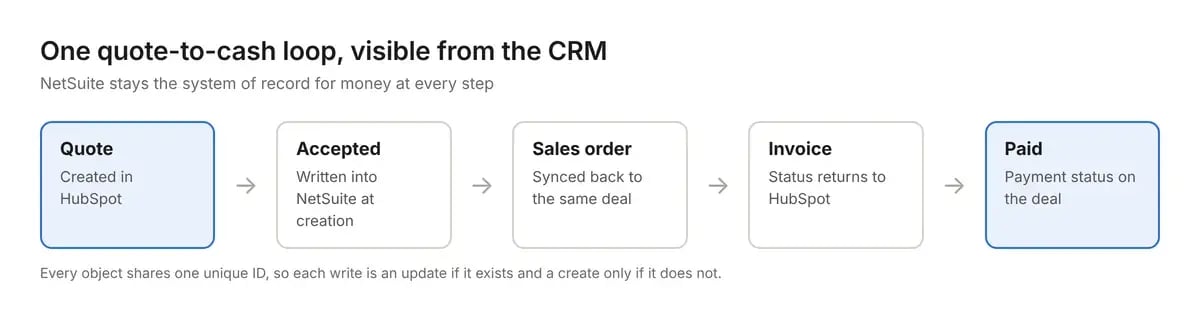
Figure 2. The quote-to-cash loop. Every state is visible in HubSpot without opening NetSuite.
Every object in the loop carries a shared unique ID, so each write updates the record if it exists and creates one only if it genuinely does not. Nothing is created blind in either direction, which is what keeps duplicates out of a two-way sync.
Example: a quote revised on site
The customer asks to swap two items and raise one quantity while the salesperson is still in the car park. The salesperson edits the quote in HubSpot, the tier pricing re-applies, and the same NetSuite quote is updated through its shared ID rather than duplicated. The customer has the revised version in minutes, and accounts never touched it.
How do you migrate 20,000 NetSuite quotes into HubSpot without flooding the pipeline?
Split them: recent quotes become HubSpot quotes on deals, and older quotes become historical records on the company and contact.
More than twenty thousand historical quotes sat in NetSuite, and the sales team wanted that history visible against their customers.
The obvious approach would have broken the CRM. In HubSpot a quote must belong to a deal, so migrating every quote that way means creating twenty thousand historical deals inside the object the sales team uses as its live working list. Pipeline views, forecasts and every deal report would have been swamped on day one.
So we split it:
- Recent quotes, from an agreed window, came across as real HubSpot quotes on deals, giving the team workable recent history.
- Older quotes came across as historical records associated with the company and contact, carrying value, date, status and line detail. They are searchable and reportable without touching the live pipeline.
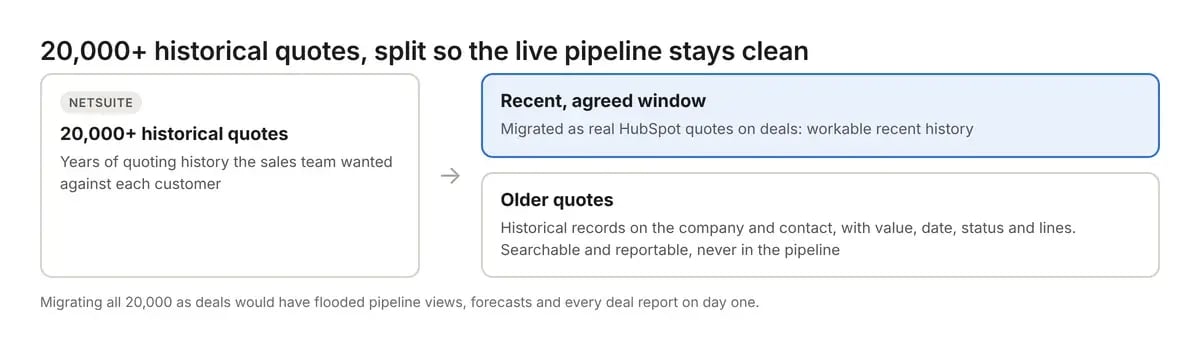
Figure 3. How 20,000+ historical quotes were split between deals and historical records.
Either way, every quote stays attached to its customer. Open a company in HubSpot and its full quoting history is there before the next call. The migration ran in batches with retry and reconciliation, in a sandbox first, against a sample the client signed off. Our HubSpot migration services follow the same sandbox-first approach.
What results did the NetSuite HubSpot integration deliver?
- Quote turnaround fell from one or two working days to under 15 minutes. A salesperson can send pricing before they are back at the van.
- Around 50 hours a month returned to accounts. They went back to finance work. No role was cut; the capacity was recovered.
- Double entry disappeared. One person creates the quote, in one system, once.
- Reporting reached line-item level. With 120 quotes a month landing as structured data, the business can see quoted value by category, win rate by category, products quoted often but rarely bought, and customers quoted regularly who never convert.
- Forecasting became a real number. Pipeline value is now the sum of what was actually quoted.
- Marketing attribution closed the loop. Quotes, orders and payments now flow back to HubSpot, so closed revenue traces to the campaign, channel and source that created the lead.
Example: a report that was impossible before
"Show me every quote over the last quarter that included a product from category X, grouped by won and lost." Before the integration, answering that meant opening hundreds of PDFs. Now it is a standard HubSpot report on quote line items.
That last result changed how the business invests. Lead volume and lead quality are different things, and only one of them pays for itself.
What made this NetSuite integration succeed?
We agreed data ownership before touching anything. Every synced field got a written owner, a direction and a conflict rule. NetSuite owned anything financial, and those fields were read-only in HubSpot so a well-meaning edit could not change a customer name an invoice depended on.
We used match keys rather than hoping. One shared ID per object, and every write an upsert against it. That is the whole answer to duplicates in a two-way sync, and it is cheaper than any clean-up later.
We kept the sync layer thin. No custom screens, no custom objects where standard ones would do. It runs on a small server in the client's own cloud account, under their credentials, in a repository they own.
We built inside the standard CRM interface. Standard screens meant adoption took one training session rather than a change programme.
The principle: let the ERP be the system of record for money, let the CRM be the system of work for salespeople, and build the narrowest possible bridge between them.
Frequently asked questions
Does the native NetSuite HubSpot integration sync quotes?
No. It syncs companies, contacts, products and invoices with configurable field mapping. It does not sync quotes, quote line items or sales orders created in the CRM, and it does not apply customer-specific price tiers at quote time. Those need a custom integration layer.
Can salespeople create quotes in HubSpot and have them appear in NetSuite?
Yes, with a custom sync layer. The salesperson uses the standard HubSpot quote editor with a synced catalogue and the customer's own price book, and the matching NetSuite quote is created with all lines and correct pricing.
What happens when a quote is accepted and paid?
Status flows back automatically. The sales order syncs to the same deal when the quote converts, followed by the invoice and payment status.
How do you stop duplicate records in a two-way sync?
Give every object one shared unique ID and make every write an upsert against it. Hold anything unmatched for review rather than creating it, and agree field ownership in advance so the two systems never write the same field.
Does NetSuite stop being the source of truth?
No. NetSuite remains the source of truth for customers, pricing, stock, orders, invoices and payments. Financial fields are read-only in HubSpot.
How long does a NetSuite HubSpot integration like this take?
This one took around eight weeks, including discovery, the sync build, migration of 20,000+ historical quotes and training. Timelines depend mostly on data quality and how quickly sandbox and API access is granted.
What does it cost to run?
There is no per-record connector licence. The ongoing cost is a small server in the client's cloud account, typically a few tens of dollars a month at this volume.
Thinking about the same problem?
If your sales team emails requirements to someone else to key into NetSuite, you are paying twice: once in hours, and again in deals that go cold while a quote sits in a queue.
We scope this as a fixed piece of work, starting with a short discovery that settles data ownership before anything is built. Talk to our integration team and we will tell you plainly what your native connector already covers and what it does not. See all our integration services or browse more Amwhiz case studies.
Related case studies

With huge passion for reading fiction novels and international political relations, Vijay is currently a full-time Copywriter & a digital marketer. He loves traveling & listening to stories.
Leave a comment
Your email address will not be published. Comments are reviewed before they appear.