-1.png?width=134&height=66&name=amwhiz-logo%20(1)-1.png)



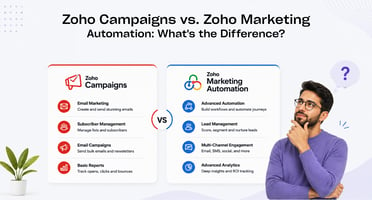
Amwhiz, an authorized Zoho partner, is often asked to explain the difference between Zoho Campaigns...
The clearest sign your business has outgrown a single Zoho app is when staff are manually copying data between Zoho and two or more other tools just to keep departments in sync, at that point, Zoho One's bundled suite usually costs less than the standalone apps and integration work combined. Amwhiz helps businesses evaluate this exact decision as part of its Zoho services, and this post lays out the concrete signs worth checking before you decide.
How Do You Know You've Outgrown a Single Zoho App?
The Short Answer
You've likely outgrown a single Zoho app if you're manually re-entering data between Zoho and other departmental tools, paying for multiple point solutions that each cost as much or more than Zoho One's per-user price, or finding that no department has visibility into what other departments are doing. Any one of these on its own might not justify switching, but two or more together usually means Zoho One pays for itself within the first year.
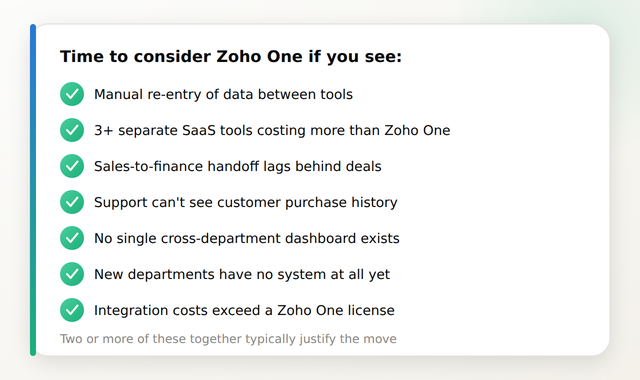
Seven Signs It's Time to Consider Zoho One
- Staff manually re-enter the same customer or deal data into a second tool because CRM doesn't talk to your finance or support software.
- You're paying for three or more separate SaaS tools (CRM, helpdesk, project management, HR) that together cost more per user than Zoho One's bundled price.
- Sales closes a deal but finance doesn't find out until someone remembers to send an email, invoicing lags behind actual sales activity.
- Support tickets and customer history live in a different system than sales and account data, so support reps can't see purchase history without asking around.
- Leadership can't get a single dashboard view across departments and instead waits on separate reports from each team.
- You're hiring or growing into new departments (HR, legal, a dedicated ops team) that don't have any system at all yet.
- Custom integration work to connect your current point solutions is starting to cost more per year than a Zoho One license would.
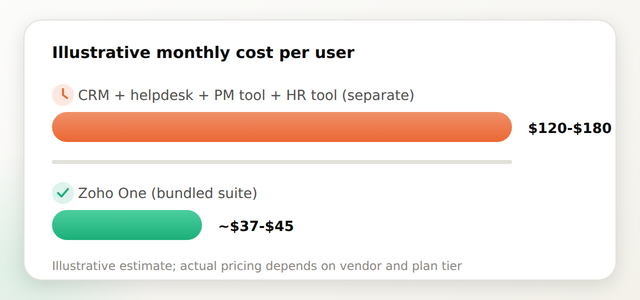
What Does It Actually Cost to Stay on Point Solutions vs. Switch?
The comparison that matters isn't Zoho One's price against a single Zoho CRM subscription, it's Zoho One's per-user price against the combined cost of every separate tool you're running plus whatever you're paying to keep them integrated.
Does Switching to Zoho One Mean Starting Over?
Not usually. If you're already on Zoho CRM or Zoho Books, that data and configuration typically carries forward into Zoho One rather than requiring a rebuild, the migration work is mainly around adding the new modules your other departments need and connecting them to what already exists. See Is Zoho One worth it? A real cost-benefit look for SMBs for a deeper look at this tradeoff.
How Do You Decide Which Departments to Bring Onto Zoho One First?
Most businesses prioritize the department with the worst manual workaround first, often finance, since invoicing delays directly affect cash flow. From there, departments are typically added in order of how much cross-department handoff pain they're causing, not all at once. A phased department-by-department rollout is covered in what a Zoho One deployment actually involves, department by department.
How Amwhiz Helps
Amwhiz evaluates whether a business genuinely needs Zoho One or whether a single-module setup is still the right fit, based on actual workflow gaps rather than a sales push toward the bigger suite. When Zoho One is the right call, Amwhiz handles the department-by-department rollout and migration from existing Zoho apps.
Frequently Asked Questions About Moving to Zoho One
How do I know if I need Zoho One or just an additional Zoho app?
If you only need one more function (like adding Books to an existing CRM setup), a single additional app is often enough. Zoho One becomes worth it when three or more departments need connected systems and you're currently paying for separate tools to cover them.
Will I lose my existing Zoho CRM or Books data when switching to Zoho One?
No. Existing Zoho CRM or Books data and configuration typically carries forward into Zoho One rather than requiring a rebuild from scratch.
Is Zoho One actually cheaper than running separate point solutions?
In most cases, yes, once you account for the combined per-user cost of three or more separate tools plus the cost of integrating them, Zoho One's bundled per-user price is usually lower than that combined total.
How long does moving to Zoho One take?
It depends on how many departments are being added. A single new department typically takes 3-6 weeks; a full multi-department rollout commonly takes 8-16 weeks when phased in stages.
Do all departments need to move to Zoho One at the same time?
No. Most businesses roll departments onto Zoho One in phases, prioritizing whichever department has the worst manual workaround or the most cross-department handoff friction first.
What's the biggest risk of staying on a single Zoho app too long?
The main risk is compounding integration cost and manual data entry, the longer departments stay disconnected, the more custom workarounds and hidden labor cost accumulate, often exceeding what Zoho One would have cost from the start.
Conclusion
Outgrowing a single Zoho app usually shows up as a pattern, not a single event, manual re-entry, disconnected departments, and integration costs that quietly add up. Once two or more of these signs are present, Zoho One is typically the more cost-effective and less painful path forward rather than continuing to patch a single-app setup.
Amwhiz helps businesses decide when a single Zoho app is enough and when it's time to move to Zoho One, then handles the department-by-department rollout. Visit amwhiz.com or email sales@amwhiz.com to get started.