-1.png?width=134&height=66&name=amwhiz-logo%20(1)-1.png)


How HubSpot’s Smart CRM Associations Improve Data Management As businesses grow, customer...
written by: Renuka M
HubSpot CRM,
CRM Best Practices,
Sales Automation,
crm architecture,
data-model,
crm-governance,
hubspot-implementation,
hubspot-customization,
business-growth
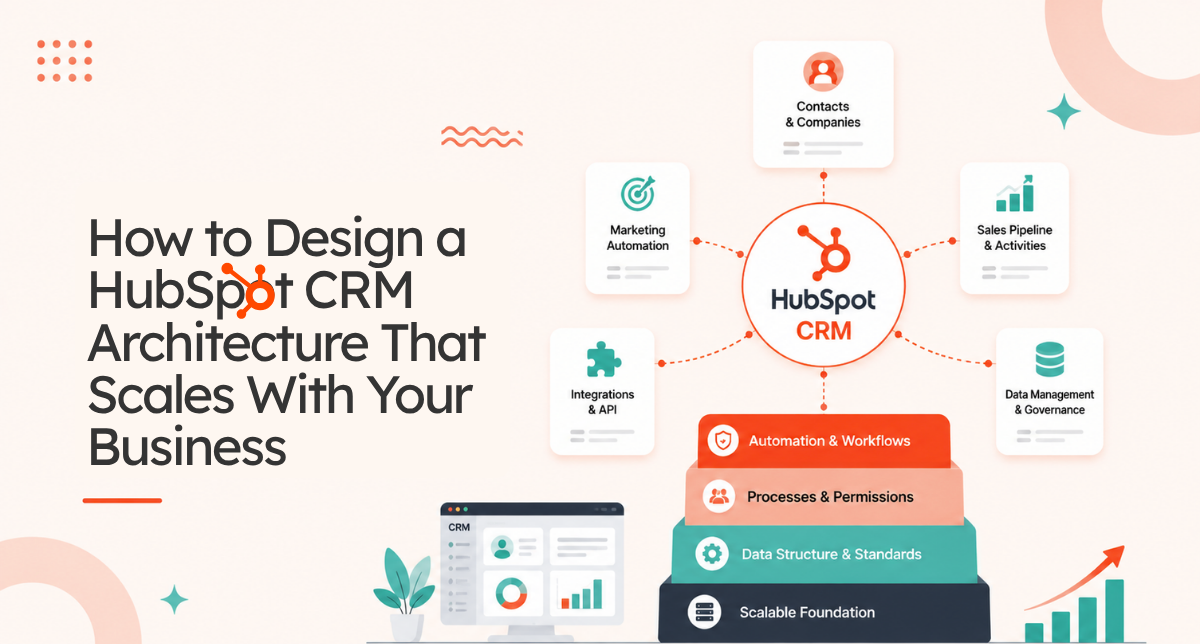
How to Design a HubSpot CRM Architecture That Scales With Your Business
You implement HubSpot. It works great initially. Then your business grows. You add more teams. More data flows in. More processes get automated. Suddenly the system feels fragmented. Reports don't align. Data flows in different directions. Teams can't see what they need to see.
The problem isn't HubSpot. It's that you built your system reactively instead of strategically. You added features as you needed them without thinking about the overall architecture.
A carefully designed HubSpot CRM architecture prevents this completely. It anticipates growth. It scales with you. It keeps everything organized and aligned no matter how big you get.
Why CRM Architecture Matters More Than You Think
Most businesses think CRM architecture is just about setting up fields and objects. It's not. It's about how data flows through your entire organization. How teams communicate. How information gets shared. How decisions get made.
Poor architecture creates information silos. Sales can't see customer service history. Marketing doesn't know which leads converted. Customer success has no visibility into sales processes. Revenue suffers because teams work in isolation.
Good architecture breaks down those silos. Every team sees the complete customer journey. Data flows seamlessly between systems. Teams collaborate instead of compete. Revenue grows because everyone's working with the same information.
The Real Cost of Bad Architecture
A company with 50 employees implements HubSpot without a clear architecture. Initially fine. Eighteen months later, they're at 150 employees. Now they have:
- Duplicate data: same company entered 3 different ways
- Conflicting reports: two teams running same report, getting different numbers
- Broken automations: workflows trigger on data that doesn't always sync correctly
- Impossible migrations: can't move data to a new object structure without losing history
- Expensive workarounds: paying for custom code to fix what architecture should have handled
By year three, they're spending $200k rebuilding what should have been designed correctly from the start.
The Three Pillars of Scalable HubSpot CRM Architecture
1. Data Model: Objects, Properties, Relationships
Your data model is the foundation. It defines what data you track, how it's structured, and how different pieces of data relate to each other.
Start with core objects: Contacts for people, Companies for organizations, Deals for revenue opportunities. Then add custom objects for things unique to your business: Projects, Cases, Contracts, Subscriptions, and so on.
Each object needs clear properties. Contact object needs: first name, last name, email, phone, company, job title, and more. But NOT "notes from the call" or "next steps" because those go in activities, not properties.
Relationships connect objects. A Contact belongs to a Company. A Company has many Contacts. A Deal is associated with both a Contact and a Company. These relationships enable data to flow correctly and reports to work across objects.
2. Process Flow: How Data Moves
You need to map how data moves through your organization. A prospect enters as a Lead. They get qualified. They move to Sales as a Contact with a Deal. If they become a customer, they move to Customer Success. If they churn, they move to win back campaigns.
Each stage has different information needs. Sales needs deal size, decision timeline, and competition details. Customer Success needs implementation timeline, tech stack, and key users. Support needs issue history, satisfaction score, and renewal date.
Your architecture needs to support all these different views of the same customer without creating data chaos.
3. Governance: Rules About Data
Who can edit what? When does data sync to external systems? How do we prevent duplicate data? What fields are required versus optional? How often do we clean data?
Without governance, data degrades. People enter information inconsistently. Required fields get skipped. Data gets updated in the wrong place. Duplicates accumulate.
Governance sets rules. Makes HubSpot predictable. Keeps data clean. Enables scaling.
Designing for Your Business Size
Startup: Under $1M Revenue
Keep it simple. Standard HubSpot objects only: Contacts, Companies, Deals. Minimal custom properties. Focus on getting data in, not on complex automation. You need flexibility to pivot.
Growth Stage: $1M to $10M Revenue
Add your first custom object. Maybe Products if you sell multiple products. Maybe Customers if you have a subscription model. Start automating common processes: lead scoring, deal assignment, customer handoff. Implement basic governance.
Mid Market: $10M to $100M Revenue
Multiple custom objects now. Different teams have different data needs. Complex automations across objects. Integrations with ERP, accounting, and support systems. Formal governance and data stewardship.
Enterprise: $100M Plus Revenue
Multiple HubSpot instances or portals. Complex data architecture with many custom objects. Real time integrations with external systems. Data governance at enterprise scale. Dedicated data stewardship teams.
Five Rules for Scalable HubSpot CRM Architecture
Rule 1: One Source of Truth
Every piece of data should live in one place. Not duplicated across objects. Not stored in multiple systems. One place. This prevents conflicts and confusion.
If a company address exists in HubSpot, don't also store it in an external system. If deal amount is in HubSpot, don't replicate it to your spreadsheet. One source. Everything else syncs from there.
Rule 2: Data Flows, Not Silos
Data should flow from system to system. A customer gets created in HubSpot. That data flows to your accounting system. Updated in accounting. Flows back to HubSpot. No isolated data islands.
Rule 3: Objects Map to Reality
Your data model should map to how your business actually works. If you sell to companies, you need a Company object. If you have multiple projects per company, you need a Projects object. If you track contracts, you need a Contracts object.
Don't force reality into a model that doesn't fit. Adjust the model to match reality.
Rule 4: Scale Up, Don't Rearchitect
Your initial architecture should be solid enough that you can add complexity on top without rebuilding. Adding a new object should be straightforward. Adding integrations should not require restructuring existing data.
Rule 5: Document Everything
New team member joins. They need to understand the data model. Why does this object exist? What's this field for? What's the relationship between these objects? Documentation answers all this.
Without documentation, knowledge lives in one person's head. That person leaves. Knowledge disappears.
Common Architecture Mistakes to Avoid
Mistake 1: Too Many Custom Objects
You can create unlimited custom objects in HubSpot. So some companies create too many. One for each use case. Then managing relationships becomes impossible.
Better approach: Use standard objects as much as possible. Create custom objects only when standard objects truly don't fit.
Mistake 2: Fields in Wrong Objects
A company stores "sales rep commission percentage" on the Contact object. But that's company level information, not contact level. Should be on Company object.
Data ends up in the wrong place. Reports fail. Automations break.
Mistake 3: Missing Relationships
You have Contacts and Companies but they're not linked. So you can't see which contacts belong to which company. Reports can't join the data.
Relationships are critical. Set them up from day one.
Mistake 4: No Governance
Anyone can enter data however they want. Required fields aren't enforced. Data validation doesn't exist. Result: garbage data.
Mistake 5: Ignoring Integration Needs
You design architecture for HubSpot only. Then you need to integrate with your accounting system, ERP, support platform. Now your architecture doesn't support what those systems need.
Design architecture with future integrations in mind.
Steps to Design Your HubSpot CRM Architecture
Step 1: Map Your Customer Journey
How does a prospect become a customer? What information is needed at each stage? This determines what objects and properties you need.
Step 2: Identify Objects
What entities are important to your business? Companies, Contacts, Deals, Customers, Projects, Cases? List them all. Determine relationships between them.
Step 3: Define Properties
For each object, what information do you need to track? Be specific. Be consistent. Create a property naming convention using all lowercase with underscores, no spaces.
Step 4: Plan Integrations
What systems will connect to HubSpot? What data needs to flow? This determines what properties are required and how objects need to be structured.
Step 5: Document and Train
Create a data dictionary. Explain each object. Explain each property. Explain relationships. Train your team on the system. Document how data flows.
FAQ About HubSpot CRM Architecture
How do I know if my architecture is scalable?
There are several key indicators that signal a scalable architecture. First, ask yourself: can you add a new object without restructuring existing data? If you need to go back and reorganize everything to accommodate a new object, your architecture isn't scalable enough.
Second, consider whether you can add new integrations without breaking existing ones. A scalable architecture has clear data flows and integration points that can be extended without disrupting current systems. Third, evaluate whether a new team member can understand your system from documentation alone. If you need the original architect to explain everything in person, documentation is insufficient. Fourth, check if your reports can be generated without manual workarounds. If you're constantly building custom SQL queries or creating workaround fields to generate reports, your architecture has structural issues. Finally, consider growth trajectory.
A good architecture shouldn't require fundamental changes as you double or triple in size. It should accommodate growth through adding objects or properties, not rearchitecting the whole system. Most scalable architectures follow these patterns: they use standard objects as much as possible, relationships are clearly defined, data flows in one direction, not circular, required fields are minimal but enforced, and everything is documented extensively. If you meet these criteria, your architecture can likely scale effectively.
How many custom objects should I create?
Most businesses drastically overestimate how many custom objects they need. A good rule of thumb is zero to start. Use standard HubSpot objects: Contacts, Companies, Deals, as long as possible. Only create a custom object when standard objects genuinely cannot accommodate your business model. For example, if you're a service business where projects are fundamentally different from deals in terms of timeline, team, and billing, create a Projects object.
If you're SaaS, a Subscriptions object makes sense because subscriptions have different properties than deals like MRR, renewal date, and churn risk. For most businesses, the sweet spot is 1 to 3 custom objects maximum. A services company might have Projects. A SaaS company might have Subscriptions and Customers. A support focused business might have Cases. More than 3 custom objects becomes very difficult to manage.
The relationships become complex. Training becomes harder. The system becomes harder to modify. Each custom object you create adds complexity. So before creating one, ask: can I achieve this with a standard object plus some custom properties? If yes, do that. Only create a custom object if standard objects truly don't fit your business model. And if you do create custom objects, document why they exist. New team members will ask "why do we have a Projects object?" and you need a clear answer.
What's the difference between objects and properties?
This is fundamental to understanding HubSpot architecture. Objects are things. They're the containers or tables in your database. Properties are attributes of those things. For example, Contact is an object. Properties of Contact include first name, last name, email, phone, job title, company, and so on. Company is another object with its own properties: company name, industry, annual revenue, number of employees, and more.
Deal is an object with properties like deal name, deal amount, close date, and deal stage. In a spreadsheet analogy, objects are worksheets and properties are columns. Objects define your data structure at the highest level. Objects are permanent. You create them once and they fundamentally shape how you organize data. Properties are more fluid. You can add and remove properties relatively easily. The relationship between objects is equally important. A Contact object belongs to a Company object. A Deal object relates to both a Contact and a Company.
These relationships are the connections that make your CRM work. Without proper object, property, and relationship design, you end up with data scattered all over the place. For instance, if you try to store company level data on the Contact object, you'll have that same company information repeated across every contact from that company. This causes problems: if company info updates, you have to update it in multiple places. If you're searching for a company's data, you have to look through all its contacts. This is why proper object structure matters so much. It's not just about organization. It's about data integrity, report accuracy, and automation reliability.
Can I change my architecture after launch?
Yes, but it becomes increasingly difficult and expensive the longer you wait. This is why getting architecture right initially is so important. Making changes after you have real data is painful. Here's what happens when you try to change architecture with existing data: you might need to migrate data from one object to another, which requires careful mapping to ensure nothing gets lost. You might need to update all your workflows and automations because they reference the old object structure.
Reports that relied on the old structure will break. Integrations with external systems might need reconfiguring. For example, if you initially put all company information on Contacts and later realize you need a Company object, migrating that data is complex. You have to find the unique companies represented across thousands of contacts, create company records, then link all contacts to their correct company. It's doable but risky. One mistake and you lose data or create duplicates. That's why companies often end up spending $50k to $200k on rearchitecting after launch. It's not just architecture work, it's data migration, automation rebuilding, testing, training, and managing the transition.
The better approach is to spend 2 to 4 weeks getting architecture right before implementation. Involve all stakeholders. Understand all their needs. Think about growth. It costs way less upfront than fixing it later. That said, if you discover after launch that your architecture is fundamentally wrong, you should fix it. It's better to rearchitect early than to live with a broken system for years.
How important are relationships between objects?
Relationships are absolutely critical. They're what transform HubSpot from a database into a CRM. Without relationships, you have isolated piles of data. With relationships, you have an integrated system where everything connects. Here's why relationships matter: they enable reporting across objects. You can run a report showing "revenue by industry" only if Deals are related to Companies which have industry information.
They enable automations that span objects. When a Deal closes, you want to automatically create a project in your Projects object and notify the project manager. That only works if Deals relate to Projects. They prevent data duplication. If Contacts relate to Companies, you store company information once on the Company object. Every contact from that company references the same company record. If company info changes, you update one place. Without relationships, you'd store company info on every contact.
That's duplicated, inconsistent data. They enable the 360 degree view. A sales rep should be able to view a company and see all related contacts, all related deals, all related projects, all related support tickets, revenue history, everything. Relationships make that possible. They enable proper routing and automation. When a contact from Company X reaches out, workflows know to route them to Account Manager Y because of the contact, company relationship. Missing relationships create problems that seem small at first but compound. You can't see the complete picture. Data gets duplicated. Automation doesn't work. Reports don't align. Sales rep can't find critical information. By the time you realize the problem, you have massive data inconsistencies. That's why defining relationships upfront, from day one, is non negotiable.
What if my architecture doesn't support my new business direction?
It happens frequently. Businesses pivot, launch new products, enter new markets, and suddenly your architecture doesn't support the new direction. This is actually a common sign that you're growing and evolving, which is good. When this happens, you have a few options. First, see if you can extend your existing architecture by adding new objects or properties.
Maybe you launched a services line and need a Projects object when you previously just had Deals. That's a relatively simple addition. Extending is usually the best path. Second, you might need to reorganize how you're using existing objects. Maybe your new product line doesn't fit the Deal model, so you need to use a custom object instead. This requires some workflow and automation changes but might be manageable.
Third, if the architecture fundamentally doesn't support your new direction, you might need to rebuild sections of it. This is more expensive and disruptive. You're essentially rearchitecting part of the system. The key is to do this thoughtfully and plan it carefully rather than leaving your architecture broken. My recommendation: when your business direction changes, immediately review your architecture. Schedule a workshop with your sales, marketing, and operations teams. Ask: does our current architecture support where we're going? If not, what needs to change? Then make a plan to evolve the architecture to support the new direction. Do this within 2 to 3 months, not later. Waiting to rearchitect when you already have incompatible data and workflows makes everything harder.
Do I need custom code for my architecture?
Rarely. HubSpot's native features, objects, properties, workflows, automations, and integrations, handle 90 percent of architecture needs. Most companies don't need custom code. Custom code becomes necessary only when HubSpot's native capabilities genuinely can't solve your problem.
Examples of when you might need custom code: complex conditional logic that HubSpot workflows can't express, custom data transformations during integration, special reporting requirements that HubSpot reports can't generate, or custom applications that need to interact with HubSpot data in ways the API doesn't directly support. Before deciding to build custom code, exhaustively explore HubSpot's native options. Can you solve this with workflows? With integration apps like Zapier or Make? With HubSpot's API combined with a third party tool? Can you restructure your data model to solve it? Usually the answer is yes. Custom code is expensive. It costs $5k to $20k to develop, then requires ongoing maintenance and updates. It makes your system harder to understand for new team members. It creates technical debt.
So my strong recommendation: design your architecture using only HubSpot's native features first. Only turn to custom code if you've exhausted native options and the problem is truly critical to your business. If you do end up needing custom code, hire experienced HubSpot developers, document thoroughly, and plan for ongoing maintenance.
How often should I audit my architecture?
At minimum annually, but I recommend quarterly for growing companies. Here's what a good architecture audit looks like: First, review your current objects and properties. Are they all being used? Do you have unused custom objects or deprecated properties cluttering the system? Second, check data quality. Run reports on required fields: are they actually being filled in? Are there duplicate records accumulating? Is old data getting archived properly? Third, interview teams about pain points.
What's frustrating about the current architecture? What's not working? What do you wish was different? Fourth, look at your integrations. Are they syncing data correctly? Are there data mismatches? Do you need new integrations? Fifth, assess growth. Where is the business heading? Does your architecture support that direction? Sixth, evaluate governance. Are rules being followed? Do you have the right access controls? Is data being updated properly? Seventh, validate relationships. Do all objects that should relate actually relate? Are relationships working in automations? Based on the audit, create a roadmap of changes. Some will be quick wins like archiving unused objects and cleaning up deprecated properties.
Others might be larger like adding a new object or reorganizing relationships. Schedule work to address the biggest issues. Without regular audits, architectural debt accumulates. You keep working around problems instead of fixing them. The system becomes harder to maintain. That's why regular audits are important. They help you catch problems early and keep your architecture healthy as you grow.
Can I have multiple data models in one HubSpot portal?
Technically you could create multiple disconnected data structures within one portal, but you absolutely shouldn't. One portal should have one coherent data model. The whole point of a unified CRM is that everything connects. If you have multiple disconnected data models, you've essentially created multiple separate systems that happen to share a portal. This causes problems: teams can't see complete customer information because it's scattered across different data models. Reports can't join data across models. Automations can't trigger across models. Integrations get confused about which model to sync with. You end up with a fragmented system that defeats the purpose of having a CRM. If your business genuinely needs fundamentally different data structures, for example your B2B division operates completely differently from your B2C division, then you might need separate HubSpot portals.
Yes, this costs more, but it's cleaner than forcing both business models into one portal with conflicting data structures. Separate portals have separate architectures, separate teams, separate customizations. They can be optimized for their different needs. Some of the largest enterprises run multiple portals for this reason. But for most companies, even companies with multiple business units or product lines, one unified architecture within one portal works better. You can accommodate different needs through clever object design, properties, and automation logic without requiring separate portals. My recommendation: start with one cohesive data model. Only split into multiple portals if you truly have fundamentally irreconcilable business models that can't coexist in one architecture.
What if architecture doesn't match how we actually work?
This is a common problem. Your architecture looks good on paper, but when your team starts using it, they realize it doesn't match how they actually work. Maybe sales team works differently than you assumed. Maybe customer success has processes you didn't anticipate. Maybe the workflow you built doesn't match their actual workflow. When this happens, don't ignore it. Forcing people to work around broken architecture creates resentment and hidden workarounds. Instead, go back and fix the architecture. Interview the team members who are struggling. Understand how they actually work.
Then adapt your architecture to match reality. This might mean adding properties you didn't anticipate. It might mean reorganizing objects. It might mean changing the automation. The key is that architecture should enable how you work, not force you into an unnatural way of working. Good architecture is invisible. People use it naturally. Bad architecture creates friction. If you're hearing complaints, the architecture needs adjustment. Remember: your architecture should be a reflection of your business reality, not an idealized theoretical model. Better to have a slightly messier architecture that matches reality than a pure architecture that doesn't work. Business needs always trump architectural purity.
How do I handle multiple teams with different needs in one architecture?
This is very common and solvable. You have sales team, marketing team, customer success team. They all need different things from the CRM. They're all using the same architecture but have different priorities and perspectives. The key is designing architecture flexible enough to support different needs while maintaining consistency. Here's how: First, make sure core objects and properties serve everyone's needs. All teams need accurate contact information, company information, and deal information. These should be standardized and consistent. Second, add team specific properties and objects where needed. Sales might track competition, decision timeline, and deal strategy. Customer success might track implementation timeline, tech stack, and key stakeholders.
These can coexist on the same objects or in separate objects that relate. Third, use views and permissions to let each team see what matters to them. Sales doesn't need to see customer success properties by default. Customer success doesn't need to see sales strategy details. But the data still flows between teams through relationships and automations. Fourth, use different landing pages or views for different teams. Sales lands on a deals page. Customer success lands on a customers page. Same underlying architecture, different interfaces. Fifth, use automations and workflows to communicate between teams. When sales closes a deal, workflows automatically alert customer success and create relevant information for them. This ensures teams are coordinated even though they have different perspectives. The architecture supports all these different needs through careful object design, property organization, relationships, and automation logic. It's not about having separate architectures for each team. It's about one unified architecture that accommodates different needs.
Ready to Build a Scalable HubSpot Architecture?
A carefully designed CRM architecture is the difference between a system that scales smoothly and one that breaks under growth. It's the foundation for everything you automate, integrate, and build on top of HubSpot.
At Amwhiz, we're a HubSpot Diamond Solution Partner specializing in helping businesses design and implement CRM architectures that grow with them. Whether you're just starting or rebuilding after growth, we'll help you create a system that scales.
Book a HubSpot consultation with Amwhiz today. We'll audit your current architecture and show you exactly what needs to change to support your growth.