-1.png?width=134&height=66&name=amwhiz-logo%20(1)-1.png)


A CRM That Doesn't Talk to Your Other Tools Is Only Half a CRM HubSpot is powerful on its own. But...
written by: Renuka M
compliance automation,
service delivery,
industry specific automation,
healthcare crm,
home services crm,
professional services crm,
workflow customization,
appointment scheduling,
project management,
billing automation
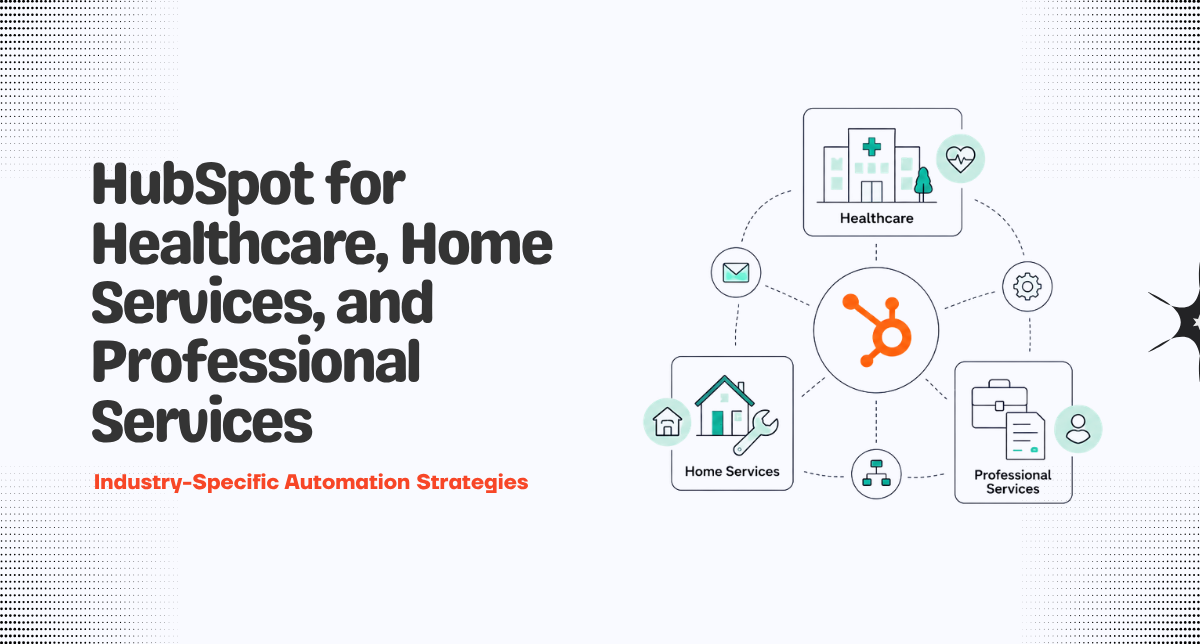
HubSpot for Healthcare, Home Services, and Professional Services: Industry-Specific Automation Strategies
HubSpot works great for SaaS companies. But what about industries like healthcare? Home services? Professional services? Different businesses have different needs. Healthcare needs HIPAA compliance. Home services needs scheduling. Professional services needs project tracking.
Generic HubSpot implementation doesn't fit. You need industry-specific automation. Workflows tailored to your business model. Properties that match your processes. Integrations that connect your tools.
Industry-specific automation strategies make HubSpot work for your unique business. Healthcare practices streamline patient care. Home services companies dispatch jobs efficiently. Professional services firms manage projects and billing. HubSpot becomes your competitive advantage.
Why Industry-Specific Automation Matters
Generic implementation misses industry requirements. Healthcare needs patient privacy. Home services needs dispatch coordination. Professional services needs time tracking. Miss these and CRM doesn't work for your business.
Industry-specific automation makes HubSpot deliver value. Workflows match your process. Automations handle your unique challenges. Integration connects your specialized tools. System works because it's built for your industry.
HubSpot for Healthcare
Healthcare Challenges
Patient privacy (HIPAA). Complex scheduling. Multiple providers. Insurance coordination. Patient records. Follow up communications. Compliance requirements.
Healthcare Automation Strategies
Patient Onboarding Workflow
New patient books appointment. Workflow sends welcome email. Requests health history. Sends insurance forms. Schedules reminder. Sends pre visit instructions. Patient arrives prepared and informed.
Appointment Reminders
Appointment scheduled. Workflow sends reminder email. Sends SMS reminder day before. Sends appointment details. Tracks if patient confirms. Follows up if no confirmation. Reduces no-shows.
Follow Up Care
Patient visit completed. Workflow sends follow up questionnaire. Requests feedback. Checks if patient has questions. Schedules next appointment if needed. Keeps patient engaged in care.
Insurance Coordination
Track insurance verification. Create workflow: when insurance is not verified, alert staff. When claim is submitted, track status. When claim is denied, route to billing team. Insurance coordination becomes systematic.
HubSpot for Home Services
Home Services Challenges
Scheduling complexity. Dispatch coordination. Travel time. Multiple technicians. Job completion tracking. Customer communications. Payment collection.
Job Scheduling Workflow
Customer requests service. Workflow creates job record. Assigns to available technician. Considers travel time and expertise. Sends technician notification. Sends customer confirmation with time window. Scheduling is automated.
Pre Visit Communication
Job scheduled. Workflow sends customer reminder. Requests access details. Sends technician information. Sends service details. Customer is prepared. Technician has all info. Efficiency increases.
Job Completion Workflow
Technician marks job complete. Workflow sends customer satisfaction survey. Requests payment if not collected. Sends invoice. Schedules follow up if needed. Job lifecycle is complete.
Review and Referral
After successful job. Workflow requests Google review. Requests referral to friends. Sends referral link. Tracks referrals. Rewards program if you have one. Customer advocacy becomes systematic.
HubSpot for Professional Services
Professional Services Challenges
Project scope management. Time tracking. Billing accuracy. Resource allocation. Client communication. Project delivery. Multiple engagements per client.
Professional Services Automation Strategies
Project Intake Workflow
New project approved. Workflow creates project record. Assigns project manager. Sends kick off invite to client. Sends project charter. Creates timeline. Project starts with clear roadmap.
Time Tracking Integration
Integrate time tracking tool with HubSpot. Team logs time. Time data flows to project record. Automatically calculates project profitability. Tracks if project is over or under budget. Real-time project health visibility.
Billing Automation
Project milestones complete. Workflow creates invoice. Pulls time from time tracking. Calculates amounts. Sends to client. Tracks payment. Billing becomes automated.
Client Communication
Scheduled update dates. Workflow sends status update to client. Includes progress. Includes hours spent. Includes budget remaining. Client stays informed.
Resource Planning
Track team member capacity. When new project starts, check availability. Assign to underutilized team members. Prevents overallocation. Keeps teams properly utilized.
Common Industry-Specific Issues
Compliance Requirements
Healthcare needs HIPAA. Home services needs licensing tracking. Professional services needs liability insurance. Build compliance into workflows. Track required documents. Alert when renewal is needed.
Licensing and Certifications
Healthcare providers need licenses. Technicians need certifications. Professionals need credentials. Track expiration dates. Workflow alerts before expiration. Renewal becomes systematic.
Service-Specific Scheduling
Different services take different time. Home inspection takes 3 hours. Appliance repair takes 1 hour. Accounting consultation takes 2 hours. Build time estimates into scheduling. Prevents double booking.
Multi Step Service Delivery
Some services have multiple steps. Inspection, quote, installation, follow up. Track progress through each step. Create workflow for each stage. Ensure nothing falls through cracks.
FAQ About Industry-Specific Automation
Can HubSpot handle my industry's complexity?
Probably yes. HubSpot is flexible platform. Custom objects, workflows, integrations handle most industry requirements. Only exception is if your industry has very specialized needs that require custom development. But most industries can be served well with HubSpot plus thoughtful configuration.
What compliance features does HubSpot have?
HubSpot has SOC 2 compliance. Data encryption. User access controls. Activity logging. These features help with most compliance requirements. For HIPAA, you need Business Associate Agreement with HubSpot. Check with HubSpot about your specific compliance needs.
How do I track time and billing in HubSpot?
HubSpot doesn't have built in time tracking. Integrate with specialized time tracking tool. Harvest. Toggl. Clockify. Pull time into HubSpot. Use workflows to automate billing based on time tracked.
Can HubSpot handle dispatch and scheduling?
HubSpot can store scheduling data. But for complex dispatch, integrate with specialized tool. Jobber. Service Titan. These tools handle dispatch complexity. HubSpot becomes system of record for customer and job data.
How do I track compliance and certifications?
Create custom properties for license number, expiration date, renewal status. Create workflow: when renewal date approaches, alert relevant person. When certification is obtained, update property. Compliance tracking becomes systematic.
What integrations are critical for my industry?
Healthcare: EHR integration. Calendar integration. Insurance verification tool. Home services: Scheduling tool. Payment processing. Photo sharing. Professional services: Project management. Time tracking. Accounting software. Integrate these and HubSpot becomes powerful for your industry.
How do I handle multi-step processes in HubSpot?
Create deal pipeline or custom object pipeline matching your process steps. Each step is a stage. Workflow progresses through stages. Automations trigger at each stage. Multi step process becomes transparent and automated.
Can I track project profitability in HubSpot?
Yes. Create custom properties for project budget, actual hours, hourly rate. Create calculated property to track profitability. Track if project is over or under budget. Visibility into project health.
How do I prevent double booking in HubSpot?
When scheduling, check if resource is already booked at that time. Use workflow to validate before allowing booking. Or integrate with calendar system that prevents double booking.
Ready to Optimize HubSpot for Your Industry?
Industry-specific automation makes HubSpot a competitive advantage. When configured for your business, HubSpot handles your unique challenges. Your team gets productivity boost. Your customers get better experience.
At Amwhiz, we're a HubSpot Diamond Solution Partner with expertise in healthcare, home services, and professional services implementations.
Book a HubSpot consultation with Amwhiz today. We'll design industry-specific automation that transforms HubSpot into powerful tool for your business model.