-1-1.webp?width=200&height=99&name=amwhiz-logo%20(1)-1-1.webp)
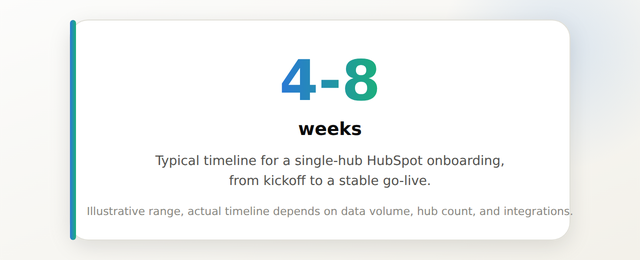
A typical HubSpot onboarding runs 4-8 weeks: week 1 is kickoff and discovery, weeks 2-3 are configuration and data migration, weeks 4-5 are integrations and workflow build-out, week 6 is testing and training, and go-live plus a short stabilization period close it out. Amwhiz runs onboarding on this same week-by-week structure, detailed on our HubSpot onboarding services page, so clients always know what stage they're in and what's coming next.
What Happens Week by Week During HubSpot Onboarding?
The Short Answer
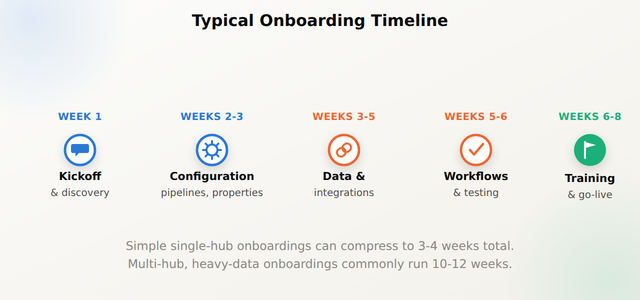
Most HubSpot onboarding engagements move through five phases over 4-8 weeks: discovery and kickoff (week 1), core configuration including pipelines and properties (weeks 2-3), data migration and integrations (weeks 3-5), workflow automation and testing (weeks 5-6), and training plus go-live (weeks 6-8). Simpler single-hub onboardings can compress to as little as 3-4 weeks; multi-hub onboardings with heavy data migration commonly extend to 10-12 weeks.
Week 1: Kickoff and Discovery
The first week is spent understanding your business before touching the portal. This includes a kickoff call, a review of your current sales/marketing/service process, an inventory of existing data sources, and a list of systems HubSpot will need to connect to. By the end of week 1, you should have a written scope document and a shared understanding of what "done" looks like for your onboarding.
Weeks 2-3: Core Configuration
This is where the portal starts taking shape: deal and ticket pipelines, custom properties, lifecycle stages, and user permissions get built according to the scope agreed in week 1. If your onboarding includes a CRM migration, field mapping and preliminary data cleanup typically begin here as well, in parallel with configuration. For teams moving off another CRM, our guide on migrating to HubSpot without losing contacts, deals, or workflows covers this data step in more depth.
Weeks 3-5: Data Migration and Integrations
Once the core structure is in place, historical data gets imported and validated, and any required integrations, ecommerce platforms, WhatsApp, custom internal tools, get connected. This phase tends to have the widest timeline variance: a clean CSV import with no integrations might take a few days, while a live sync with Shopify or Zoho and years of historical records can take several weeks. Amwhiz's HubSpot custom integration services are frequently scoped as part of this phase rather than as a separate later project.
Weeks 5-6: Workflow Automation and Testing
With data and integrations in place, automation gets built: lead routing, lifecycle stage triggers, internal notifications, sequences. This phase always includes a testing pass, running sample records through the full pipeline to confirm workflows fire correctly before real deals and tickets depend on them. Skipping this step is one of the most common causes of post-launch firefighting.
Weeks 6-8: Training and Go-Live
The final phase includes structured training sessions for each user group (sales, marketing, service), written documentation, and the actual go-live cutover. Most onboarding engagements include a short stabilization period immediately after go-live, commonly 1-2 weeks, where the implementation team is on standby for issues that only surface once the whole team is using the system daily. See this HubSpot implementation case study for how a full onboarding timeline played out for a real client.
How Amwhiz Helps
Amwhiz runs every onboarding against a shared week-by-week plan agreed upfront, so there's no ambiguity about what stage the project is in or what's blocking the next one. Our HubSpot onboarding services are structured around exactly the phases described above, scaled up or down based on your hub count and data complexity.
Frequently Asked Questions About the HubSpot Onboarding Timeline
How long does HubSpot onboarding usually take?
Most single-hub onboardings take 4-8 weeks from kickoff to go-live. Simple setups with minimal data migration can finish in as little as 3-4 weeks, while multi-hub onboardings with heavy historical data or several integrations commonly run 10-12 weeks.
What's the first thing that happens once onboarding starts?
A kickoff call and discovery phase, typically in week 1. This covers your current process, existing data sources, and the systems HubSpot needs to integrate with, and produces a written scope document before any configuration begins.
Which phase of onboarding usually takes the longest?
Data migration and integrations most often take the longest and have the widest variance, since timeline depends heavily on data volume, data quality, and how many external systems need to connect.
Do we need to pause our team's HubSpot use during onboarding?
Not usually. Most onboarding work happens in a sandbox or staged environment, with the live cutover scheduled for a specific go-live date rather than an extended freeze on daily use.
What happens right after go-live?
Most engagements include a stabilization period, commonly 1-2 weeks, where the implementation team remains available to fix issues that only appear once the full team is using the system in real conditions.
Can onboarding be sped up if we're in a hurry?
To a point. Timeline can be compressed by narrowing scope (single hub, minimal historical data, no integrations at launch) but core steps like data validation and testing shouldn't be skipped entirely, since that's what onboarding delays are usually trying to prevent.
Conclusion
A HubSpot onboarding timeline isn't a single black box, it's five distinct phases, each with its own typical duration and deliverables. Knowing the week-by-week shape in advance makes it much easier to plan internal resourcing and set realistic expectations with your team.
Amwhiz runs HubSpot onboarding as a clearly staged, week-by-week engagement so your team always knows what's next. Visit amwhiz.com or email sales@amwhiz.com to get started.
Leave a comment
Your email address will not be published. Comments are reviewed before they appear.