-1.png?width=134&height=66&name=amwhiz-logo%20(1)-1.png)



Is Zoho Books Enough, or Do You Need the Full Zoho Finance Suite? Zoho Finance implementation by...
Zoho Finance implementation by Amwhiz helps businesses decide when standalone accounting is enough and when it is time to add inventory, expenses, subscription billing, or payroll. The result is a finance system that fits where your business is now, with no modules you will never open.
Books or the Full Suite? Start With Where You Are
Is Zoho Books All You Need?
Let us settle one thing first. This is not a which-is-better question, because it does not have that answer. Zoho Books is one of the best small-business accounting tools going, and for a huge slice of businesses it is the whole solution.
The Finance suite simply extends it with more apps. So the real question is narrower: which one fits your business right now? Buy the full suite too early and you pay for modules you will not open. Cling to Books too long and your team glues the gaps with spreadsheets.
We help businesses find that line every week, and the honest truth is that it lands in a different place for almost everyone. A ten-person services firm and a fast-growing product brand can both be right, one on Books alone and the other on the full suite. The trick is reading your own signals instead of copying someone else's setup, and that is what the rest of this guide walks through.
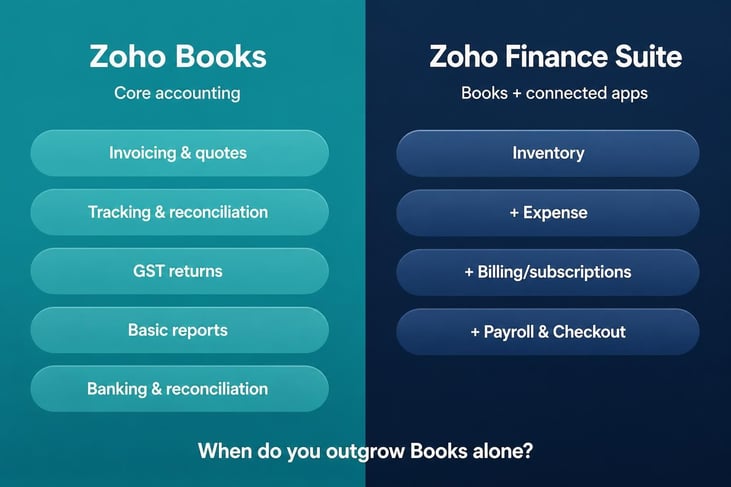
Books handles the accounting core; the Finance suite wraps inventory, expense, billing, and payroll around it.
What Books Handles Perfectly Well On Its Own
Books is a full double-entry accounting platform, and by itself it covers the day-to-day finances of most small and mid-sized businesses without breaking a sweat.
- Invoices, quotes, and estimates, including recurring invoices and online payment links.
- Bank feeds and reconciliation, so the books stay current without hand-keying every line.
- GST-ready invoicing and return-ready reports for filing without the last-minute scramble.
- Bills, vendor payments, and basic expense entry.
- The full reporting set, from P&L and balance sheet to cash flow and dozens more.
If that describes your world, stop there. Books is enough. Paid plans open around $20 a month and climb as your invoice volume, user count, and feature needs grow. Plenty of businesses run happily on Books for years without ever needing anything more, and there is no prize for buying software you will not use.
The Signals You Have Quietly Outgrown It
Watch for workarounds. The instant your team keeps a stock sheet here, an expense tracker there, and a payroll calculation in some other tab, you are paying in manual effort for work the broader suite would just do.
You Carry Stock, and It Moves
Books tracks items, but if you juggle stock across warehouses, need reorder points, batch or serial numbers, or live stock levels tied to your orders, that is Zoho Inventory's job. Wire it to Books and a single sale drops your stock and posts the entry at once.
Expense Claims Are Piling Up
The odd bill is fine in Books. But once staff regularly file receipts, mileage, and travel that need approving and reimbursing, Zoho Expense handles the capture, the approval chain, and the policy checks, then hands clean figures to Books.
You Bill On Subscriptions
Recurring or usage-based revenue, with renewals, proration, and dunning, is exactly what Zoho Billing exists for. Run a real subscription business on manually repeated invoices in Books and it holds together right up until it does not.
You Want Payroll In-House
If payroll currently lives with your accountant or in a spreadsheet, Zoho Payroll runs the salary cycle, handles statutory deductions and payslips, and drops the journal straight into Books. That is the manual grind most accountants are relieved to hand off.
You Operate Across Borders or Entities
Once you invoice in multiple currencies, run more than one business entity, or need consolidated reporting across branches, the wider suite and its shared configuration save real time. Books handles a lot of this alone, but the moment tax rules, currencies, and inter-entity flows multiply, having every finance app share one setup stops small inconsistencies from turning into month-end firefights.
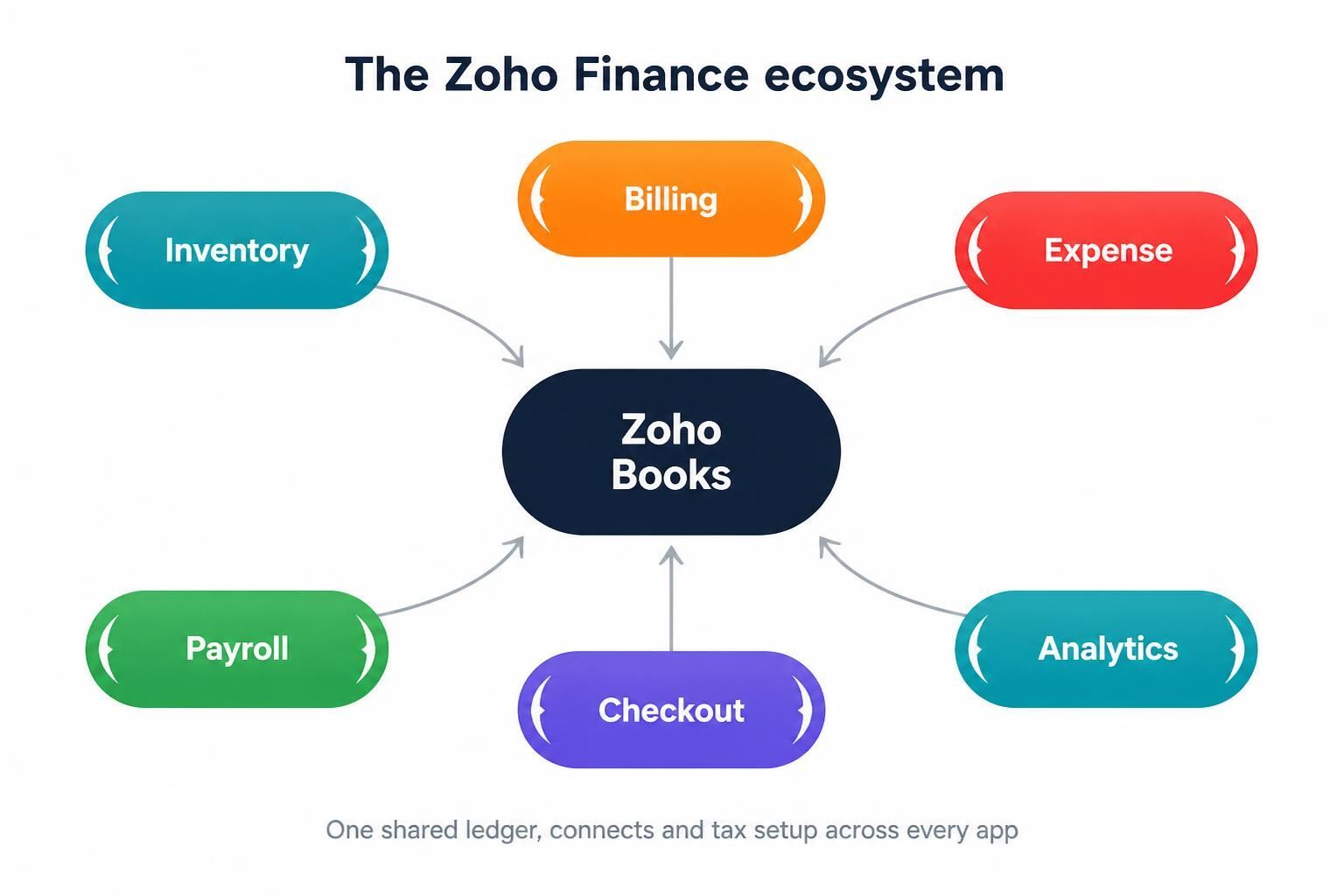
In the Finance suite every app shares one ledger, one contact list, and one tax setup, with Books at the centre.
Why the Suite Beats the Sum of Its Apps
The real win is not more apps. It is one shared spine. Contacts, items, tax settings, and the ledger are common across Books, Inventory, Expense, Billing, and Payroll. Create a vendor once and it exists everywhere. Approve an expense and it shows up in Books with no re-entry.
We will be straight, though. More apps mean more setup, more licences, and more to learn. The suite only earns its price when you genuinely use the extra modules. That judgement call is where a partner is worth having.
A Quick Gut-Check
Want a fast read on where you sit? Run these. The more yeses, the more likely you have outgrown Books alone.
- Holding physical stock across one or more locations, needing live levels tied to orders? That points to Zoho Inventory.
- Staff filing regular expense claims that need approval and reimbursement? That points to Zoho Expense.
- Earning recurring revenue with renewals, proration, or dunning? That points to Zoho Billing.
- Wanting payroll off your accountant's plate and in-house? That points to Zoho Payroll.
- Already running spreadsheets to patch what Books does not cover? The suite likely pays for itself in reclaimed time.
Mostly noes? Then Books alone is the leaner, smarter choice, and you can always expand later without redoing your accounting. The point of asking honestly is to stop you buying modules you will not touch, while making sure you are not paying twice for the same work in hidden manual effort.
The Money Angle: When the Suite Earns Its Cost
Each extra app adds licence cost and setup time, so the suite only makes financial sense when those modules replace real grunt work or a tool you already pay for elsewhere. A subscription business drowning in manual renewals recoups Zoho Billing fast. A services firm with no stock and no payroll ambitions may never need to leave Books.
The right answer is yours specifically, not a rule of thumb. A useful way to frame it: for every module you are considering, name the spreadsheet, the standalone tool, or the manual task it would retire. If you can name one, the module is probably worth it. If you cannot, leave it off the plan for now and add it the day the need is real.
How Amwhiz Helps You Choose and Set It Up
Amwhiz, an authorized Zoho partner, implements both standalone Books and the full Finance suite. Being authorized means our consultants are Zoho-certified and work inside the official partner programme, so your finance setup is handled by people who know these products cold.
We start by mapping how you actually work, from how you invoice to whether you hold stock and how payroll happens today. If Books is enough, we say so and set it up properly. If you are outgrowing it, we bring in Inventory, Expense, Billing, or Payroll in the right order, migrate your data, and connect it all onto one ledger.
Frequently Asked Questions About Zoho Books and the Finance Suite
Is Zoho Books Part of Zoho Finance Plus?
Yes. Books is the accounting core, and Finance Plus bundles it with Inventory, Expense, Billing, and more so they operate as one connected system rather than separate tools.
Can I Start On Books and Add the Other Apps Later?
Absolutely, and it is the most common path. Because the apps share data, you can slot in Inventory, Expense, or Payroll when the need arrives without unpicking your accounting setup.
Is Zoho Books GST Compliant?
Yes. Books does GST-ready invoicing and return-ready reports, which is a big reason businesses pick it. Getting the tax configuration right at setup is what keeps your filings clean.
Do I Need the Full Suite If I Only Hold a Little Stock?
Not really. Light item tracking sits fine inside Books. You graduate to Zoho Inventory when you need multi-warehouse stock, reorder points, or live levels tied to your orders.
How Does the Suite's Cost Compare to Books Alone?
Books paid plans start around $20 a month, and the bundled suite costs more because it adds apps and users. But the fair comparison is total value. If the extra modules retire spreadsheets or standalone tools you already pay for, the suite usually costs less once you count the manual effort it deletes.
Conclusion
Books alone covers core accounting: invoicing, banking, GST, and reporting. You move to the full suite for warehouse stock, heavy expense claims, subscription billing, or in-house payroll. The suite's real value is a shared ledger and contacts, not just extra icons.
Book a free Zoho finance consultation.
Amwhiz, an authorized Zoho partner, will map your finance workflows and recommend the right fit, nothing more. Visit amwhiz.com or email sales@amwhiz.com to talk it through with a Zoho finance specialist.