-1.png?width=134&height=66&name=amwhiz-logo%20(1)-1.png)




In today’s digital-driven market, a strong e-commerce platform is essential for startups and...
Plain and Simple
Shopify Liquid is Shopify's own open-source templating language, and it's what connects your store's design (HTML, CSS) to its actual data: products, collections, customers, orders. Liquid works through simple syntax, objects, tags, and filters, to dynamically pull store information into theme files. Every Shopify theme, whether it's a stock theme or a fully customized build like the ones Amwhiz delivers at a flat rate in 7 days, is running on Liquid underneath.
Why Shopify Built Its Own Templating Language
Shopify built Liquid back in 2006 specifically so store owners and developers could safely customize themes without ever touching the underlying application code or database directly. It runs in a sandboxed environment, meaning theme code can display and manipulate store data without being able to run arbitrary server-side operations. That was a deliberate security and stability call, and it still shapes how Shopify development works today.
The Three Core Building Blocks
1. Objects
Objects represent pieces of data Shopify hands over to your theme, wrapped in double curly braces. {{ product.title }} displays a product's name. {{ cart.total_price }} shows the current cart total. Objects are how your theme actually pulls real store data onto the page.
2. Tags
Tags control logic and flow, wrapped in curly braces with percent signs: {% if %}, {% for %}, {% assign %}. These let you loop through a collection of products, show conditional content based on inventory status, or set a variable you can reuse further down the template.
3. Filters
Filters modify what an object outputs, applied with a pipe character. {{ product.price | money }} turns a raw price value into properly formatted currency. {{ product.title | upcase }} converts text to uppercase. Filters are how raw data turns into something that actually reads well.
A Simple Example
{% for product in collections.featured.products %}
<div class="product-card">
<h3>{{ product.title }}</h3>
<p>{{ product.price | money }}</p>
</div>
{% endfor %}
This loop grabs every product from a "featured" collection and displays its title and formatted price, a pattern you'll see constantly across collection pages, homepage featured sections, and related-product blocks.
Where Liquid Fits Into Online Store 2.0
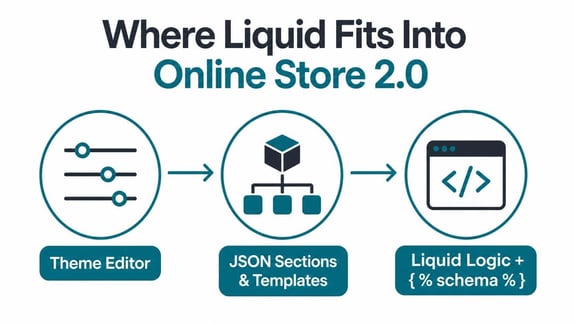
Since Shopify rolled out Online Store 2.0, Liquid now works alongside a JSON-based section and template system, which lets merchants add, remove, and rearrange sections through the theme editor without touching code at all. Developers write the underlying Liquid logic and define a {% schema %} block spelling out what settings merchants can control, giving non-technical store owners genuine flexibility on top of what a developer built.
Why Understanding Liquid Matters, Even If You Don't Code
You don't have to write a line of Liquid yourself to benefit from knowing what it does. Once you understand that your theme's dynamic content, prices, product details, cart behavior, all flows through Liquid, a few things get easier:
- Talking to developers gets clearer, since you can describe what you want changed and why in terms that actually make sense.
- You start to understand why some requests are quick (adjusting a schema setting) and others take longer (writing new Liquid logic for something genuinely new).
- You can gauge developer quality better. Clean, efficient Liquid code loads faster and is far easier to maintain than something bloated and messy.
Common Liquid Performance Pitfalls
Poorly written Liquid is one of the most common reasons behind slow Shopify stores:
- Excessive nested loops. Looping through large collections repeatedly on one page slows rendering down noticeably.
- Redundant object calls. Fetching the same piece of data multiple times instead of just assigning it to a variable once.
- Overly complex conditional logic. Deeply nested
{% if %}statements that could easily be simplified.
- Unoptimized image handling, skipping Liquid's built-in image filters for responsive, properly sized images.
This is exactly the kind of detail that separates a fast, well-built theme from a sluggish one, even when the two look nearly identical on the surface.
Liquid and the Theme Editor: How They Work Together
A question that trips up a lot of store owners: if changes can be made through the theme editor, why does a developer sometimes say a request needs code? It comes down to what the developer originally exposed through {% schema %} settings when they built that section. If a setting, a background color, a text field, whatever, was defined as editable, you can change it freely through the editor, no code needed. If you're asking for something outside what was defined, a new layout behavior, a different data source, a genuinely new feature, that needs a developer to write new Liquid logic and expose new schema settings for it. Once you get this distinction, it's much easier to tell whether a request should be quick or actually needs development time.
A Simple Way to Evaluate Code Quality Without Reading Code Yourself
You don't need to read Liquid to judge whether a theme is well-built. Just ask your developer to walk you through how a specific page, your product page, say, is structured. Well-organized code should map cleanly to logical sections, image gallery, price and variant selector, description, reviews, that a developer can explain in plain language without stumbling. If the explanation gets vague or the structure sounds like a tangle, that's usually a decent proxy for what the underlying code quality actually looks like, even if you've got zero technical background yourself.
Frequently Asked Questions
Is Liquid difficult to learn?
Basic Liquid syntax, objects, tags, filters, is approachable for anyone comfortable with basic programming logic, and Shopify's official documentation covers it extensively.
Can I use Liquid outside of Shopify?
Liquid itself is open-source and used elsewhere, but Shopify's specific objects, tags, and filters (products, collections, cart) only exist in the Shopify context.
Does every Shopify theme use Liquid, even paid ones?
Yes. Every Shopify theme, free or paid, stock or fully custom, runs on Liquid as its underlying templating language.
How does Amwhiz use Liquid in its builds?
Every customized theme Amwhiz delivers gets built and modified with clean, efficient Liquid code, structured for both flexibility in the theme editor and genuinely fast page load times.
Why do some Shopify customization requests cost more than others?
Requests that use settings already exposed in the schema are quick, often free. Requests that need genuinely new Liquid logic and new schema settings involve real development time, and that's reflected in what they cost.
Can poorly written Liquid code actually break my store?
It can cause slow load times, display bugs, or broken functionality in certain edge cases, though Shopify's sandboxed environment stops Liquid errors from ever taking down the whole platform or exposing sensitive data.
Get a Store Built on Solid Foundations
Understanding Liquid helps you ask the right questions of any developer, but you don't need to write a single line of it to get a fast, well-built store. Amwhiz delivers cleanly coded, sales-focused Shopify themes at a flat rate in 7 days. Reach out and let's get started.