-1.png?width=134&height=66&name=amwhiz-logo%20(1)-1.png)



-1.png?width=493&height=296&name=image%20(1)-1.png)

The Challenge

Smarter Campaigns. Faster Execution. Better Results.
Introduction
HubSpot Marketing Studio is an AI powered workspace designed to simplify campaign planning, collaboration, and execution. Recent updates bring enhanced analytics, improved workspace organization, and reusable campaign capabilities, enabling marketing teams to launch campaigns faster and work more efficiently.
.png?width=461&height=328&name=image%20(7).png)
Marketing Studio Overview
Marketing Studio provides a unified workspace for campaign management. An AI powered workspace for campaign planning and execution.
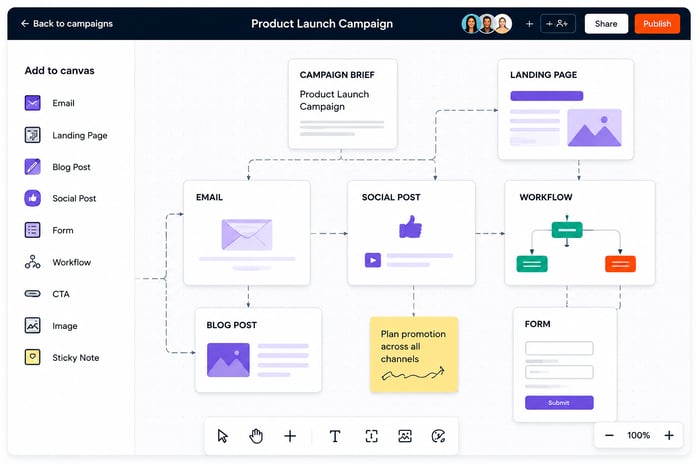
Key Highlights
- Centralizes campaign planning and execution.
- Enables seamless team collaboration.
- Uses AI to accelerate campaign creation.
- Reduces dependency on multiple tools.
- Improves productivity and efficiency.
- Helps teams launch campaigns faster.
Benefits
- Faster campaign execution.
- Better collaboration.
- Simplified workflows.
- Increased productivity.
Analyze Tab
Overview
The Analyze tab brings campaign performance insights directly into Marketing Studio.You can now view all the campaign metrics related to your campaign directly inside Marketing Studio.
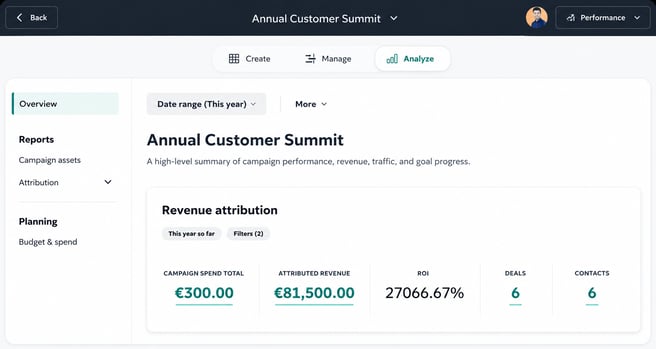
Key Highlights
- Displays campaign metrics in one place.
- Eliminates the need for separate reporting tools.
- Enables faster performance analysis.
- Provides visibility into campaign results.
- Supports quicker optimization.
Benefits
- Continuous workflow.
- Faster decision making.
- Improved campaign visibility.
- Better performance tracking.
Redesigned Canvas
Overview
The redesigned canvas offers a smarter and more organized workspace.
How does it work?
Modes

The most significant update includes "modes" to avoid overfilling the canvas with a number of actions. Modes give you select views and actions to perform certain tasks, such as creating content, managing and scheduling content, or building automation. Switch between modes to focus on what you're working on.
At the bottom of the canvas, you'll be introduced to the "dock". The new dock combines existing actions (rearrange, select) with ones previously found on the lefthand sidebar of Marketing Studio (e.g., add assets).
Snap to grid
In the canvas settings, you can now select "snap to grid" to align cards as you place them.
-1.png?width=572&height=425&name=image%20(2)-1.png)
Auto layout
Quickly clean up misaligned cards by selecting "auto layout", placing all selected cards in a uniform grid.
.png?width=381&height=349&name=image%20(3).png)
Key Highlights
- Introduces focused modes for different tasks.
- Simplifies navigation with the new dock.
- Aligns assets with Snap to Grid.
- Organizes layouts using Auto Layout.
- Improves campaign visibility and structure.
Benefits
- Reduced workspace clutter.
- Better organization.
- Easier asset management.
- Improved productivity.
Campaign Cloning
Overview
Campaign Cloning allows marketers to reuse successful campaigns and launch them quickly. You can now clone an existing campaign in Marketing Studio including its brief and most associated assets and update key details in just a few steps.
.png?width=582&height=355&name=image%20(4).png)
Key Highlights
- Duplicates existing campaigns in minutes.
- Preserves campaign structure and assets.
- Reduces manual setup.
- Maintains consistency across campaigns.
- Simplifies recurring campaign execution.
Benefits
- Saves time.
- Reduces errors.
- Improves scalability.
- Enables faster campaign launches.
FAQ’s
1. We run the same webinar campaign every month. Do we need to rebuild everything from scratch?
No. With Campaign Cloning, you can duplicate a previous campaign including emails, landing pages, forms, and workflows and simply update the dates and content.
This helps marketing teams reduce repetitive work and maintain campaign consistency across recurring launches.
2. Our team uses spreadsheets, documents, and multiple tools to manage campaigns. Can Marketing Studio simplify this?
Yes. Marketing Studio provides a single workspace where teams can plan, create, collaborate, and manage campaign assets without switching between tools.
This reduces operational complexity and improves campaign execution efficiency.
3. We frequently lose track of campaign assets. How can Marketing Studio help?
The visual canvas provides a centralized view of all campaign assets, making it easier to organize and manage emails, landing pages, social posts, and workflows.
Teams gain better visibility and faster access to campaign resources.
4. Our content, email, and automation teams work separately. Can multiple teams collaborate on the same campaign?
Yes. Marketing Studio supports multiplayer collaboration, comments, and sticky notes, allowing teams to work together in real time.
This improves alignment across departments and reduces communication delays.
5. We usually spend hours arranging campaign assets. Is there an easier way?
Yes. The redesigned canvas includes Snap to Grid and Auto Layout features, which automatically organize assets for a cleaner and more structured workspace.
This allows teams to spend more time on strategy instead of layout adjustments.
6. We often switch between campaign creation and reporting tools. Can performance be tracked without leaving Marketing Studio?
Absolutely. The Analyze tab provides campaign metrics and performance insights directly within Marketing Studio.
Campaign analysis becomes faster and easier without changing platforms.
7. How can I quickly identify whether a campaign is performing well?
The Analyze tab provides key metrics such as revenue attribution, ROI, contacts, and engagement data, helping marketers make faster decisions.
Teams can monitor campaign outcomes and optimize performance continuously.
8. We have limited resources and need to launch campaigns quickly. Can AI help?
Yes. AI assisted campaign creation helps generate campaign briefs and assets, significantly reducing the time required to launch campaigns.
This enables teams to move from planning to execution much faster.
9. Our campaigns follow a similar structure every quarter. Can we standardize the process?
Yes. Campaign Cloning enables teams to reuse successful campaign structures, ensuring consistency across recurring campaigns.
This supports scalable campaign management across teams and markets.
10. Our campaign canvas becomes cluttered with too many assets. How can we stay organized?
The redesigned canvas introduces dedicated modes for content creation, scheduling, and automation, allowing teams to focus on specific tasks without distractions.
This creates a cleaner and more productive campaign environment.
11. We want to improve collaboration between marketing managers and content creators. What features support this?
Teams can collaborate through a shared visual canvas, comments, and sticky notes, making communication more efficient.
Everyone stays aligned throughout campaign execution.
12. We often need to present campaign performance to leadership. Can Marketing Studio help?
Yes. The Analyze tab provides a consolidated view of campaign metrics, making it easier to review results and demonstrate ROI.
This supports better reporting and stakeholder communication.
13. Can Marketing Studio help reduce campaign launch time?
Yes. AI assisted content creation, campaign cloning, and centralized asset management help teams launch campaigns faster and with fewer manual steps.
Teams can improve efficiency while maintaining campaign quality.
14. What happens if we want to reuse a successful product launch campaign next year?
Simply clone the campaign, update the details, and relaunch it without recreating assets from scratch.
This preserves successful campaign structures and reduces setup effort.
15. Why should our team adopt Marketing Studio?
Marketing Studio brings campaign planning, collaboration, analytics, and campaign reuse into one AI powered workspace, helping teams work smarter and execute campaigns faster.
It enables teams to streamline workflows, improve visibility, and scale campaign execution more efficiently.