-1.png?width=134&height=66&name=amwhiz-logo%20(1)-1.png)




Revenue Operations with HubSpot From siloed data and manual outreach to a fully automated,...

Case Study: Apollo.io & Zoho CRM Integration, A Duplicate-Safe Two-Way Lead Engine
A B2B team came to us with a half-built outbound setup: Apollo.io was partially configured and Zoho CRM was the system of record, but nothing connected the two cleanly. We completed the Apollo setup, built ICP-based lead lists, and engineered a duplicate-safe, two-way Apollo-Zoho CRM sync, then documented exactly what worked and where merchants should keep expectations in check.
Executive Summary
What Did the Apollo.io and Zoho CRM Integration Actually Deliver?
We finalized an Apollo.io account, built targeted lead lists, and connected Apollo to Zoho CRM with a clean two-way sync.
The objective was simple: get outbound leads, activities, and status changes flowing between Apollo and Zoho without duplicates or mismatched data, while keeping email deliverability healthy.
Below is what we built, how we handled data hygiene, and where a sync like this helps versus where expectations should stay realistic.
The Problem We Were Trying to Solve
Why Is Connecting Apollo.io to Zoho CRM a Headache?
Like a lot of B2B teams, the client had several moving parts: an Apollo.io account for prospecting and sequences, and Zoho CRM as the single source of truth for contacts and deals.
The trouble was that the two weren't talking to each other reliably, and pushing data across without a plan would have caused more harm than good.
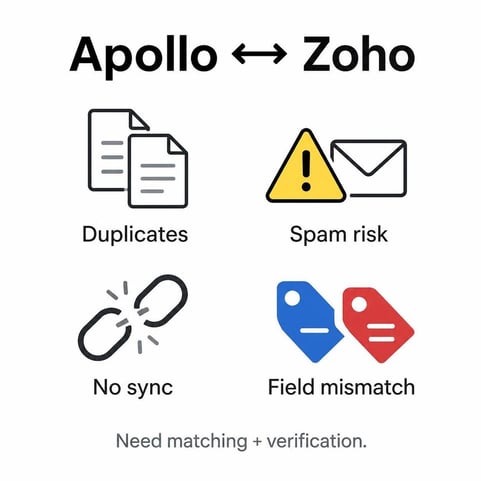
That created a few specific headaches:
- Syncing Apollo into a CRM with no matching logic would multiply existing duplicates and fracture contact history.
- Without verified SPF, DKIM, and DMARC records and proper mailbox warming, even well-written sequences would land in spam.
- Replies and status changes happening in Apollo weren't reflected in Zoho, so reps lacked full context on each lead.
- Custom fields didn't map cleanly across both platforms, so data risked landing in the wrong place.
- There was no safe way to handle edge cases, like a contact using a different email in Apollo than the one stored in Zoho.
For a small, single-region team, none of this matters much day to day.
But once you run real outbound volume across two systems, the duplicates and blind spots start to add up fast.
What the Integration Actually Does
What Does the Apollo-Zoho Two-Way Sync Control?
The two-way sync connects Apollo.io and Zoho CRM so leads, activities, and contact statuses move between them cleanly, using email address as the primary unique identifier.
What it does:
- Matches on email first, then updates the existing record instead of creating a new one
- Maps Apollo status changes (reply received, meeting booked, opted out) to the matching stage in Zoho
- Logs the specific activity, such as "Replied via Apollo sequence X," as a note on the contact
- Flags ambiguous matches as "needs review" rather than merging or duplicating them silently
- Logs and retries any failed sync attempt so nothing gets dropped quietly
What it doesn't do:
- Fix a messy CRM on its own. Deduplication has to happen before live sync is enabled.
- Guarantee inbox placement without correct SPF, DKIM, and DMARC and proper warming.
- Replace fraud checks, lead scoring, or anything your CRM does after the handoff.
- Guess at a merge. When in doubt, it flags for a human instead.
Setting It Up
How Do You Build the Integration Without Creating Duplicates?
We started with an audit of the current Apollo and Zoho setup before touching any live sync settings. The work then broke into four steps.
1. Apollo.io Completion and Deliverability
First we confirmed SPF, DKIM, and DMARC were correctly configured for the sending domain, this is the foundation. Then mailbox warming was run properly before any real sending, ramping volume gradually instead of sending at full daily limits from day one.
Initial emails were kept plain-text or lightly formatted, opening lines were personalized per prospect, and daily send limits were respected to stay under provider spam thresholds. Bounce and spam-complaint rates were watched closely in the first weeks.
2. ICP-Based Lead Prospecting
With the account healthy, we built targeted lead lists in Apollo based on the client's Ideal Customer Profile (ICP) and buyer personas, turning broad filters into focused, ready-to-work lists.
3. Data Mapping and Hygiene
Custom fields were mapped so they matched across both platforms. Critically, we ran a deduplication pass on the existing Zoho database first, because syncing Apollo against a CRM that already has duplicates only multiplies the problem.
4. Two-Way Sync With Status Mapping
The live logic matches on email address, updates existing records, and flags edge cases as "needs review." A webhook or scheduled sync job fires when a lead's status changes in Apollo and updates the matching stage in Zoho, logging the activity so the sales team sees full context without opening Apollo.
Every sync attempt is logged so any failure is visible and retried, rather than silently dropped.
What Changed After the Build
What Were the Operational and Pipeline Results?
Operationally:
- One connected system instead of siloed data and manual outreach
- Upkeep afterward is light, most of the sync runs on its own once live
- No more copy-paste between tools, since records update automatically on an email match
In the CRM:
- Leads, activities, and statuses flow between Apollo and Zoho without duplicates
- Reps see replies and stage changes inside Zoho without checking Apollo separately
- Early outreach stayed out of spam thanks to verified DNS records and disciplined warming
Being Honest About What a Sync Can and Can't Do
Can You Credit the Integration for More Replies or Fewer Bad Leads?
We need to be careful here, because it's tempting to credit an integration for things it may not have caused.
Deliverability: Getting SPF, DKIM, and DMARC right plus proper warming keeps mail out of spam, but inbox placement also depends on list quality and copy. The setup removes the technical blockers; it doesn't write better emails for you.
Data quality: Duplicates dropped sharply because of the pre-sync deduplication and email-keyed matching. That's a direct, measurable win from the process, not a side effect.
Reply and meeting rates: Those depend on your ICP, offer, and sequence quality far more than on the plumbing. A clean sync makes activity visible and trustworthy; it doesn't manufacture demand.
Bottom line: the integration does exactly what it says, moving leads, activities, and statuses between Apollo and Zoho cleanly and safely. Whether that turns into pipeline depends on the outbound strategy sitting on top of it.
Strengths and Limitations
What Worked Well
Duplicate-safe by design. Email-keyed matching plus a pre-sync dedup pass means the CRM stays clean instead of degrading over time.
Full context in one place. Apollo replies and stage changes land in Zoho automatically, so reps never have to switch tools to understand a lead.
Nothing gets dropped. Failed syncs are logged and retried, and ambiguous matches are flagged for review rather than merged blindly.
Deliverability handled at the root. SPF, DKIM, and DMARC plus proper warming address why emails land in spam, not just the symptoms.
Where to Keep Expectations in Check
It's not a demand generator. A clean sync makes outbound trustworthy; it doesn't create replies or meetings on its own.
Garbage in still matters. If your ICP or list quality is weak, better plumbing won't fix poor targeting.
Edge cases need a human. "Needs review" flags are deliberate, someone still has to resolve genuinely ambiguous matches.
Ongoing hygiene is a choice. Monthly list sourcing, sequence upkeep, and CRM cleanup keep the system healthy but are a separate, optional phase.
Who Should Actually Do This
Is an Apollo-Zoho Integration Right for Your Team?
Makes sense for:
- Teams running Apollo.io for outbound and Zoho CRM as the system of record
- Businesses worried about duplicate or mismatched records across the two tools
- Sales teams that need replies and stage changes visible in Zoho without living in Apollo
- Anyone whose emails have been landing in spam due to SPF, DKIM, or DMARC gaps
- Teams that want ICP-based lead lists built and kept fresh
Probably not worth it for:
- Teams expecting the sync alone to generate demand or replies
- Stores with no real outbound motion across two systems
- Teams already running a mature, custom RevOps stack with its own sync logic
Scope and Phases
What Do the Setup and Ongoing Phases Include?
- Phase 1 (Immediate): Integration setup, ICP-based list building, and end-to-end workflow verification
- Phase 2 (Ongoing / Optional): Monthly lead-list sourcing, sequence maintenance, and CRM cleanup
If you run steady outbound volume and regularly adjust targeting, Phase 2 keeps the pipeline fed and the data clean without pulling reps off selling.
The real value here isn't a magic conversion lift; it's less manual work, cleaner data, and full visibility across Apollo and Zoho.
Our take: start with the Phase 1 build. Add ongoing maintenance once your list volume and segmentation get complex enough to need it.
Final Take
Is the Apollo.io + Zoho CRM Integration Worth Doing?
This integration solves one specific, real problem: giving a team a duplicate-safe, two-way flow of leads, activities, and statuses between Apollo.io and Zoho CRM. It does that job well and without much fuss.
What it isn't is a growth shortcut. It won't manufacture replies, fix weak targeting, or generate demand on its own. Those depend on much bigger reasons like your ICP, offer, and sequence quality.
If duplicate records, spam issues, or blind spots between Apollo and Zoho have been a genuine bottleneck, this is worth doing.
For everyone else, it's a solid foundation that quietly makes outbound cleaner and more trustworthy rather than a magic switch that moves the needle by itself.