-1.png?width=134&height=66&name=amwhiz-logo%20(1)-1.png)





Overview An IT services company offering AI solutions, product engineering, and enterprise...
Client Overview
Our client uses HubSpot CRM to manage and visualize their business data effectively. They wanted to enhance their CRM interface by displaying only the relevant Custom Object records (like Shipping Addresses or Projects) linked to a specific record (such as a Deal, Contact, or Company) — and also enable users to create new associations without leaving the CRM view.
Problem Statement
Showing Only Associated Custom Object Records in a HubSpot CRM Card
1. Default HubSpot Limitation:
HubSpot’s native CRM view for Custom Objects displays all records from that object, regardless of association.
2. User Confusion:
Users cannot easily identify which records (e.g., Shipping Addresses, Projects, or Orders) are actually linked to the current CRM record (Deal, Contact, or Company).
3. Manual Effort Required:
Users have to manually search or filter through all custom object records to find the correct associated record.
4. Time-Consuming Workflow:
The process of locating or creating associated records requires multiple steps and often takes users outside the CRM card view.
5. No Direct Association Management:
There is no quick option within the card to create a new record and immediately associate it with the current CRM entity.
6. Lack of Business Logic Control:
The native card does not allow the application of custom business rules, such as conditional filtering or record visibility logic.
7. Operational Inefficiency:
These limitations slow down daily operations, especially for teams managing logistics, projects, or other relationship-driven data.
Key Challenges
- In-Card Functionality: Providing a smooth experience to view, create, and manage associated Custom Object data (like Shipping Addresses) directly from the CRM card.
- Seamless Association Creation: Ensuring that new Custom Object records can be created and instantly linked to the active record (Deal, Contact, or Company).
- Real-Time Synchronization: Ensuring real-time synchronization between Deals and associated Custom Object records was a major challenge. When an existing association (like a linked Shipping Address or Project) was removed and a new one was added, the CRM card needed to instantly update without requiring a manual refresh — keeping the displayed data accurate at all times.
Integration Approach / Steps
1. CRM UI Extension Setup
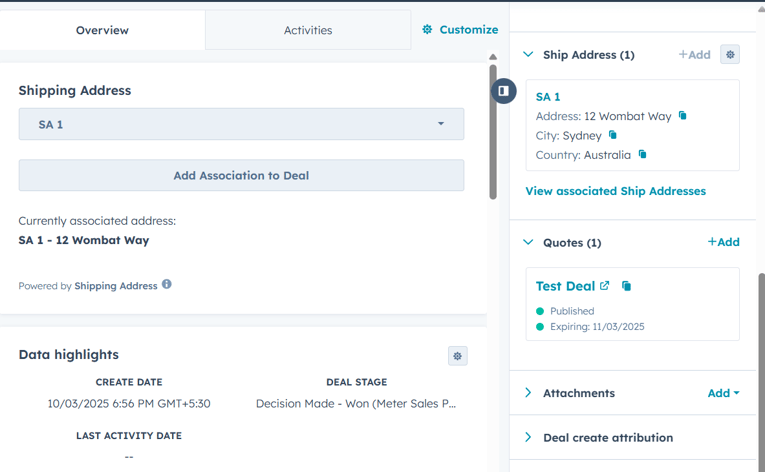
We implemented a custom CRM card using HubSpot’s CRM UI Extensions framework. This card was embedded directly inside the record sidebar and configured to:
- Retrieve and display only the associated Custom Object records (like Shipping Addresses or Projects) using HubSpot’s Associations API.
- Automatically refresh when new associations were created or existing ones were modified.
2. API-Based Association Logic
Through HubSpot’s CRM v4 APIs, we developed a system to:
- Dynamically fetch associated Custom Object records.
- Allow users to create new associations using API calls — linking them automatically with the current CRM record.
3. Create and Associate Workflow
A “+ Add New [Custom Object]” option was built into the CRM card.
When clicked, it opened a form where users could:
- Enter details for a new record (for example, a Shipping Address).
- On submission, a new Custom Object record was created and immediately associated with the current record.
4. User-Friendly Design
The CRM card was designed using React and HubSpot’s UI Extension SDK to ensure:
- A clean, responsive layout.
- Simple table view for existing associations (e.g., Shipping Addresses linked to a Deal).
- Instant visual updates when records were added or removed.
Results & Outcomes
- Focused Data View: Only the relevant Custom Object records (like Shipping Addresses or Projects) are now displayed, improving data clarity.
- Increased Efficiency: Users can create and associate Custom Object records directly within the CRM card, saving significant time.
- Reduced Errors: Automated association ensures accuracy and prevents manual linking mistakes.
- Enhanced User Experience: All related data — including Shipping Addresses and other Custom Object records — is accessible from a single, unified interface.
Conclusion
This solution, built using HubSpot CRM UI Extensions and Custom Object APIs, provided the client with a smarter, cleaner, and more efficient way to handle their CRM data. It empowered users to manage Custom Object data (like Shipping Addresses or Projects) seamlessly, reduce manual processes, and maintain accurate associations — all within HubSpot’s native experience.