-1-1.webp?width=200&height=99&name=amwhiz-logo%20(1)-1-1.webp)
A Shopify store migration typically moves through six stages: audit and planning, data mapping, theme and design rebuild, app and integration setup, a staged test migration, and a launch with SEO redirects, usually taking 4-10 weeks depending on catalog size and complexity. Amwhiz runs migrations through its Shopify store migration services, and most of what goes wrong in a self-managed migration happens because one of these steps gets rushed or skipped. Here's what each stage actually involves, in order.
What Does a Shopify Store Migration Actually Involve, Step by Step?
The Short Answer
A Shopify migration involves six core steps: (1) auditing the current store and planning scope, (2) mapping and exporting product, customer, and order data, (3) rebuilding the theme and design in Shopify, (4) reconnecting apps and integrations, (5) running a staged test migration on a duplicate/development store, and (6) launching with 301 redirects to protect SEO. Most migrations take 4-10 weeks; skipping the test-migration or redirect steps is the most common cause of post-launch problems.
The Six Steps in Order
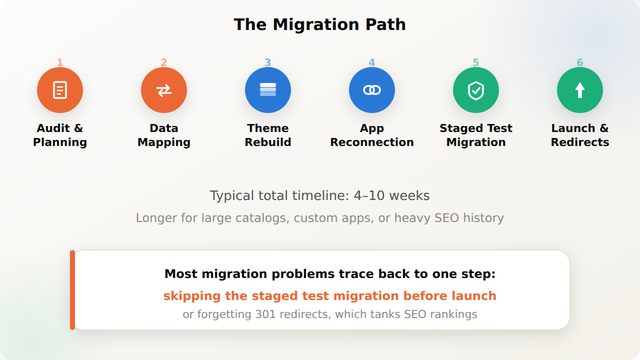
For a realistic sense of how long each stage takes on an actual project, see Amwhiz's Shopify migration timeline breakdown.
Step 1-2: Audit, Planning, and Data Mapping
Before anything moves, a proper migration starts with a full audit of the current store: product catalog size and structure, customer records, order history requirements, active apps, custom code, and current URL/SEO structure. This becomes the map for exactly what needs to move and in what format. Data mapping then translates the source platform's fields (products, variants, customers, orders, metafields) into Shopify's data model, this is where most silent data loss happens if it's rushed.
Step 3-4: Theme Rebuild and App Reconnection
The storefront design gets rebuilt in Shopify's theme framework rather than copy-pasted, since most platforms don't share a common templating language. In parallel, every app and integration the store depends on, email marketing, reviews, loyalty, ERP/CRM sync, gets reconnected or replaced with a Shopify-compatible equivalent. This is also the stage where custom app integration work happens if the old platform relied on integrations Shopify's App Store doesn't directly replace.
Step 5: The Staged Test Migration
Before touching the live store, a full migration runs on a duplicate or development store first. This step verifies data accuracy (spot-checking products, orders, and customer records), confirms apps and integrations behave correctly, and tests checkout, shipping rates, and tax calculation end to end. Skipping this step is the single most common cause of post-launch surprises.
Step 6: Launch and SEO Redirects
Launch involves cutting DNS over to Shopify, running a final data sync to catch anything created since the test migration, and, critically, setting up 301 redirects from every old URL to its new Shopify equivalent. Amwhiz's Shopify migration SEO checklist covers this step in detail, since missed redirects are the most common reason a migrated store loses search rankings.
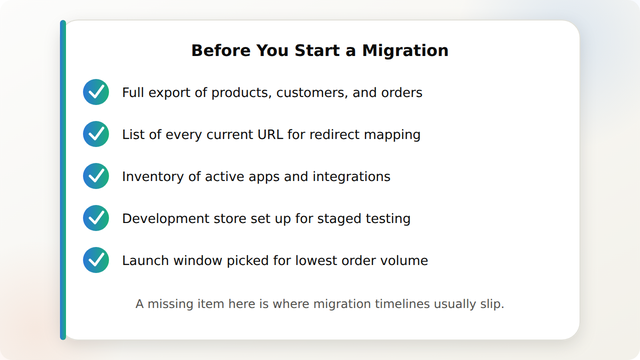
A Pre-Migration Checklist
How Amwhiz Helps
Amwhiz's Shopify store migration services run all six steps above as a managed engagement, including the staged test migration and SEO redirect mapping that most self-managed migrations skip. The Shopify migration without SEO or sales loss case study shows this process applied to a live store.
Frequently Asked Questions About Shopify Store Migration Steps
What are the main steps in a Shopify store migration?
The six main steps are: audit and planning, data mapping and export, theme rebuild, app and integration reconnection, a staged test migration on a development store, and launch with 301 redirects.
How long does each step typically take?
Audit and planning usually takes 3-7 days. Data mapping and theme rebuild often run in parallel over 2-4 weeks. App reconnection adds 1-2 weeks. The staged test migration typically takes 3-5 days, and launch itself is usually a single day with redirect verification continuing for a week or two after.
What data moves during a migration, and what commonly gets left behind?
Products, variants, customers, and order history typically move. What commonly gets left behind or requires extra work: product reviews tied to a third-party app, custom metafields without a clear Shopify equivalent, and historical analytics data that doesn't transfer between platforms.
Do I need a development store before migrating live?
Yes, strongly recommended. A staged test migration on a duplicate or development store catches data mapping errors, broken app connections, and checkout/tax issues before they affect real customers and orders.
Will my Shopify migration hurt my SEO rankings?
Not if 301 redirects are set up correctly from every old URL to its new Shopify equivalent, and metadata/structured content is preserved. Rankings drops after migration are almost always caused by missing or incorrect redirects, not the platform switch itself.
Can apps and custom integrations move with the migration?
Most apps need to be reinstalled and reconfigured on Shopify rather than migrated directly, since they're platform-specific. Custom integrations built for the old platform typically need to be rebuilt for Shopify's API and app architecture.
Conclusion
A Shopify migration is a sequence of six well-defined steps, not a single cutover event, and the steps most often skipped (staged testing, SEO redirects) are exactly the ones that cause the most damage when missed. Following the sequence in order, with enough time budgeted for the test migration, is what separates a smooth launch from a scramble.
Amwhiz manages Shopify store migrations end to end, from audit through launch, protecting both data accuracy and SEO rankings along the way. Visit amwhiz.com or email sales@amwhiz.com to get started.
Leave a comment
Your email address will not be published. Comments are reviewed before they appear.