
-1.png?width=134&height=66&name=amwhiz-logo%20(1)-1.png)


A Shopify POS integration fixes online and in-store inventory mismatches by connecting both channels to a single, real-time stock count, so a sale at the register instantly reduces what's available online and vice versa. Without that sync, retailers routinely oversell products that just walked out the door, or leave stock sitting in a back room that the website shows as unavailable. Amwhiz builds this sync as part of its Shopify POS integration services, and this post walks through what actually breaks without it and how the fix works.
What Does Syncing Online and In-Store Inventory Actually Fix?
The Short Answer
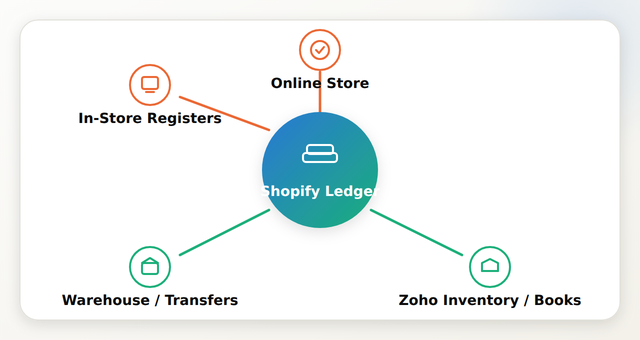
Syncing online and in-store inventory through Shopify POS eliminates the two most common retail inventory problems: overselling (selling online stock that was already sold in-store) and phantom stock (products marked unavailable online because the system doesn't know an in-store return or restock happened). It does this by making Shopify's inventory ledger the single source of truth that both channels read from and write to in real time.
What Goes Wrong Without a Synced Inventory System?
Retailers running Shopify online alongside a separate or loosely connected POS system tend to run into the same handful of problems, usually discovered after a customer complaint rather than before.
- Overselling: a product sells out in-store but the website still shows it in stock, leading to a canceled online order and a refund.
- Phantom stock: inventory sitting on a shelf shows as "out of stock" online because a manual count never got updated.
- Double-counted returns: an in-store return doesn't add the item back to available online inventory, so the count stays permanently off until someone catches it.
- End-of-day reconciliation drift: staff spend time every night manually comparing register totals to the online dashboard, and small errors compound over weeks.
How Does a Shopify POS Integration Solve This?
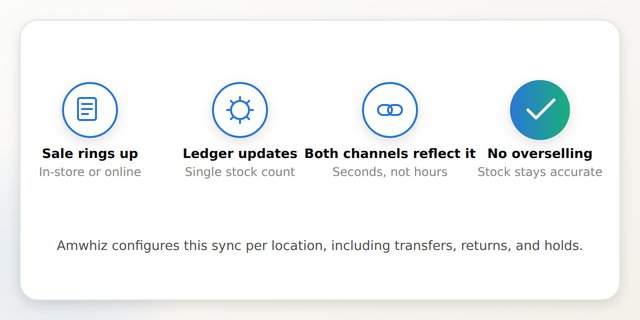
The fix isn't a single feature, it's a set of sync rules configured once and then running automatically in the background.
How Does This Work Across Multiple Store Locations?
Multi-location retailers need one more layer: location-level inventory rules rather than a single combined count. Shopify POS supports assigning stock to specific locations, which means an integration has to account for transfers between stores, location-specific "buy online, pick up in-store" logic, and reporting that breaks sales down by location as well as channel. This is typically the biggest scope difference between a single-store and multi-location project, see Shopify POS integration services for how that scoping works.
What About Inventory Systems Outside of Shopify?
Some retailers run inventory management through Zoho Inventory or another external system rather than relying on Shopify's native stock counts alone, often because it also drives purchasing, accounting, or multi-channel warehouse operations. In that case, the sync has to run in two directions, Shopify POS to the external system and back, rather than just between Shopify's own online and POS channels. Amwhiz has documented how this pattern works on the accounting side in connecting an ecommerce store to Zoho Books and Inventory, which follows a similar sync logic.
How Long Does It Take to Set Up a Synced System?
For a single location on Shopify's native inventory, sync configuration and testing usually takes 2-4 weeks. Adding an external inventory or accounting system, or multiple locations with transfer logic, commonly extends that to 5-9 weeks, since each sync rule needs to be tested against real transaction scenarios before go-live.
How Amwhiz Helps
Amwhiz's Shopify POS integration services are built specifically to solve the online/in-store inventory mismatch, configuring the sync rules, testing transfer and return scenarios, and training staff before launch. The results of this approach are covered in the Shopify POS unified retail operations case study.
Frequently Asked Questions About Syncing Shopify Inventory
What causes online and in-store inventory to fall out of sync in the first place?
Most commonly it's a POS system that isn't fully connected to Shopify's inventory ledger, or manual stock counts that get updated on a delay rather than in real time as sales happen.
How fast does inventory update across channels after a sale?
With a properly configured Shopify POS integration, inventory updates in near real time, typically within seconds of a sale ringing up, whether it happens online or at a physical register.
Can this stop overselling completely?
It significantly reduces overselling by keeping both channels reading from the same live stock count, though very high-velocity flash sales can still require buffer stock rules as an added safeguard.
Does this work if I use a separate inventory system like Zoho?
Yes, but it requires two-way sync logic between Shopify POS and the external system rather than relying on Shopify's native inventory count alone, which typically adds to project scope.
How long does setting up synced inventory take?
Single-location setups on Shopify's native inventory typically take 2-4 weeks. Multi-location or external-system integrations commonly take 5-9 weeks.
Do I need to migrate my whole store to fix this?
No. Inventory sync is a POS integration project, not a store migration, it can typically be added to an existing live Shopify store without rebuilding the storefront.
Conclusion
Inventory mismatches between online and in-store channels are almost always a sync problem, not a staffing problem, and they're fixable with the right POS integration rather than more manual counting. Getting the sync configured correctly the first time, including transfers, returns, and any external systems, is what determines whether it actually holds up under real sales volume.
Amwhiz configures Shopify POS integrations that keep online and in-store inventory accurate in real time, across single or multi-location retail operations. Visit amwhiz.com or email sales@amwhiz.com to get started.



