
-1.png?width=134&height=66&name=amwhiz-logo%20(1)-1.png)


A native HubSpot integration stops being enough the moment your data model, volume, or workflow logic outgrows what a marketplace app was built to handle. Amwhiz works with growing teams every week who started with an off-the-shelf connector and eventually needed a custom HubSpot integration to keep their systems in sync. This post walks through the concrete signs that tell you it's time to move past the App Marketplace and into custom-built territory.
How Do You Know a Native HubSpot Integration Isn't Enough?
The Short Answer
You know a native integration isn't enough when it forces you to manually patch data gaps, can't map your custom objects or properties, breaks under your transaction volume, or simply doesn't connect to a system you depend on. If you're spending recurring hours reconciling records between tools, or a marketplace app has a hard rate limit or field-mapping ceiling you've already hit, a custom-built integration using HubSpot's API is typically the more durable fix.
Sign 1: You're Manually Reconciling Data Every Week
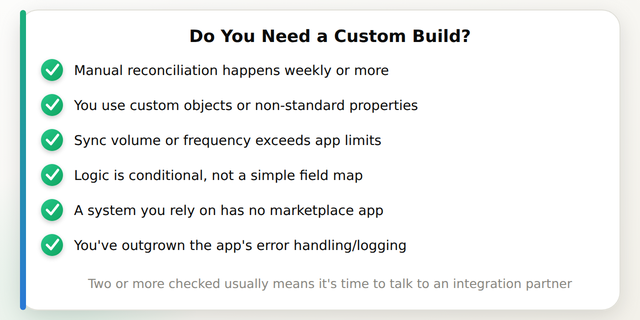
The clearest signal is time. If someone on your team is exporting CSVs, cross-checking records, or copy-pasting between HubSpot and another system on any regular cadence, the "integration" you have isn't actually integrating anything, it's a partial bridge with a human filling the gaps. Teams in this position commonly report 3-8 hours a week of manual reconciliation work across sales, support, and finance combined, which adds up to real payroll cost over a year.
Sign 2: You Have Custom Objects or Non-Standard Properties
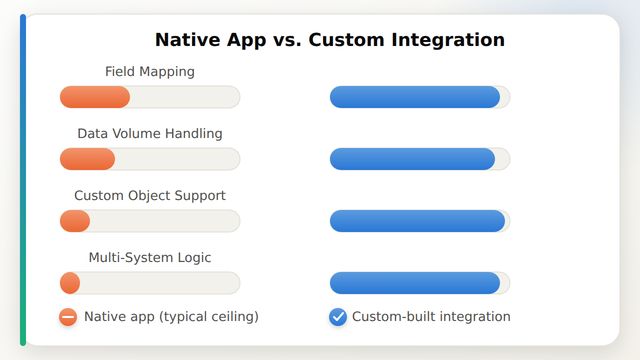
HubSpot's custom objects feature is powerful, but most marketplace apps were built against standard objects (contacts, companies, deals, tickets) and never updated to map custom objects cleanly. If your business tracks something HubSpot doesn't natively model, equipment, locations, subscriptions, projects, a native app usually can't see it. A custom integration built on the HubSpot API can read and write to any object, standard or custom, with the field logic your business actually uses.
Sign 3: Your Data Volume or Sync Frequency Exceeds the App's Limits
Many marketplace connectors are priced and engineered for small-to-mid record counts and batch syncs every 15-60 minutes. Once you're pushing tens of thousands of records or need near-real-time sync (order confirmations, inventory changes, support escalations), rate limits and polling intervals start causing visible delays. Custom builds can use HubSpot's webhooks and batch APIs to get sync latency down to seconds rather than the better part of an hour.
Sign 4: The Logic Between Systems Isn't a Simple 1-to-1 Field Map
Native apps are good at "map field A to field B." They struggle with conditional logic, for example, only creating a deal when an order exceeds a threshold, splitting one Shopify order into multiple HubSpot line items, or triggering a different workflow branch depending on a customer's lifecycle stage. That kind of business logic is exactly what a custom integration is designed to carry, because it's written against your rules instead of a generic template.
Common Signs Checklist
Sign 5: There's No Marketplace App for the System You Actually Use
Plenty of businesses run on tools that simply don't have a HubSpot listing, a custom ERP, an industry-specific platform, an internal database, or a niche shipping/logistics provider. In that situation there's no "native" option to outgrow; you either build the connection or keep working around the gap manually. This is one of the most common reasons companies come to Amwhiz's integration services team in the first place.
Sign 6: Error Handling and Visibility Are a Black Box
Native apps often fail silently or surface a generic error message with no clear next step. When a sync fails at 2am and nobody notices until a customer complains, that's a support and revenue risk, not just an inconvenience. Custom integrations are typically built with logging, retry logic, and alerting tailored to what actually matters to your business, which record failed, why, and who should be told.
How Amwhiz Helps
Amwhiz designs and builds custom HubSpot integrations for businesses that have outgrown marketplace apps, mapping custom objects, handling conditional logic, and connecting systems that don't have a native listing at all. Our team has built these integrations across HubSpot, Shopify, Zoho, and WhatsApp, and we scope every project around your actual data volume and workflow rules rather than a generic template. See how this played out for a real client in our HubSpot integration case study.
Frequently Asked Questions About Custom HubSpot Integrations
How do I know if my current HubSpot integration is actually broken or just needs configuration?
Start by checking whether the gap is a settings issue (a field genuinely isn't mapped in the app's UI) or a structural one (the app has no way to map that field at all, or can't handle your data volume). If support tickets or reconfiguration don't fix it after a reasonable attempt, it's usually a structural limit, not a settings problem.
Can a custom integration work alongside apps I already have installed from the HubSpot Marketplace?
Yes. Most custom integrations are built to run alongside existing marketplace apps, handling only the specific objects, workflows, or systems the native app can't cover, rather than replacing everything at once.
How long does it typically take to build a custom HubSpot integration?
Straightforward two-system integrations commonly take 2-4 weeks from scoping to launch. More complex builds involving custom objects, multiple systems, or high-volume real-time sync typically run 6-10 weeks depending on scope.
What does a custom HubSpot integration typically cost compared to a marketplace app subscription?
A marketplace app is usually a low monthly fee, but it caps what you can do. A custom build is a larger upfront investment, commonly in the low-to-mid five figures depending on complexity, with no recurring per-record or per-workflow fees from a third-party app vendor.
Do I need to migrate my existing data before building a custom integration?
Not usually. A custom integration is typically layered on top of your existing HubSpot data, with a one-time backfill or reconciliation step at launch to make sure historical records line up correctly going forward.
What happens if HubSpot changes its API after my custom integration is built?
Reputable integration partners build with API versioning and monitoring in mind, and typically offer ongoing maintenance so the integration is updated when HubSpot deprecates or changes an endpoint, rather than breaking silently.
Conclusion
A native HubSpot integration is a fine starting point, but it has real, predictable limits around custom objects, volume, and business logic. If you're recognizing more than one or two of the signs above, it's worth a scoping conversation before the manual workarounds cost more than a proper build would.
Amwhiz builds custom HubSpot integrations for businesses that have outgrown what marketplace apps can do. Visit amwhiz.com or email sales@amwhiz.com to get started.



