-1.png?width=134&height=66&name=amwhiz-logo%20(1)-1.png)


The Ultimate Guide to HubSpot Custom Objects for Complex Business Processes HubSpot comes with...
A Practical Guide to HubSpot Object Associations and Relationship Mapping
You have contacts. You have companies. You have deals. But how do they connect? Is this contact connected to that company? Is this deal connected to that contact? Without proper associations, your CRM is a pile of isolated records. You can't see relationships. Reporting breaks. Automations fail.
Proper object associations and relationship mapping connect your CRM. A contact belongs to a company. A deal involves multiple contacts. A project relates to multiple deals. These relationships make CRM powerful. Without them, CRM is useless.
Understanding associations transforms your CRM from disconnected records into integrated system. You see full customer journey. Automations work across objects. Reporting shows complete picture.
Why Object Associations Matter
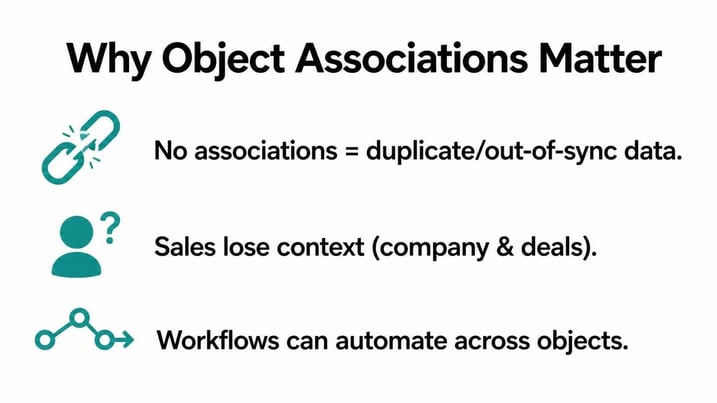
Without associations, you have duplicate data. Customer moves. You update contact record. But company record still has old address. Data gets out of sync. Reports show conflicting information.
Without associations, you lose context. Sales rep views contact. They don't know which company contact belongs to. They don't know which deals are related. They lack context needed to sell effectively.
Without associations, automations can't work across objects. Workflow wants to send email to all contacts from company X. Can't do it if contacts aren't associated with company. Associations enable sophisticated automations.
Understanding HubSpot Object Relationships
One to One Associations
One contact belongs to one company. One association. Simple relationship. A contact works at one company. Company record shows which contact works there. Bidirectional. Both sides see relationship.
One to Many Associations
One company has many contacts. Company record shows all associated contacts. Contact record shows which company they belong to. This is most common relationship in CRM.
Many to Many Associations
One contact works with multiple companies. One company has multiple contacts. More complex. HubSpot supports this through custom objects. Example: a contact might be advisor to multiple companies.
Self Referential Associations
One contact refers to another contact. Example: contact A reports to contact B. Contact B is manager. Relationships within same object type. HubSpot supports this.
Standard HubSpot Associations
Contact to Company
Most fundamental association. Contact works at company. One contact can be associated with multiple companies. One company can have multiple contacts. This association is often the foundation of your data model.
Contact to Deal
Contact is involved in deal. Could be decision maker. Could be influencer. One deal typically involves multiple contacts. One contact involved in multiple deals. This shows who is involved in sales process.
Company to Deal
Deal belongs to company. One company can have multiple deals. One deal involves one company (typically). This shows which deals are with which customers.
Contact to Ticket
Support ticket belongs to contact. One ticket is associated with one contact. Multiple tickets per contact. This shows support history for contact.
Contact to Engagement
Emails, calls, meetings, tasks are associated with contacts. Tracking engagement history. Shows all interactions with contact.
Custom Associations
Creating Custom Associations
Beyond standard associations, create custom ones. Project to Company. Subscription to Contact. Custom object to Deal. Enables sophisticated relationship mapping specific to your business.
Association Labels
Associations can have labels. Contact is "decision maker" for deal. Contact is "advisor" to company. Labels clarify the nature of relationship. One contact can have multiple labels with same object.
Relationship Mapping Best Practices
Map Relationships Upfront
Before implementing HubSpot, map all relationships. How do contacts relate to companies? How do deals relate to contacts? How do custom objects relate? Document all relationships.
Keep It Simple
Don't create complex web of associations. Each association should have clear purpose. Too many associations confuse teams and slow down system.
Use Association Labels
Labeling relationships clarifies intent. "Decision maker" vs "influencer" tells you role. Use labels to capture nuance in relationships.
Enforce Association Creation
Set up workflows to create associations. When deal is created, associate with contact and company. When contact is created, associate with company. Don't rely on manual association. Automate it.
Audit Associations Regularly
Do records have expected associations? Are there missing associations? Quarterly audit ensures data quality. Fix broken relationships.
Common Association Mistakes
Forgetting to Associate Records
User creates deal. Forgets to associate with contact and company. Deal floats in isolation. Data quality decays. Automate association creation to prevent this.
Incorrect Association
User associates contact with wrong company. Now contact and company are linked incorrectly. Bad data propagates. Validation rules can prevent this.
Over Associating
You can create association. But should you? Each association adds complexity. Don't create associations for everything. Only create when it serves a business purpose.
Not Documenting Association Types
You create custom association. New person joins. They don't know it exists. They don't use it. Document all custom associations. Make them discoverable.
FAQ About Object Associations
Can one contact be associated with multiple companies?
Yes. A contact might work with multiple companies. Consultant works for multiple clients. Account manager manages multiple accounts. HubSpot supports multiple company associations per contact. One contact to many companies.
How many associations should a record have?
Varies by object type. A contact might have 1 company association but multiple deal associations and multiple engagement associations. That's normal. A deal should have 1 company association, multiple contact associations. Too many associations is red flag. Usually indicates data quality issue.
Can I delete an association?
Yes. You can break associations. But be careful. Deleting association might break reporting or automations that depend on it. Before deleting, check what depends on association. Update dependent workflows or reports.
What happens to associated records if I delete a record?
Depends on how association is configured. Some associations cascade delete. If you delete company, associated contacts might delete. Others don't cascade. Contacts remain but association breaks. Configure cascade behavior based on your business rules.
Can I create association between two custom objects?
Yes. Custom object to custom object associations work. Project to Subscription. Contract to Deal. Create whatever relationships your business needs. HubSpot supports flexible association architecture.
How do I report on associated records?
Reporting engine can join across associations. Show all contacts for a company. Show all deals for a contact. Show all tickets for a contact. Associations enable cross object reporting. Without associations, reporting is limited to single object.
Can workflows create associations?
Yes. Workflows can create and remove associations. When deal is created, automatically associate with contact and company. When contact is added to deal, workflow creates association. Automation ensures associations are created consistently.
What if I have duplicate records with associations?
When you merge duplicates, associations merge too. Primary record keeps all associations from merged record. Check associations after merge to ensure correctness. Sometimes associations get duplicated. Clean up after merge.
How do I handle many to many relationships?
HubSpot doesn't directly support many to many without custom objects. Example: contact works with multiple companies and each company has multiple contacts. Solution: create custom object or use association labels to capture nuance. Document the workaround.
Ready to Master Object Associations?
Object associations transform HubSpot from isolated records into connected system. When associations are correct, everything works better. Reporting improves. Automations work. Teams have context. Customer journeys make sense.
At Amwhiz, we're a HubSpot Diamond Solution Partner specializing in data architecture and relationship mapping.
Book a HubSpot consultation with Amwhiz today. We'll audit your current associations and design relationship mapping that connects your entire business.