-1.png?width=134&height=66&name=amwhiz-logo%20(1)-1.png)



The Fear That Keeps Businesses Stuck on the Wrong CRM Plenty of businesses know they've outgrown...
Moving to a New CRM Without a Checklist Is How Things Get Missed
Switching to a modern CRM is one of those projects where the excitement is real and the details are endless. It's also where things quietly fall through the cracks: a field that didn't map, a workflow nobody rebuilt, a team left untrained until launch day.
A good checklist turns that chaos into a plan. It's not glamorous, but it's the difference between a smooth move and a scramble. So here's the one we use.
This is the HubSpot implementation checklist for businesses moving to a modern CRM, from Amwhiz, a HubSpot partner.
.jpeg?width=1672&height=941&name=Duck-ai-image-2026-08-10-15-20%20(1).jpeg)
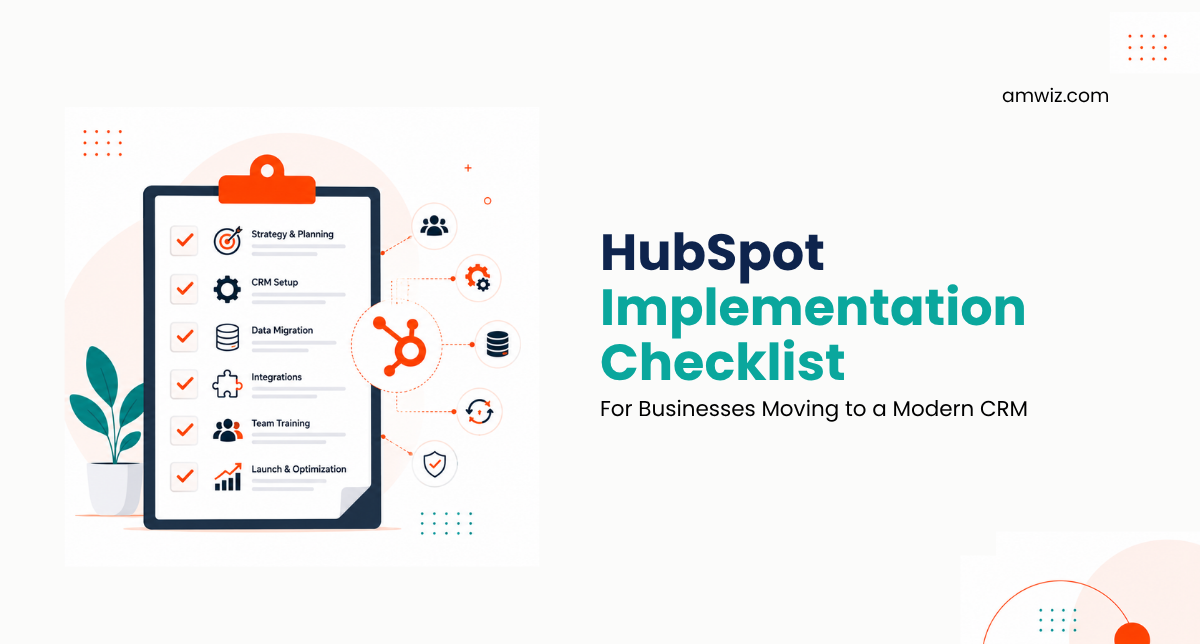
Goals, clean data, pipelines, automation, integrations, training. Tick each before you go live.
Before You Start: Define Goals and KPIs
Nothing should be built until you know what success looks like. Write down what you want HubSpot to achieve and how you'll measure it, whether that's a shorter sales cycle, better forecasting, or aligned teams.
These goals aren't box-ticking. They shape every decision that follows, from which hubs you set up to which reports you build. Skip them and you'll build a system with no clear purpose.
Data: Clean, Map, and Import Carefully
Your data is the foundation, so it earns its own set of checks. Before importing anything, clean it, map every field to where it belongs in HubSpot, and confirm it after import.
- Contacts and companies deduplicated and cleaned.
- Deals mapped to the right stages with correct values.
- Fields mapped so nothing lands in the wrong place.
- A sample checked after import to confirm it came across intact.
Configuration: Pipelines, Properties, and Permissions
Next, configure HubSpot around your process. Build your deal pipelines with clear stages, set up the properties and fields your team needs, and configure permissions so people see and do what's appropriate for their role.
This is where the CRM stops being generic and starts reflecting your business. Rushing it produces a system that fights how you work, so it's worth the care.
.jpeg?width=1672&height=941&name=Duck-ai-image-2026-08-10-15-20%20(2).jpeg)
Plan, clean data, configure, migrate, train, go live. In that order, every time.
Automation: Build the Workflows That Matter
Set up the automations that remove the most manual work first: lead routing, follow-up tasks, notifications, and any handoffs between teams. Start focused rather than automating everything at once, and confirm each workflow does what you expect before relying on it.
Integrations: Connect Your Other Tools
A CRM that stands alone creates double entry. Connect the tools your business runs on, whether that's your store, your accounting, your marketing channels, or messaging like WhatsApp, so data flows automatically instead of being copied by hand. Test each connection, especially the awkward edge cases, before go-live.
Training and Launch: The Part You Can't Skip
Finally, and most importantly, train your team, by role, on the workflows they'll actually use, and support them through the first weeks. A flawless technical setup still fails if nobody knows how to use it. Plan the launch, communicate it, and be ready to help people through the change.
The Checklist Item Everyone Underestimates
Every item on the checklist matters, but one gets cut more than any other and causes the most damage: adoption. Businesses invest weeks in configuration and data, then treat training as a quick demo at the end, and wonder why the team drifts back to old habits.
Adoption deserves its own place on the checklist, with real weight. Role-specific training, a system genuinely easier than the old way, leadership visibly using it, and support through the first weeks. A flawless technical setup still fails without this. Tick every other box perfectly and skip this one, and you've built an expensive system nobody opens.
How Amwhiz Runs the Checklist
Amwhiz is a HubSpot partner, and we run every implementation against a checklist like this one, so nothing gets missed. We define your goals, clean and map your data, configure HubSpot around your process, build the right automation, connect your tools, and train your team before go-live.
Because we've done this many times, we know where things quietly slip, and we design around it. The result is a move to HubSpot that feels controlled rather than chaotic, with every box genuinely ticked.
Frequently Asked Questions
What should be first on a HubSpot implementation checklist?
Defining your goals and KPIs. Everything else, from configuration to reporting, should follow from what you actually want HubSpot to achieve.
How important is data mapping?
Critical. If fields aren't mapped correctly, data lands in the wrong place and the CRM becomes untrustworthy. Map carefully and check a sample after import.
Should I automate everything during implementation?
No. Start with the automations that remove the most manual pain, get the team comfortable, then expand. Over-automating early overwhelms people.
Can I skip training if the setup is good?
No. A perfect technical setup still fails without adoption. Role-based training and support through launch are essential, not optional.
Do I need to connect other tools right away?
Connect the ones that remove real manual work first, such as your store, accounting, or messaging. Others can follow as you settle in.
The Short Version
The HubSpot implementation checklist runs in order: define goals and KPIs, clean and map data, configure pipelines and permissions, build the right automation, connect your tools, then train and launch. Tick each box and the move to a modern CRM is smooth instead of a scramble.
Book a free HubSpot implementation consultation.
Amwhiz will run your move to HubSpot against a proven checklist. Visit amwhiz.com or email sales@amwhiz.com.