
For most small and mid-size teams, n8n runs well on a 2 vCPU / 4 GB server with Docker and PostgreSQL. DigitalOcean is simpler and has predictable pricing, making it a good choice for single-server setups. AWS suits companies that need enterprise security controls, private networking, compliance, or queue mode with multiple workers at scale.
Key takeaways
- Use Docker with PostgreSQL, not SQLite, for production.
- Put n8n behind HTTPS with a reverse proxy and restrict editor access.
- Enable queue mode with Redis and workers when executions grow.
- Back up the database and encryption key; losing the key means losing credentials.
- DigitalOcean is simpler; AWS offers more control and compliance options.
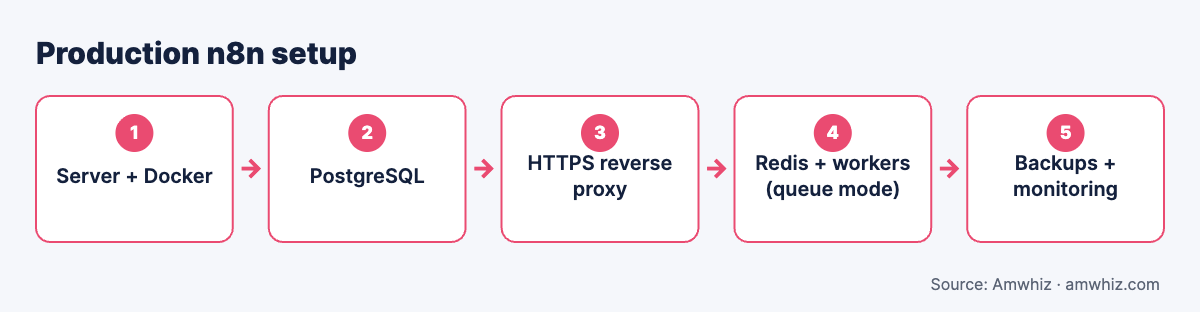
Production n8n setup.
AWS vs DigitalOcean at a glance
| Factor | DigitalOcean | AWS |
|---|---|---|
| Setup complexity | Low | Medium to high |
| Pricing | Simple fixed monthly droplets | Many components, pay-as-you-go |
| Managed PostgreSQL | Yes | Yes (RDS) |
| Managed Redis | Yes | Yes (ElastiCache) |
| Private networking / VPC | Yes (VPC) | Advanced (VPC, security groups, PrivateLink) |
| Compliance and IAM | Basic | Extensive |
| Regions incl. India / Middle East | Bangalore; check others | Mumbai, Hyderabad, UAE, Bahrain |
| Best for | SMBs, single-server setups | Enterprises, regulated data, scale |
Recommended server sizes
| Usage | Setup | Approx. size |
|---|---|---|
| Light (few workflows, <10k executions/month) | Single server | 1–2 vCPU, 2–4 GB RAM |
| Medium (many workflows, <100k/month) | Single server + managed Postgres | 2–4 vCPU, 4–8 GB RAM |
| Heavy (100k+/month, AI workflows) | Queue mode: main + workers + Redis + Postgres | Multiple 2–4 vCPU servers |
AI workflows with large payloads need more memory.
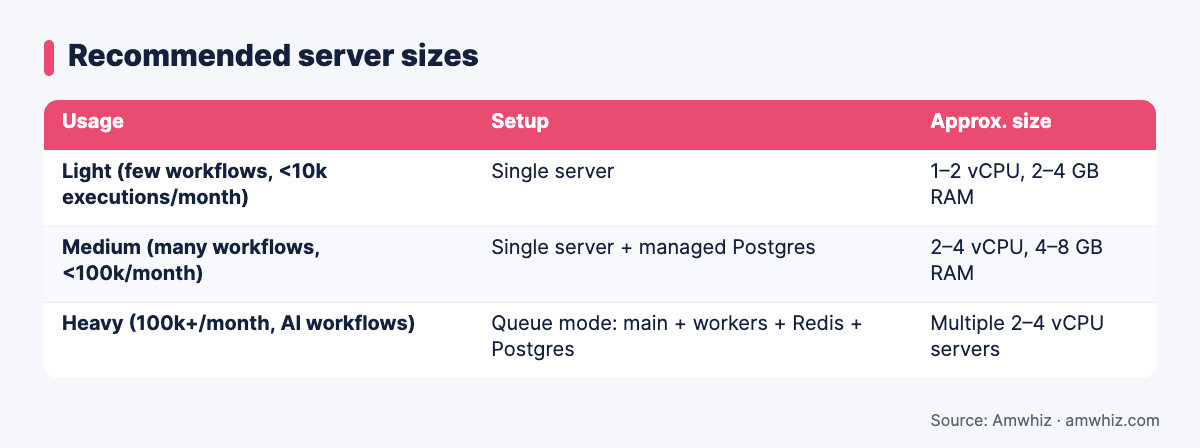
Recommended server sizes
Indicative monthly costs
| Setup | DigitalOcean (approx.) | AWS (approx.) |
|---|---|---|
| Small single server | USD 12 to 24 | USD 15 to 35 (EC2 + storage) |
| Server + managed Postgres | USD 40 to 70 | USD 50 to 100 (EC2 + RDS) |
| Queue mode with workers | USD 100 to 250 | USD 150 to 400+ |
Prices vary by region and change over time. Add backups, bandwidth and monitoring.
Setup steps (Docker)
- Create a server (Ubuntu LTS) in a region near your users and data.
- Install Docker and Docker Compose.
- Create a PostgreSQL database (managed or container).
- Configure environment variables: database connection,
N8N_ENCRYPTION_KEY,N8N_HOST,WEBHOOK_URL, timezone. - Add a reverse proxy (Caddy, Nginx or Traefik) with HTTPS certificates.
- Start n8n with Docker Compose and create the owner account.
- Set up backups for the database and the encryption key.
- Set up monitoring for uptime, CPU, memory and disk.
Queue mode for scale
Queue mode separates the main instance (editor, webhooks) from worker processes that run executions, using Redis as a queue.
- Add Redis (managed or container)
- Set
EXECUTIONS_MODE=queue - Run one or more worker containers
- Scale workers when executions queue up
Security checklist
- ☐ HTTPS only, with automatic certificate renewal
- ☐ Strong owner password and 2FA/SSO where available
- ☐ Restrict editor access by IP or VPN
- ☐ Keep webhook URLs separate from the editor where possible
- ☐ Store
N8N_ENCRYPTION_KEYsecurely and back it up - ☐ Firewall: only ports 80/443 open publicly
- ☐ Database not publicly accessible
- ☐ Regular OS and n8n updates
- ☐ Execution data pruning to limit stored personal data
- ☐ Least-privilege API keys for connected apps
Backups and updates
- Daily database backups with 7–30 days retention
- Test restores quarterly
- Pin n8n versions and update monthly after testing in staging
- Export workflows to Git for version control
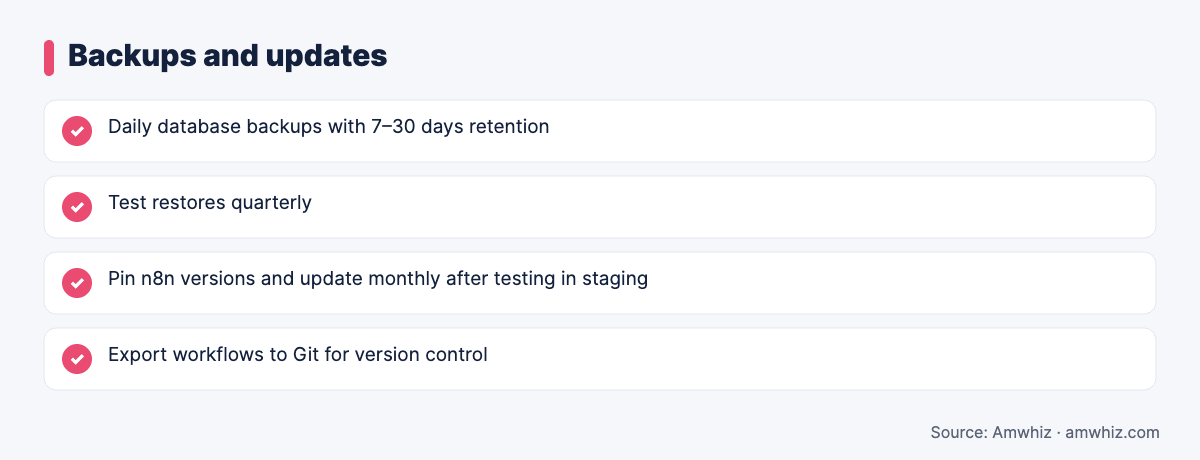
Backups and updates
When to choose n8n Cloud instead
If you don't want to manage servers, updates or security, n8n Cloud may be simpler. Self-hosting wins on data control, cost at volume and custom infrastructure. Compare in self-hosted n8n vs n8n Cloud.
Why choose Amwhiz?
Amwhiz deploys and manages self-hosted n8n for clients on AWS, DigitalOcean and other clouds, and builds workflows for HubSpot, Zoho, Shopify and WhatsApp. We set up queue mode, backups, monitoring and security so your automations run reliably.
Want help with this? Book a free n8n hosting consultation with the Amwhiz team.
Related guides
- AI Lead Qualification Agent for HubSpot: How to Build One With n8n and Claude
- Integration Cost Calculator: HubSpot, Zoho, Shopify and ERP Sync (2026 Price Ranges)
- Zoho Creator vs Custom Web App: When Low-Code Stops Being Enough
Frequently asked questions
What are the minimum server requirements for n8n?
A small setup runs on 1–2 vCPUs and 2–4 GB RAM. Production setups should use PostgreSQL and more memory for heavy or AI workflows.
Is DigitalOcean good for hosting n8n?
Yes. It's simple and affordable for single-server and small queue-mode setups.
Why host n8n on AWS?
For advanced security, private networking, compliance needs, regional data residency and large-scale queue mode.
What is n8n queue mode?
Queue mode separates the editor/webhook process from worker processes using Redis, so executions can scale across multiple workers.
What happens if I lose the n8n encryption key?
Stored credentials can't be decrypted. Always back up the encryption key securely.
Leave a comment
Your email address will not be published. Comments are reviewed before they appear.