-1.png?width=134&height=66&name=amwhiz-logo%20(1)-1.png)



Introduction Can a free CRM still deliver real business value in 2026? With increasing competition...
written by: Renuka M
Workflow Automation,
platform optimization,
hubspot features,
productivity tips,
team efficiency,
sequences,
implementation guide,
templates
The Most Overlooked HubSpot Features That Improve Team Productivity
Your team uses HubSpot. They know contacts, deals, and campaigns. But HubSpot has hundreds of features. Most teams use 20 percent of features and miss 80 percent that could make them more productive.
Teams spend time on manual tasks that HubSpot could automate. They miss productivity features that would save hours weekly. They don't know about time saving capabilities hiding in settings.
The overlooked HubSpot features often deliver most value. They're not flashy. Marketing doesn't promote them. But they solve real problems and save real time.
Why Teams Miss These Features
HubSpot releases new features constantly. Teams stay focused on core workflows. They don't explore settings or advanced capabilities. Features that require configuration get missed. Features that are one level deep in menus get missed.
But discovering overlooked features often delivers biggest ROI. One feature saves hours weekly. Multiply by team size. That's significant productivity gain.
Top 10 Overlooked HubSpot Features
1. Sequences (Free in Sales Hub)
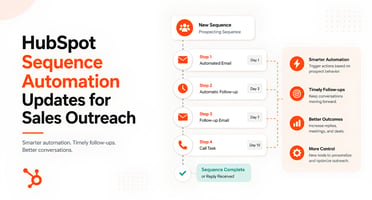
Sequences are templated email campaigns. Sales rep hits one button. Sequence sends emails on schedule to contact. Each email includes templates. Contact can reply to any email in sequence. Replies stop sequence. This automates follow up.
Most teams don't use sequences. They send manual emails. Sequences save 2 to 3 hours per week per sales rep.
2. Snippets (Free in all hubs)
Snippets are templated text. Create once. Reuse hundreds of times. Sales rep sends custom email? Snippets auto complete parts. "Best regards, Firstname" becomes "Best regards, John" automatically. No typing needed.
Creates consistency. Saves time. Improves email quality. Most teams don't know snippets exist.
3. Sidebar Tracking (Free with Sales Hub)
Sales rep writes email in Gmail or Outlook. HubSpot sidebar pops up. Rep can attach email to deal. Can create task. Can log note. All without leaving email. Reduces friction of logging activities.
Most teams don't configure it. It's powerful when set up properly.
4. Conversation Inbox (Free in Service Hub)
All customer conversations in one place. Email. Chat. Phone. Social messages. One inbox for entire team. You assign conversations. Track status. Leave notes. Customers get consistent experience.
Instead of scattered inboxes, unified communication hub. Massive productivity gain but rarely configured.
5. Templates (Free in all hubs)
Create templates for common emails, documents, content. Sales rep sends common email? Template fills in blanks. Consistency. Speed. Quality. Most teams create one template then forget about it. Should create 50 templates for all common scenarios.
6. Workflows (Free up to 5 in all hubs)
Automate routine tasks. When lead arrives, automatically send welcome email. When deal closes, automatically notify success team. When contact doesn't open email, automatically send follow up. Workflows handle work automatically.
Most teams have 1 to 2 workflows. Should have 10 to 15. Each one saves hours.
7. Custom Objects (Free in all hubs)
Model complex business scenarios. Projects. Subscriptions. Cases. Custom objects track information standard objects can't. Enables sophisticated automations and reporting. Most teams don't know they exist.
8. Calculated Properties (Free in all hubs)
Properties that calculate based on other properties. Days since last activity. Total revenue for customer. Engagement score. These properties update automatically. Enable intelligent automation.
Most teams don't use calculated properties. They manually track things that properties could calculate.
9. Meeting Link Tracking (Free with Sales Hub)
When you send meeting link to prospect, HubSpot tracks if they clicked it. When they join meeting, it's logged automatically. No manual note taking. Removes friction from activity logging.
Rarely used but transforms activity logging.
10. Predictive Lead Scoring (Requires Sales Hub Pro)
HubSpot AI scores leads automatically based on historical patterns. Which leads are likely to close? Ranking is better than manual scoring. Sales reps focus on high probability leads. Productivity skyrockets.
Most teams don't enable it. Biggest ROI comes from letting AI do the ranking.
Why These Features Get Missed
They're Buried in Settings
Features aren't front and center. They're in settings. In menus. Users have to know to look for them.
They Require Configuration
Features need setup. Create snippets. Create templates. Create workflows. This setup work happens once. But requires someone to do it.
They're Not Promoted
HubSpot promotes new features. Rarely promotes overlooked existing features. Marketing pushes new shiny things. Overlooked features stay overlooked.
They Require Training
Users need to learn features. Most teams don't train on overlooked features. Training is expensive. Time consuming. Gets deprioritized.
How to Discover and Implement Overlooked Features
Audit Your Current Usage
What features are your team using? What aren't you using? List manual tasks. List time wasters. See if HubSpot has feature to automate.
Read Release Notes
HubSpot releases features constantly. Read the notes. Many gems hide in there. Follow HubSpot blog. Subscribe to newsletter.
Explore Settings
Spend 30 minutes exploring settings. You'll find features you didn't know existed. Each discovery is potential productivity gain.
Talk to HubSpot Support
Support knows the platform deeply. Ask: what features could help with X? They know hidden gems. Use their expertise.
Implement One at a Time
Don't try to implement 10 features at once. Pick one. Set it up. Let team use it. Once it's working, move to next. Phased approach prevents overwhelm.
FAQ About Overlooked HubSpot Features
Which overlooked features have biggest ROI?
Sequences save most time for sales teams. Workflows save most time for all teams. Predictive scoring improves close rates most. It depends on your use case. Start with biggest pain points. If sales spends 5 hours on follow up, sequences are highest ROI. If you're not automating routine tasks, workflows are highest ROI.
How much time can overlooked features save?
Sequences save 2 to 3 hours per week per sales rep. Snippets save 1 to 2 hours. Workflows save 3 to 5 hours per week for whole team. Conversation inbox saves 1 to 2 hours for support teams. Multiply by team size. That's significant time savings.
Are overlooked features stable and reliable?
Yes. Overlooked features are mature. They've been in HubSpot for years. They're not new and buggy. They're stable and reliable. Problem is not stability. Problem is visibility.
Do overlooked features require additional cost?
Most overlooked features are free with your existing hub. Sequences free with Sales Hub. Workflows free with any hub. Predictive scoring requires Sales Hub Pro. Check your plan. Most valuable overlooked features are included.
How do I convince my team to adopt overlooked features?
Show time savings. "Sequences will save 2 hours per week." That's 100 hours per year per person. Quantify it. Show money. Then make adoption easy. Configure features. Train team. Remove friction. Start with one feature everyone agrees is valuable.
What if I don't have admin access to configure features?
Talk to admin. List features you want to use. Explain time savings. Ask admin to configure. Admins respond well to requests tied to business value. Frame as efficiency improvement.
How do I stay updated on new overlooked features?
Read HubSpot release notes monthly. Follow HubSpot blog. Subscribe to HubSpot Academy emails. Join HubSpot community forums. These are best sources of feature knowledge.
What if my team is resistant to change?
Change is hard. Start small. Don't implement 10 features at once. Pick one. Show it works. Get champions who adopt it and evangelize. Others follow. Resistance decreases when change is gradual and benefits are clear.
How do I measure if overlooked features are actually helping?
Track before and after. Before sequences: how many follow up emails per week? After sequences: same metric. Track time saved. Track quality improvements. Have team report. Most will notice immediate time savings.
Ready to Discover Overlooked HubSpot Features?
Your team is probably leaving hours of productivity on the table. Overlooked features hide in plain sight. Small configuration effort delivers massive time savings.
At Amwhiz, we're a HubSpot Diamond Solution Partner specializing in platform optimization and feature adoption.
Book a HubSpot consultation with Amwhiz today. We'll audit your implementation and uncover overlooked features that can transform your team's productivity.