-1.png?width=134&height=66&name=amwhiz-logo%20(1)-1.png)



How Many Tabs Does One Question Take You? Here's a test. In your business right now, how many...
Why 'Just Switch Everything On' Falls Apart
"We've got Zoho One. Let's switch everything on."
It's the most understandable instinct in the world, and it's also the fastest way to overwhelm a business. Fifty-plus apps, all lighting up at once, every department told to change how they work on the same Monday. Nobody adopts anything. The shiny suite becomes the thing everyone quietly avoids.
A real Zoho One deployment doesn't work like that. It goes department by department, one solid win at a time. So let's walk the building floor by floor and see what actually happens in each one. This is roughly how we sequence it at Amwhiz.
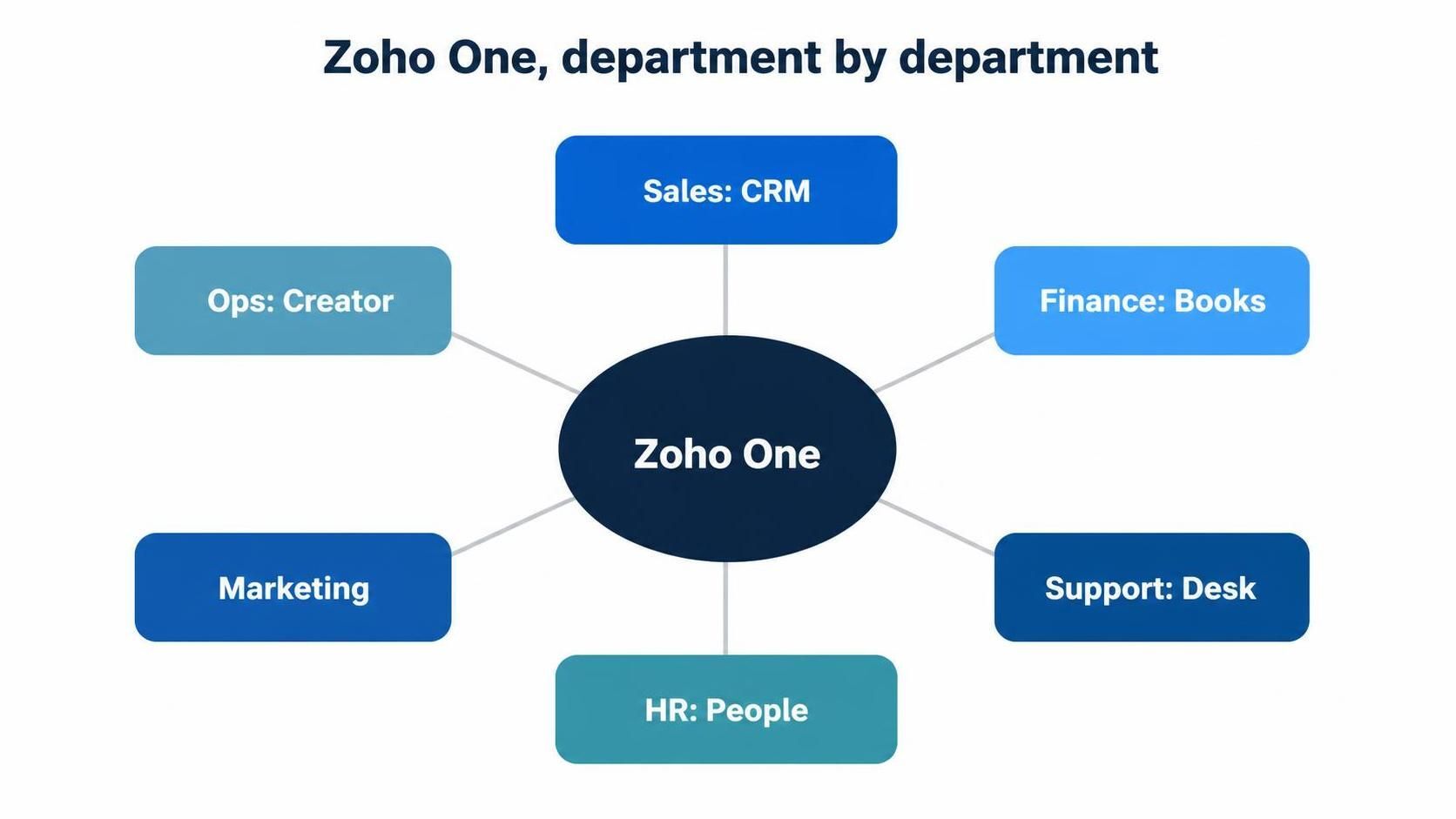
Each department gets the app that solves its biggest headache, then they connect.
Why Department by Department Beats Big Bang
Roll out everything at once and you ask your whole organisation to learn new tools simultaneously, while still doing their day jobs. Something has to give, and usually it's adoption.
Go one department at a time and each rollout is manageable. People learn one system, feel the benefit, and become quiet advocates for the next team's turn. Momentum builds instead of collapsing. That's the whole philosophy: prove value in one place, then move.
Sales: Zoho CRM
Sales is often the first stop, because a messy pipeline is a visible, expensive problem. Zoho CRM gets configured around how the team actually sells, the data comes over clean, and reps get automation that removes the admin they hate. Win here and the rest of the business starts paying attention.
Finance: Zoho Books
Next, finance moves onto Zoho Books for invoicing, banking and reporting. The magic starts when it connects back to CRM: a won deal in sales can flow toward an invoice in finance without anyone re-typing it. Two departments, starting to talk.
Support: Zoho Desk
Support gets Zoho Desk, so tickets are captured, routed and resolved properly instead of getting lost in a shared inbox. Tied to CRM, an agent sees who they're helping and what that customer has bought. Suddenly support feels joined-up rather than starting from scratch each time.
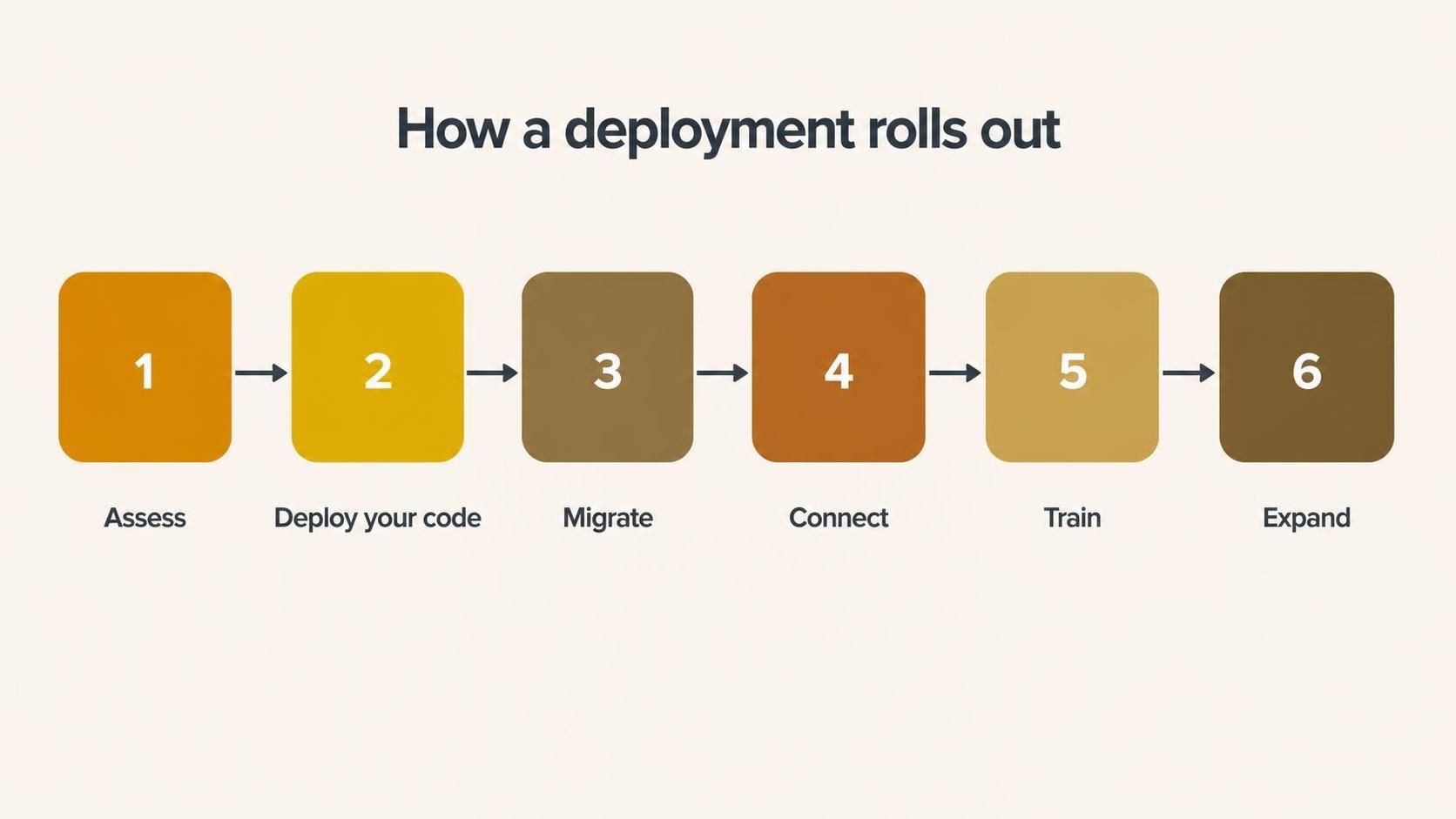
Assess, deploy the core, migrate data, connect apps, train, then move to the next department.
HR: Zoho People
HR moves onto Zoho People for onboarding, leave, attendance and records. The paper forms and scattered spreadsheets get retired, employees get self-service, and when it connects to payroll, the whole employee journey starts running on one set of data instead of five.
Marketing: Campaigns and Beyond
Marketing picks up the tools that fit its channels, email through Campaigns, social through Zoho Social, deeper journeys through Marketing Automation, all feeding leads into the same CRM the sales team already lives in. Now marketing and sales share one reality instead of arguing about lead quality across a wall.
Operations: Creator and Flow
Finally, the odd processes that don't fit any standard app get handled by Zoho Creator, and the gaps between apps get automated with Zoho Flow. This is where the deployment stops being a set of tools and becomes a genuinely connected operation, with data moving on its own and bespoke apps covering whatever's unique to you.
The Thread That Runs Through It All
Notice what keeps happening. Each department gets its own tool, yes, but the real payoff is the connections between them. A lead becomes a customer becomes an invoice becomes a support ticket, and it's all the same record, the same person, no re-keying at any boundary. That's what separates a Zoho One deployment from just buying fifty apps.
What It Feels Like When It's Working
It's worth painting the destination, because "connected" can sound abstract until you've lived it.
A customer calls support. The agent already knows they're a big account, because the CRM told the help desk. Their last invoice is right there, pulled from finance. When the agent flags an upsell opportunity, the account manager sees it without a handover email. Marketing knows not to send this person a "come back" campaign, because the system knows they're an active, happy customer.
None of that requires anyone to check with another department, because there are no walls between the departments anymore. That's what a proper deployment buys you: not a pile of apps, but an organisation that finally has one shared memory. Once a team has worked that way, going back to four disconnected tabs feels faintly ridiculous.
The Mistake That Undoes It All
There's one error that quietly wrecks otherwise good deployments: treating each department's rollout as a separate project and forgetting to connect them. You end up with a tidy CRM, a tidy finance system and a tidy help desk that all ignore each other, which is just your old silos wearing nicer clothes. The connections between departments aren't an optional extra at the end. They're the entire point, and they have to be designed in from the second department onward.
How Amwhiz Deploys Zoho One
Amwhiz is an authorized Zoho partner, and we deploy Zoho One the way that actually sticks: department by department, biggest pain first, each rollout connected to the last. We assess where you are, deploy the core app for a department, migrate its data, wire it to what's already live, train the team, and only then move on.
You end up using enough of the suite to justify it, with the departments genuinely connected, rather than paying for fifty apps and using six. That's the difference between a deployment and a shelf of software.
Frequently Asked Questions
Should I roll out all of Zoho One at once?
No. Department by department is far more likely to succeed, because each rollout stays manageable and adoption builds instead of collapsing under a big-bang launch.
Which department should go first?
Usually the one with the biggest, most visible pain, often sales with CRM. An early, obvious win builds the momentum to carry the rest.
How long does a full deployment take?
It's phased over time rather than done in a week. Each department is a manageable chunk, and the pace suits your capacity rather than forcing everything at once.
Do the apps really connect, or just sit together?
They genuinely connect. Data flows between CRM, Books, Desk, People and more, so a customer is one record across the whole business, not five separate ones.
Do we have to use every app?
No. You deploy the apps that solve real problems for each department. The value comes from using enough of the suite well, not from switching on all of it.
The Short Version
A Zoho One deployment rolls out department by department, CRM for sales, Books for finance, Desk for support, People for HR, marketing and operations tools after, each one connected to the last. Skip the big-bang launch, prove value one team at a time, and let the connections between departments do the real work.
Book a free Zoho One deployment consultation.
Amwhiz, an authorized Zoho partner, will plan and deliver your deployment department by department so it actually gets adopted. Visit amwhiz.com or email sales@amwhiz.com.