-1.png?width=134&height=66&name=amwhiz-logo%20(1)-1.png)



Introduction Launching an online store sounds simple until you actually start doing it. From design...
The Core Idea
Building a custom Shopify theme from scratch means setting up the theme file structure (layouts, templates, sections, snippets), coding in Liquid, Shopify's templating language, and building around Online Store 2.0's section-and-block architecture so merchants get real flexibility. A from-scratch build typically takes 4 to 10 weeks and costs Rs. 1,50,000 to Rs. 5,00,000+ for something fully custom. Most stores get an equivalent, or better, result faster and cheaper through deep customization of a proven theme, which is exactly how Amwhiz delivers a fully tailored store at a flat rate in 7 days.
Understanding Shopify Theme Architecture
Every Shopify theme is built on a defined folder structure:
- Layout: the theme.liquid file wrapping every page, header, footer, global scripts.
- Templates: JSON or Liquid files defining page types, product, collection, homepage, cart.
- Sections: reusable, configurable content blocks merchants can add, remove, and reorder through the theme editor.
- Snippets: small, reusable Liquid code fragments called from templates or sections.
- Assets: CSS, JavaScript, images, fonts.
- Config: theme settings schema, defining what merchants can customize without touching code.
- Locales: translation files for multi-language support.
Get this structure straight first. Everything else in theme development builds on top of it.
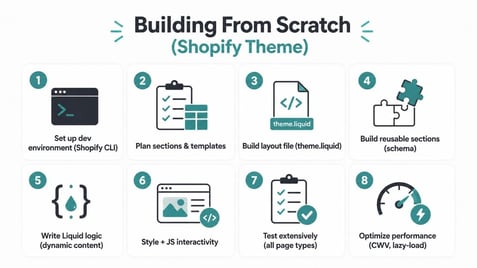
Step-by-Step: Building From Scratch
1. Set Up Your Development Environment
Install Shopify CLI so you can develop locally, preview changes in real time against a development store, and push code without manually uploading files through the admin like it's 2015.
2. Plan Your Section and Template Structure
Before writing a single line of code, map out every page type you'll need, home, product, collection, cart, blog, and which sections each one uses. Skip this step and you'll be restructuring the whole thing later at a much higher cost.
3. Build the Layout File
Start with `theme.liquid`, defining the global HTML structure: header, footer, and whatever scripts or stylesheets need to load on every single page.
4. Build Reusable Sections
Following Online Store 2.0 conventions, build sections with a {% schema %} block defining what merchants can actually edit, text, images, colors, so the theme editor gives real flexibility without anyone needing to touch code.
5. Write Liquid Logic for Dynamic Content
Product pages, collection pages, and cart functionality all need Liquid logic to pull and display dynamic store data: prices, variants, inventory status, and more.
6. Style With CSS and Add Interactivity With JavaScript
Build a responsive, mobile-first CSS structure, then layer JavaScript on top for interactive elements, variant selectors, cart drawers, filtering, animations.
7. Test Extensively
Test every template type across devices and browsers. Checkout flow, cart behavior, variant selection, page speed, all of it needs verification before anything launches.
8. Optimize for Performance
Cut render-blocking scripts, lazy-load images, and audit for Core Web Vitals compliance. Page speed directly affects both conversion and SEO, so this isn't optional polish.
From-Scratch vs. Customized Existing Theme
| From Scratch | Customized Existing Theme (Amwhiz) | |
| Cost | Rs. 1,50,000 - Rs. 5,00,000+ | a flat rate |
| Timeline | 4-10 weeks | 7 days |
| Risk of bugs | Higher, unproven code | Lower, built on tested foundation |
| Design uniqueness | Fully unique | Highly customizable, proven base |
| Maintenance | Higher ongoing burden | Lower |
Why Deep Customization Usually Wins
A from-scratch theme sounds appealing when uniqueness is the goal, but it also means every single component, cart drawer behavior, variant logic, mobile menu, is untested code being written for the first time ever. A proven, well-architected theme, deeply customized in its sections, styling, and functionality, gets you a genuinely unique storefront while still standing on code that's already been battle-tested across thousands of other stores. That's the whole approach behind Amwhiz's flat-rate, 7-day builds: real customization, a look that's genuinely yours, without the cost, timeline, and bug risk of starting completely from zero.
Common Mistakes When Building From Scratch
- Skipping the planning phase and coding templates ad hoc, which leads to inconsistent structure and duplicated code everywhere.
- Ignoring Online Store 2.0 conventions. Rigid, hard-coded sections instead of merchant-editable ones kill your future flexibility.
- Under-testing the mobile experience. Most Shopify traffic is mobile, so this is exactly where conversion gets won or lost.
- Neglecting page speed until after launch, when it's a lot harder to retrofit performance into a theme that's already fully built.
What "Deep Customization" Actually Involves
Worth being specific here about what separates genuinely deep customization from a surface-level reskin. A shallow customization changes colors, swaps fonts, drops in a new logo. A genuinely deep customization restructures section layouts around a specific conversion strategy, builds custom sections that aren't in the base theme at all (custom filtering UI, product comparison tables, bespoke trust-badge layouts), rewrites Liquid logic wherever the base theme's default behavior doesn't fit the brand, and optimizes each page type individually instead of stretching one template across everything. This is the level of customization that makes a theme-based build feel every bit as unique as something from scratch, minus the cost and risk of code nobody's ever tested.
A Practical Checklist Before Choosing Your Approach
Before you decide between building from scratch and going deep on customization, walk through this: does your required functionality already exist as a pattern somewhere in an existing theme's section system? Do you have an in-house team that can maintain fully custom code indefinitely? Is your timeline actually flexible enough to absorb a multi-month build? If most of your answers point away from custom, deep customization of a proven theme is very likely the smarter, faster, easier-to-maintain path for your store.
Frequently Asked Questions
Is building a theme from scratch worth it for a small store?
Rarely. That much cost and time is usually only justified when you've got genuinely unusual design or functional requirements that customization simply can't reach.
What's the difference between a section and a snippet?
Sections are merchant-editable content blocks with schema settings visible right in the theme editor. Snippets are reusable code fragments called by templates or sections, and merchants can't edit those directly.
How long does it take to learn Shopify theme development?
Basic Liquid proficiency comes together in a few weeks. Building production-ready, genuinely well-tested themes takes a lot longer to get good at.
Does Amwhiz build fully custom themes from scratch?
Amwhiz's standard flat-rate, 7-day package uses deep customization of a proven theme foundation. Fully from-scratch builds get scoped separately for stores with genuinely unique requirements.
Will customers notice the difference between a from-scratch theme and a deeply customized one?
No. Done properly, the storefront looks and functions like a fully bespoke experience no matter which starting point it came from.
How do I know if my customization needs are "genuinely unique"?
If a competitor or a reference site you admire is pulling off the effect you want using a standard theme's section system, your need is almost certainly achievable through customization, not a from-scratch build.
Get a Genuinely Custom Store, Faster
You don't need a from-scratch build to get a store that feels entirely your own. Amwhiz delivers deeply customized, sales-focused Shopify themes for a flat flat rate in 7 days. Reach out and see what a customized build can actually do for your brand.