-1.png?width=134&height=66&name=amwhiz-logo%20(1)-1.png)



What If Your Forms and Workflows Could Adapt to Every Customer Automatically? Modern customers...
Build a Lead Qualification Engine Using HubSpot Workflows
Your sales team spends hours qualifying leads. Are they real opportunities or tire kickers? Do they have budget? Is it the right timing? Are they the decision maker?
Manual qualification wastes time. Some leads get qualified fast. Others slip through without proper vetting. Quality is inconsistent. Sales rep qualification skills vary widely.
A lead qualification engine built on HubSpot workflows solves this completely. It automatically qualifies every lead using consistent criteria. Separates real opportunities from noise. Routes qualified leads to sales instantly. Sales reps spend time selling, not qualifying.
Why Lead Qualification Engine Matters
Without systematic qualification, your sales team wastes 30 to 40 percent of their time on unqualified leads. Time that could be spent closing actual opportunities.
A qualification engine changes everything. Every lead gets scored. Qualified leads flow directly to sales. Unqualified leads go to nurture. Sales focuses on high probability opportunities.
Result: Sales productivity increases 20 to 30 percent. Close rates improve. Sales reps are happier because they're working on real opportunities.
How a Lead Qualification Engine Works
Step 1: Define Qualification Criteria
What makes a lead qualified? Define it clearly. Company size? Industry? Annual revenue? Budget availability? Timeline? Decision authority?
Most companies use BANT or MEDDIC framework. Budget, Authority, Need, Timeline. Or Money, Economic Buyer, Decision Criteria, Identify Pain, Champion, Identify, Close Plan.
Step 2: Collect Data
You can't qualify what you don't know. Workflows collect qualifying information automatically. Forms ask relevant questions. Progressive profiling collects data over time. Enrichment APIs fill in company information.
Step 3: Score Leads
Assign points for each qualification criteria. Large company equals 10 points. Mid size equals 5 points. Small equals 0 points. Budget confirmed equals 20 points. Timeline within 90 days equals 15 points. Score accumulates. When score hits threshold (example: 50 points), lead is qualified.
Step 4: Route and Alert
When a lead qualifies, automatically route to correct sales rep. Send alert notification. Create task. Update lead status to "Qualified." Everything happens instantly without human intervention.
Building Your Lead Qualification Engine
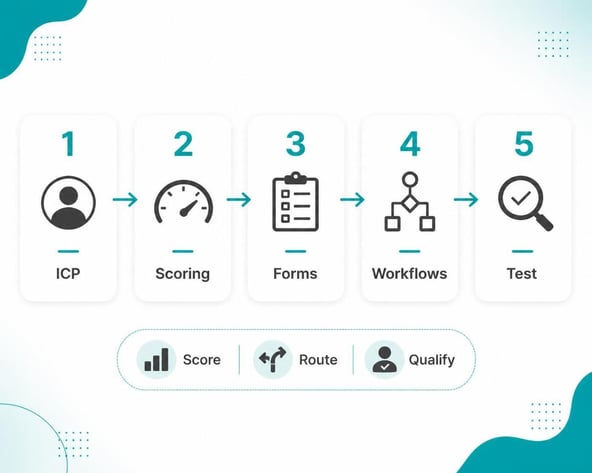
Phase 1: Define Your ICP (Ideal Customer Profile)
What does your ideal customer look like? Company size, industry, location, annual revenue, number of employees? Create a detailed ICP. This becomes your qualification foundation.
Phase 2: Create Scoring Model
Assign points for each qualification attribute. Create a matrix. Use historical data to validate. What attributes actually correlate with closed deals? Those get higher points.
Phase 3: Design Data Collection
Create forms that ask qualification questions. Not too many (people won't fill it out). Not too few (you won't have data to qualify). 5 to 7 key questions usually works.
Phase 4: Build Workflows
Create workflows that trigger when a lead arrives. Score based on attributes. When score threshold is reached, mark as qualified. Route to sales. Send notifications.
Phase 5: Test and Refine
Run the engine with test data. Does it qualify appropriately? Are you catching real opportunities? Are you filtering out bad leads? Adjust scoring if needed.
Advanced Lead Qualification Tactics
Behavior Based Scoring
Beyond demographic scoring, track behavior. Visited pricing page equals 5 points. Downloaded case study equals 3 points. Opened 3 or more emails equals 5 points. High engagement signals buying intent.
Company Research Integration
Use enrichment APIs to pull company data automatically. Employee count, funding, industry, growth rate. Automatically score based on company attributes. You don't need the person to fill out a form.
Time Based Scoring Decay
A lead that engaged 6 months ago is less qualified than one that engaged today. Implement decay so old points count for less. Keeps scoring fresh and relevant.
Negative Scoring
Some attributes disqualify leads. Not a target industry equals -20 points. Company too small equals -15 points. Negative scoring removes unfit leads automatically.
Common Mistakes Building Lead Qualification Engines
Too Complex Scoring
100 or more scoring rules becomes impossible to manage. Start simple. Company size, budget, timeline. Add complexity as you learn what works.
Asking Too Many Questions
Forms with 15 fields have 70 percent abandonment rates. Forms with 5 fields have 25 percent abandonment. Fewer questions, better conversion, sufficient data.
Not Validating Against Actual Deals
Your scoring model might be wrong. Don't assume. Look at won deals. What did they have in common? Update your model based on reality.
Ignoring Sales Feedback
Your sales team knows if qualification is working. Are they getting quality leads? Or noise? Listen to them. Adjust accordingly.
Set and Forget
Qualification criteria change. Market shifts. Your ICP evolves. Review and update quarterly. Don't use a 2 year old scoring model.
Measuring Lead Qualification Engine Success
Qualified Lead Volume
How many leads qualify monthly? Are you qualifying enough for sales to hit quota? Track the pipeline flowing in.
Qualification Accuracy
Of leads marked qualified, what percentage actually close? 30 percent close rate is good. 10 percent is bad. If accuracy is low, adjust scoring.
Sales Productivity
Before qualification engine: reps spend 40 percent time on unqualified leads. After: spend 90 percent on qualified. That's a 20 to 30 percent productivity increase.
Time to Sales
Before: takes 2 days to qualify a lead. After: instant. Faster sales engagement means faster closes.
FAQ About Lead Qualification Engines
Can I build a qualification engine without forms?
Yes. Use enrichment data, website tracking, email behavior. Forms help but aren't required. Passive qualification works if you have enough data sources. The advantage of forms is that they give you explicit information directly from the prospect. The disadvantage is friction: some prospects won't fill them out. Passive approaches (tracking behavior, enrichment data) require no friction but give you less certain information. Most sophisticated qualification engines use both. Forms for explicit qualification data. Tracking and enrichment for passive signals. Combine them into a single score. This hybrid approach gets best of both worlds: high data quality plus low friction.
What's the ideal lead score threshold for qualification?
Depends on your model. If 100 is max, 50 to 70 is usually good. Test different thresholds. See which correlates with highest close rates. There's no universal answer because different businesses have different conversion patterns. A B2B SaaS company might find that 60 points equals quality leads. An enterprise software company might need 75 points. Run a small experiment: qualify leads at 50 points for two weeks. Track close rate. Then qualify at 60 points. Compare. Find your sweet spot where you're balancing volume and quality. You want enough volume for sales to hit quota, but high enough quality that close rates are strong.
Should I disqualify leads or nurture them?
Both. Qualified leads go to sales immediately. Unqualified go to nurture. Maybe they qualify later. Nurture keeps them warm. A lead that doesn't qualify today might become qualified in 6 months when their situation changes. Nurture ensures you don't lose those opportunities. Plus, nurturing unqualified leads is low cost. Automated email sequences run with zero additional effort. Meanwhile, they might educate themselves, decide they actually have budget, and become qualified. When they re-engage, your nurture has already warmed them up.
How do I handle leads that partially qualify?
Create tiers. Highly Qualified, Qualified, Nurture. Highly qualified goes to top tier sales rep. Qualified goes to standard sales. Nurture goes to email sequences. This tiered approach gives you more nuance than simple qualified or not qualified. A lead with strong demographic fit but low engagement is in one tier. A lead with strong engagement but weaker fit is in another. Different tiers get different handling. This maximizes sales focus on best leads while nurturing the rest.
Can I have multiple qualification engines?
Yes. Different criteria for SMB versus Enterprise. Different for different products. Different for different geographies. Multiple engines serving different segments work well. Example: your SMB qualification engine might look for companies with 10 to 100 employees. Your enterprise engine looks for 500 plus employees. Build each engine with its own ICP and scoring model. Then route leads to the right engine based on company size. Each engine optimizes for its segment.
How often should I recalibrate my scoring model?
Quarterly minimum. Look at closed deals. What did winners have in common? Update scoring to emphasize those attributes. Also look at lost deals. What were their characteristics? Maybe they scored high but didn't close because they lacked something important. Adjust your model. Quarterly recalibration keeps your model in sync with reality. Markets change. Your ideal customer evolves. Your model should too.
What if my sales team disagrees with qualification decisions?
Listen. They're right sometimes. Maybe your model is off. Override occasionally. Track what happens to overridden leads. Do they close at higher rates? Lower rates? Use overrides to inform model improvements. If sales overrides the engine frequently, the engine probably needs recalibration. But if they rarely override, the engine is probably working well. Some overrides are expected because qualification isn't perfect. But if overrides are frequent, dig into why and fix the model.
Should qualification be automatic or require human approval?
Start automatic. If quality is high, stay automatic. If accuracy is low, add human review step. Usually automatic works better after you calibrate. However, some companies prefer an approval step for legal or compliance reasons. Or their sales process requires human judgment to qualify leads. Build the way that matches your business. You can always add or remove the approval step based on results.
Can I use HubSpot's built in lead scoring or need custom workflows?
HubSpot's built in scoring is good. Workflows give you more control. For complex logic, use workflows. For simple scoring, built in works. If you just want to score based on a few attributes and threshold, built in lead scoring is faster. If you want to score based on behavior, company data, and multiple criteria with different logic, workflows give you more flexibility. Many companies use both: HubSpot built in scoring for baseline, plus custom workflows for additional qualification logic.
What if I don't have historical data to validate scoring?
Use your ICP. Use industry best practices. Start with educated guesses. Track results. Refine based on what actually happens. This is more art than science at first. But as you collect data, you'll see patterns. Over time, your model becomes data driven. Don't let lack of historical data paralyze you. Start with reasonable assumptions, monitor results, and improve iteratively.
Ready to Build Your Lead Qualification Engine?
A qualification engine transforms your sales process. Your team stops wasting time on bad leads. They focus on real opportunities. Productivity soars. Close rates improve. Revenue grows.
At Amwhiz, we're a HubSpot Diamond Solution Partner specializing in building lead qualification engines that actually work. We've built dozens for companies across industries.
Book a HubSpot consultation with Amwhiz today. We'll design a qualification engine matched to your exact sales process.