-1.png?width=134&height=66&name=amwhiz-logo%20(1)-1.png)


Client Overview We recently assisted a client in transitioning their CRM from Salesforce to...
HubSpot Data Governance: Best Practices for Large CRM Databases
Your CRM has 100,000 contacts. But how many are duplicates? How many are outdated? How many have incomplete information?
As your database grows, data quality decays. Without governance, you get garbage data. Reports show wrong numbers. Automations fail. Sales reps can't find the right information.
HubSpot data governance prevents this. It establishes rules. Ensures consistency. Maintains quality. Keeps your CRM reliable as it grows.
Why Data Governance Is Critical at Scale
Data quality degrades exponentially as volume grows. With 1,000 contacts, manual quality checking works. With 100,000, it's impossible.
Bad data cascades. Wrong email gets used in campaigns. Wrong phone gets called. Wrong account gets merged with another. Wrong historical data appears in reports. Team loses trust in the system.
Governance prevents this. It makes bad data nearly impossible. It maintains quality automatically.
Three Pillars of HubSpot Data Governance
1. Data Standards (How Data Should Look)
Every field has rules. Email must be valid email format. Phone must be valid phone format. Company size can only be "1 to 10," "11 to 50," "51 to 200," etc. (not free text). First name and last name are required, not optional.
Standards prevent garbage data from entering the system in the first place.
2. Data Quality Processes (How You Maintain Quality)
Regular audits identify problems. Deduplication merges duplicate records. Enrichment fills gaps. Validation catches invalid data. These processes keep data clean continuously.
3. Data Ownership (Who's Responsible)
Someone owns each field or object. When something breaks, you know who to contact. When data needs updating, you know who's responsible. Clarity prevents "nobody fixes it" situations.
Building Your HubSpot Data Governance Program
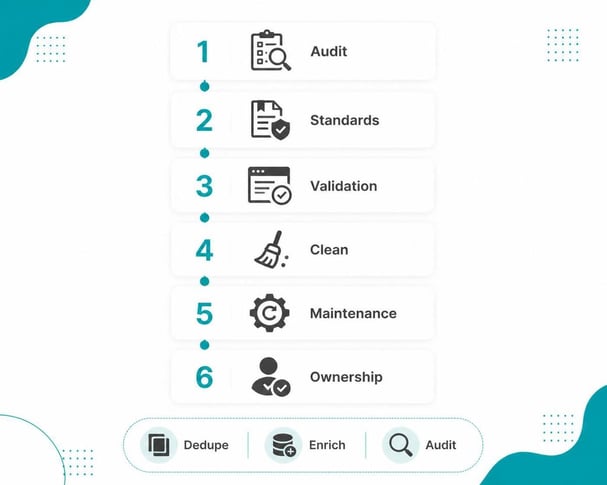
Step 1: Audit Current Data Quality
Run reports. How many records have missing required fields? How many duplicates exist? How much data is outdated (not updated in 1 or more year)? This baseline tells you the problem size.
Step 2: Define Data Standards
For each field, define rules. Email: must be valid email. Phone: must be valid phone format. Company: required, not optional. Company Size: select list only, no free text. Create a data dictionary documenting all rules.
Step 3: Implement Validation Rules
Use HubSpot's validation features. Set required fields. Set field formats. Set picklist options. Don't allow free text where there should be structured data.
Step 4: Clean Existing Data
Merge duplicates. Remove invalid records. Update outdated information. Fill gaps where possible. This is the hardest step but necessary foundation.
Step 5: Set Up Maintenance Processes
Data decays continuously. Implement processes to maintain it. Quarterly deduplication. Monthly enrichment. Regular audits. Make maintenance routine, not emergency.
Step 6: Assign Ownership
Document who owns each field or object. Sales owns deal data. Marketing owns lead data. Support owns case data. Clear ownership prevents confusion.
Best Practices for HubSpot Data Governance
Make Required Fields Truly Required
If a field is required, enforce it. Users can't skip required fields. Don't make something required then never enforce it. Consistency matters.
Use Picklists, Not Free Text
For status fields, use predefined options. Not "Open," "open," "OPEN," "in progress," "pending." Use one standardized list. Picklist consistency enables accurate reporting.
Implement Progressive Profiling
Don't ask for all fields at once. Collect data over time. This reduces form friction while gradually building complete profiles.
Audit Regularly
Set up quarterly audits. Run reports on data quality. Are validation rules working? Are users following standards? Where are problems? Update processes based on findings.
Merge Duplicates Automatically
Use deduplication tools or API. Set rules for automatic merging. Same email equals same person. Automatic merging keeps duplicates from accumulating.
Common Data Governance Mistakes
Too Many Required Fields
If you require 20 fields, users will enter garbage just to complete the form. Require only truly essential fields. Collect optional data later.
Inconsistent Naming
One person enters "John Smith," another enters "smith, john." One enters "john@company.com," another enters "jsmith@company.com." Inconsistency prevents deduplication.
No Deduplication
Duplicates accumulate if you don't actively remove them. Set up processes. Run deduplication monthly. Keep duplicates from building up.
Outdated Data
Data is only good if it's current. Flag records not updated in 12 months. Consider archiving or enriching. Don't let stale data accumulate.
No Governance Document
Rules live in someone's head. New person joins. They don't know the standards. Data quality degrades. Document everything. Make rules accessible.
FAQ About HubSpot Data Governance
How often should I audit data quality?
Quarterly minimum. More frequently if you have high volume. Monthly is ideal if resources allow. The key is building auditing into your routine rather than treating it as one time project. Schedule audits like you schedule meetings. First week of every quarter: run data quality reports. Check duplicate count, missing required field count, invalid data count. Review trends. Are things getting better or worse? Quarterly audits let you spot problems early before they cascade. If you wait six months between audits, problems compound and become harder to fix.
Can I automate data quality checks?
Yes. Use workflows to identify invalid data, flag duplicates, alert when data is missing. Automation catches problems faster than manual review. Example workflow: every night, find all contacts missing required email field. Assign task to the contact owner: "Complete email for this contact." Automated workflow catches this during data entry. No quarterly audit needed. Another example: every hour, find new contacts with email that exactly matches existing contact. Flag as duplicate. Alert the person who created it. This constant automated checking prevents small problems from becoming big ones.
What's an acceptable duplicate rate?
Under 2 percent is good. 2 to 5 percent needs attention. Over 5 percent is a problem. Run deduplication when it exceeds 2 percent. Most CRMs naturally accumulate some duplicates. Spam bots create fake records. Real people sign up twice with slightly different email addresses. Some duplication is inevitable. But it should be small and should be cleaned regularly. If your duplicate rate is 10 percent, you have serious data governance problems that need immediate attention.
Should I delete or merge duplicate records?
Merge, not delete. Merging preserves history. Deleting loses data. Always merge, keeping the more complete record. When you merge, HubSpot combines the records and keeps all historical activity. This is important for reporting and understanding customer lifecycle. Deletion loses that history forever. Merge is almost always the right choice.
How do I enforce data standards with remote teams?
Use validation rules in HubSpot (enforce required fields, email formats, picklists). Make standards visible in training. Monitor compliance regularly. Validation rules are the backbone of remote data governance. If a rule says email field is required, nobody can save a record without it. That's enforcement without manual oversight. Plus, document standards clearly. Create a data dictionary everyone has access to. Include examples of what good data looks like. Regular monitoring shows you where teams struggle. If your sales team consistently enters "TBD" in required fields, that's a sign they need training or the field shouldn't be required.
What fields are most critical for governance?
Email, phone, company name, job title, company size. These fields are used most frequently and impact reporting most. Start your governance program with these core fields. Get them clean and well maintained. Then expand to secondary fields. Focusing on critical fields first gives you the most ROI on your governance effort. These fields directly impact sales rep productivity, reporting accuracy, and automation success.
Can governance slow down data entry?
Slightly. But garbage data is much slower. Better to slow entry a bit than spend hours fixing bad data later. This is the governance trade off. You can make data entry fast and loose, which feels good short term but creates problems long term. Or you can enforce standards, which slows entry slightly but saves huge amounts of time on cleanup and fixes. Almost always, the slight slowdown in entry is worth it for the time saved on cleanup.
Who should own the governance program?
Usually CRM manager or operations manager. Someone with authority to enforce standards. Someone who understands all departments' needs. This role requires cross-functional influence. They need to convince sales to follow standards, marketing to use consistent naming, support to fill required fields. Good governance owner thinks about the whole system, not just one department.
How much time should governance take monthly?
4 to 8 hours for organizations under 50k records. More for larger databases. It pays for itself by preventing costly data problems. Data quality issues cost way more than the time spent maintaining governance. Bad data in reports leads to wrong decisions. Duplicate records confuse sales. Missing information breaks automations. An hour spent on governance prevents days of cleanup work.
Can I use third party tools for data governance?
Yes. Many tools integrate with HubSpot for enrichment, deduplication, validation. Use them to supplement HubSpot's native features. Tools like RocketReach enrich company data. Dedupely finds duplicates. Many are worth the investment if you have complex data governance needs. However, start with HubSpot's native features first. They cover most use cases. Only add third party tools when you have specific needs native features don't cover well.
Ready to Implement HubSpot Data Governance?
Clean, consistent data is the foundation of a working CRM. Without governance, data decays. With governance, it stays reliable at scale.
At Amwhiz, we're a HubSpot Diamond Solution Partner specializing in data governance for organizations scaling their CRM.
Book a HubSpot consultation with Amwhiz today. We'll audit your current data quality and build a governance program that scales with you.