
A HubSpot TallyPrime integration (Tally ERP, not the Tally form builder) syncs customers, products, sales orders, invoices and payment status between HubSpot CRM and TallyPrime, so sales sees what finance sees without re-typing. Because Tally runs on a local machine or server, the integration uses a connector that talks to Tally's XML/HTTP interface and the HubSpot API. Most builds take 2 to 6 weeks.
Key takeaways
- HubSpot has no native Tally integration; you need a connector app, middleware or a custom build.
- The usual flow is HubSpot deal won → Tally ledger and sales voucher → payment status back to HubSpot.
- Tally must be reachable: either an always-on machine with a sync agent or Tally hosted on a cloud server.
- GST details (GSTIN, place of supply, HSN/SAC codes) must be captured in HubSpot before invoices are created.
- Decide which system is the source of truth for customers, products and prices before you build.
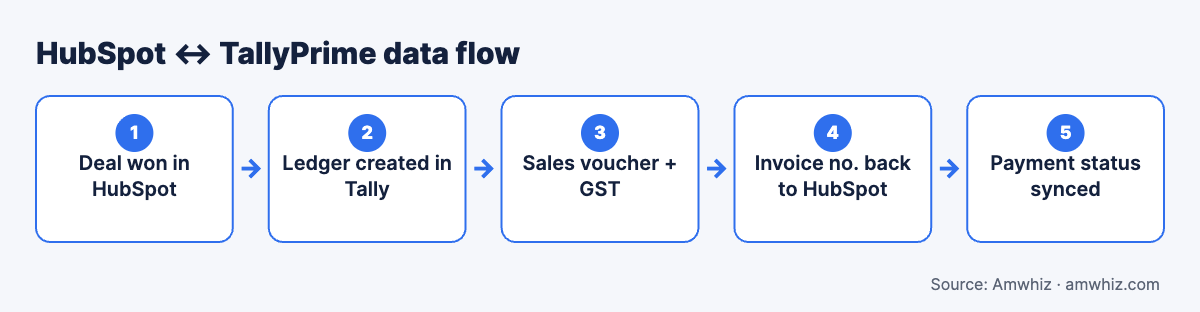
HubSpot ↔ TallyPrime data flow.
Why connect HubSpot with Tally?
Most Indian B2B companies run sales in a CRM and accounting in Tally. Without integration:
- Accounts teams re-enter customer and order details from HubSpot into Tally
- Sales reps don't know whether an invoice is paid before chasing renewals or new orders
- GST details are captured twice and often mismatch
- Management can't see bookings and collections in one view
An integration removes double entry and gives sales live payment status.
What data should sync between HubSpot and Tally?
| Data | Direction | Trigger |
|---|---|---|
| Customer (company + GSTIN) | HubSpot → Tally (create ledger) | Deal closed won or first invoice |
| Products / stock items | Tally → HubSpot | Daily or on change |
| Price lists | Tally → HubSpot | On change |
| Sales order / invoice | HubSpot → Tally (sales voucher) | Deal stage or quote accepted |
| Invoice number and amount | Tally → HubSpot | After voucher is created |
| Payment / receipt status | Tally → HubSpot | Hourly or daily |
| Outstanding balance | Tally → HubSpot | Daily |
| Credit notes | Tally → HubSpot | On creation |
Keep the scope small at first: customer creation, invoice creation and payment status cover most of the value.
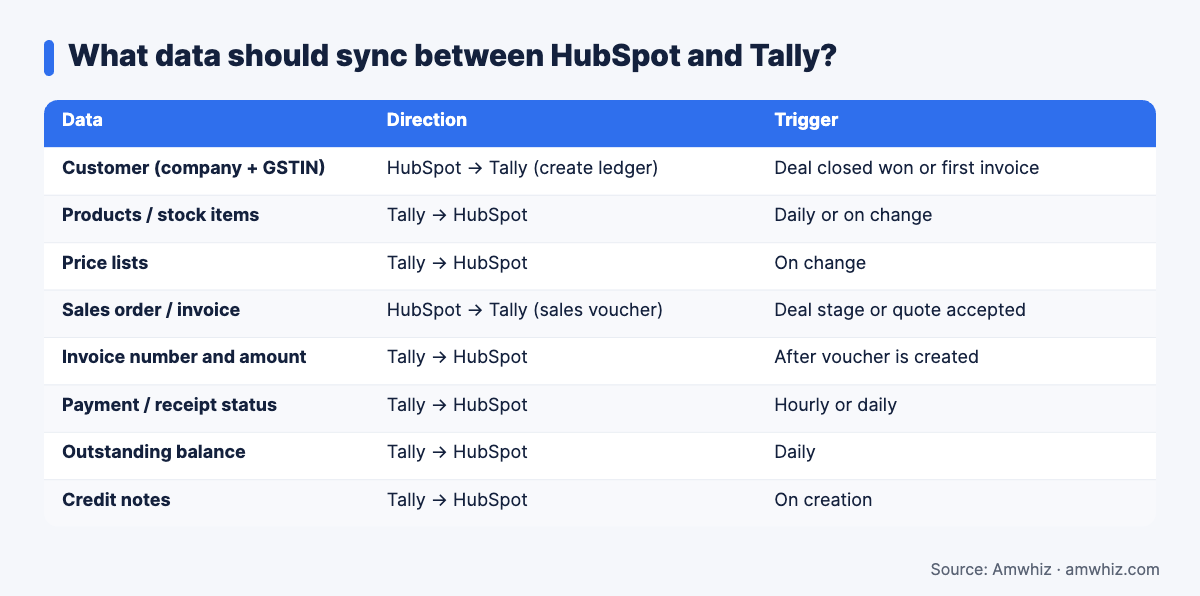
What data should sync between HubSpot and Tally?
How does Tally integration work technically?
TallyPrime exposes data through an XML interface over HTTP (usually on port 9000) and through ODBC. A connector:
- Reads or writes Tally data as XML requests (create ledger, create voucher, fetch outstanding)
- Talks to HubSpot through its CRM API and webhooks
- Runs on a schedule or reacts to HubSpot events, with a queue for retries
Because Tally isn't a cloud API, the key design decision is where the connector runs:
- On-premise agent: a small service installed on the Tally machine pushes and pulls data. Tally must be open and the machine online.
- Tally on cloud: Tally hosted on a cloud server (Tally on AWS or a hosting provider) so the connector can reach it 24/7.
- Middleware: an n8n or custom service that sits between HubSpot and the Tally agent, handling mapping, logging and retries.
Integration options compared
| Option | Best for | Pros | Cons |
|---|---|---|---|
| Marketplace / third-party connector | Standard flows, small teams | Quick to set up, subscription pricing | Limited field mapping, fixed logic |
| n8n middleware + Tally agent | Growing teams with custom rules | Flexible, logs and retries, low running cost | Needs setup and maintenance |
| Fully custom integration | Multi-company, multi-GSTIN, complex pricing | Exactly fits your process | Higher build cost |
If you outgrow a connector, read when a native HubSpot integration isn't enough.
GST and accounting details to plan for
- GSTIN and state on the HubSpot company record, validated for format
- Place of supply to decide CGST/SGST vs IGST
- HSN/SAC codes on HubSpot products
- Ledger naming rules to avoid duplicates in Tally (for example, "Company Name – City")
- Voucher type (Sales, Sales Order, Proforma) agreed with finance
- Multiple Tally companies if you have more than one GSTIN or entity
- E-invoicing: if your turnover requires e-invoices, decide whether IRN is generated in Tally or elsewhere
Step-by-step build plan
- Workshop with sales and finance to agree on triggers, fields and ownership.
- Add HubSpot properties for GSTIN, billing address, HSN codes, Tally ledger name and invoice status.
- Set up Tally access: agent installation or cloud hosting, with secure connection.
- Build customer sync and test ledger creation with duplicate checks.
- Build invoice sync from HubSpot deals or quotes to Tally vouchers.
- Build payment sync back to HubSpot deal and company records.
- Add logging and alerts for failed syncs.
- Test with real scenarios: new customer, repeat customer, partial payment, credit note.
- Go live with a parallel run for one billing cycle.
Common HubSpot Tally sync errors
- Ledger already exists: name mismatch between HubSpot and Tally. Store the Tally ledger name on the HubSpot record.
- Tally not reachable: machine off or Tally closed. Use cloud hosting or queue and retry.
- Wrong tax ledger: place of supply missing. Make state mandatory on companies.
- Stock item not found: product names differ. Sync products from Tally first.
- Rounding differences: match decimal settings and round-off ledger.
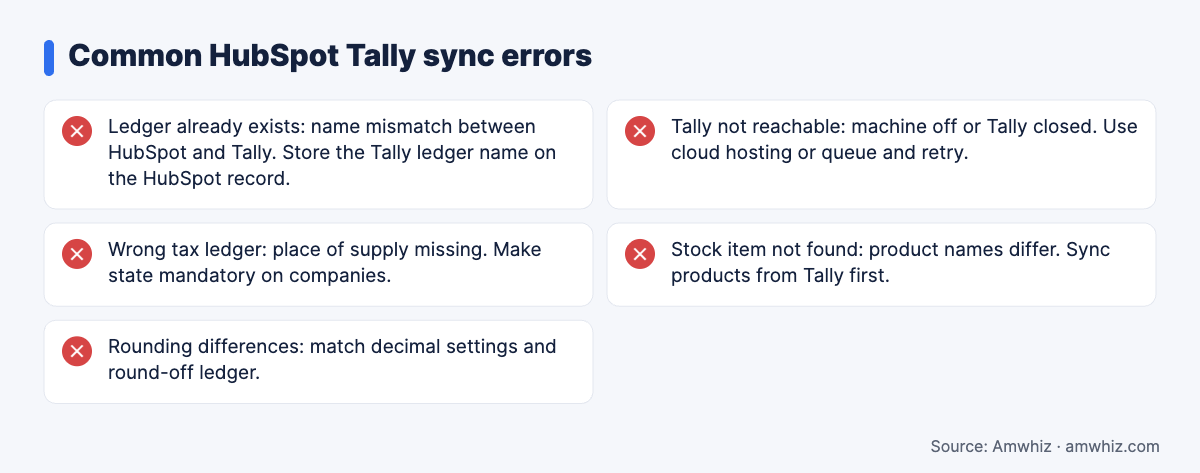
Common HubSpot Tally sync errors
How much does a HubSpot Tally integration cost?
| Scope | Typical range |
|---|---|
| Connector subscription with basic setup | INR 3,000 to 15,000/month plus setup |
| Custom sync: customers, invoices, payments | INR 1.5 lakh to 4 lakh one-time |
| Multi-company, inventory and complex pricing | INR 4 lakh+ |
Running costs include hosting for Tally or the agent and optional support. See HubSpot custom integration services and costs.
Why choose Amwhiz for HubSpot and Tally?
Amwhiz is a HubSpot Diamond partner with in-house developers who build integrations with Indian accounting systems, including Tally and Zoho Books. We design the sync with your finance team, handle GST fields properly, and add logging so failures are visible, not silent.
Want help with this? Book a free TallyPrime integration scoping call with the Amwhiz team.
Related guides
- Shopify TallyPrime Integration: Options, Costs and Common Sync Errors
- Integration Cost Calculator: HubSpot, Zoho, Shopify and ERP Sync (2026 Price Ranges)
- Shopify Zoho Books Integration: Automatic GST Invoices for Every Order
Frequently asked questions
Does HubSpot have a native Tally integration?
No. HubSpot doesn't offer a native Tally integration. You can use a third-party connector, middleware like n8n, or a custom integration.
Can HubSpot create invoices in Tally automatically?
Yes. When a deal reaches a defined stage, the integration can create a sales voucher in Tally with customer, items, taxes and amounts.
Does Tally need to be on cloud for the integration?
Not necessarily. An on-premise agent works if the Tally machine stays on. Hosting Tally on a cloud server makes the sync more reliable.
Can payment status from Tally show in HubSpot?
Yes. The integration can read receipts and outstanding balances from Tally and update deal or company properties in HubSpot.
How long does a HubSpot Tally integration take?
A standard customer, invoice and payment sync takes 2 to 4 weeks. Multi-company or inventory-heavy setups can take 6 weeks or more.
Leave a comment
Your email address will not be published. Comments are reviewed before they appear.