-1.png?width=134&height=66&name=amwhiz-logo%20(1)-1.png)


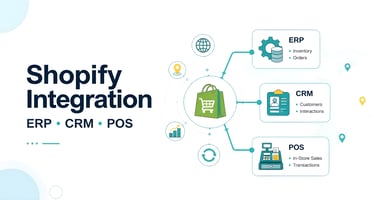
The Practical Answer Integrating Shopify with an ERP, CRM, or POS system is typically done through...
written by: Renuka M
Shopify ERP Integration,
Shopify Custom API Development,
Shopify Inventory Integration,
Shopify 3PL Integration,
Shopify Warehouse Integration
Key Takeaways
- Shopify inventory integration connects your storefront with the systems responsible for inventory, orders, warehousing, fulfillment, and business operations.
- The most important decision is defining which system is the source of truth for each type of data.
- Shopify supports inventory across multiple locations, making it possible to manage stock across warehouses and fulfillment locations.
- A strong integration should handle more than inventory quantities. Orders, fulfillment, tracking, returns, product data, and exceptions also need to be considered.
- Real-time synchronization is useful for high-volume or fast-moving businesses, but not every data point requires instant updates.
- Native apps can work well for straightforward requirements. Complex operations often benefit from middleware or custom API integration.
- The right architecture should support the business as it adds locations, sales channels, products, and fulfillment partners.
Why Shopify Inventory Integration Becomes Critical as You Scale
Inventory is easy to manage when a business has one warehouse, a small catalog, and a single sales channel.
The picture changes quickly as the business grows.
You may have Shopify handling online orders, an ERP managing purchasing and financial operations, a warehouse management system controlling stock movement, and one or more 3PLs handling fulfillment.
Suddenly, the question is no longer: “How much inventory do we have?”
It becomes: “Which system has the most accurate inventory, where is that inventory located, what is already committed, and how quickly can it be made available to customers?”
That distinction matters. A delay of a few minutes can create overselling. A missed fulfillment update can trigger unnecessary customer service work. A product mismatch between systems can result in inventory being unavailable online even when stock is sitting in a warehouse.
A well-designed Shopify inventory integration removes much of that friction by creating a dependable flow of information between commerce and operations.
What Does Shopify Inventory Integration Actually Mean?
Shopify inventory integration means connecting Shopify with the systems your business relies on to manage products, stock, orders, fulfillment, and operations.
Depending on the business, that could include:
- ERP
- Warehouse Management System (WMS)
- 3PL
- POS
- CRM
- Accounting platform
- Procurement system
- Manufacturing system
- Shipping platform
- Marketplaces
Shopify supports inventory across multiple locations, including warehouses and fulfillment services, with inventory tracked by location.
But connecting systems is only the technical part. The harder question is deciding:
What data should move between systems, which system owns it, and when should the update happen?
That is where good integration architecture makes the difference.
Shopify + ERP: Connecting Ecommerce With Business Operations
An ERP typically manages the operational side of the business.
It may control:
- Purchasing
- Suppliers
- Inventory
- Product records
- Warehousing
- Order processing
- Procurement
- Financial information
Shopify serves a different purpose. It is the commerce layer where customers discover products, place orders, and manage their shopping experience.
A typical integration might send product and inventory information from the ERP to Shopify while sending customer orders from Shopify back into the ERP.
Data commonly moving from ERP to Shopify
- SKU
- Product information
- Product status
- Pricing
- Available inventory
- Locations
- Product variants
Data commonly moving from Shopify to ERP
- Orders
- Customer information
- Line items
- Discounts
- Taxes
- Payment details
- Returns
Data that may flow back to Shopify
- Fulfillment status
- Tracking information
- Updated inventory
- Order adjustments
The exact flow should always reflect the merchant's operating model.
A B2B distributor with thousands of SKUs and negotiated pricing will have very different integration requirements from a direct-to-consumer brand selling a small product catalog.
Shopify + Warehouse & 3PL Integration
ERP systems manage business operations. Warehouses and 3PLs deal with the physical movement of products.
A warehouse integration may cover:
- Receiving
- Putaway
- Picking
- Packing
- Transfers
- Stock adjustments
- Cycle counts
A 3PL integration can extend that workflow into:
- Fulfillment requests
- Shipment creation
- Tracking
- Inventory updates
- Returns
A typical flow looks like this:
//(Show the below in image)
Customer places an order
↓
Shopify receives the order
↓
Order is sent to the appropriate fulfillment location
↓
Warehouse or 3PL picks and packs
↓
Shipment is created
↓
Tracking information returns to Shopify
↓
Inventory and order status are updated
Shopify supports third-party fulfillment services and multi-location inventory, which makes this model possible for businesses operating across fulfillment partners and locations.
The complexity appears when a merchant operates several warehouses or 3PLs.
For example:
- California warehouse for West Coast orders
- Texas warehouse for central regions
- New Jersey warehouse for the East Coast
- 3PL for overflow fulfillment
Now inventory management becomes a question of allocation, routing, availability, and fulfillment rules.
What Data Should Sync Between Systems?
A common mistake is trying to synchronize everything. A better approach is to identify the data that actually drives business operations.
Product Data
- SKU
- Product ID
- Variant
- Barcode
- Product status
- Weight
- Dimensions
- Product attributes
Inventory Data
- Available quantity
- On-hand quantity
- Committed quantity
- Incoming stock
- Location
- Inventory adjustments
Order Data
- Order number
- Customer
- Line items
- Quantities
- Discounts
- Taxes
- Payment status
- Shipping method
Fulfillment Data
- Fulfillment status
- Fulfillment location
- Tracking number
- Carrier
- Shipment date
Returns
- Return request
- Returned quantity
- Return status
- Restock status
The objective is not maximum synchronization.
It is accurate synchronization of the information each system actually needs.
Real-Time vs Scheduled Inventory Sync: Which Should You Use?
There is no single answer.
Real-time or near-real-time sync
This is generally more valuable when you have:
- High order volumes
- Fast-moving products
- Limited inventory
- Multiple sales channels
- Multiple fulfillment locations
- Frequent inventory changes
The primary benefit is fresher data.
The tradeoff is greater technical complexity. Your integration needs to account for events, retries, API limits, temporary failures, and conflicting updates.
Scheduled synchronization
Scheduled updates can make sense when:
- Inventory changes slowly
- Order volumes are lower
- Some information is not business-critical
- Connected systems do not support real-time events
The important point is that synchronization frequency should be based on business impact, not technical preference.
Many mature ecommerce operations use a hybrid approach. Critical inventory and order events may synchronize rapidly, while less important product information can update on a schedule.
Common Shopify Inventory Integration Challenges
Most integration projects do not fail because the systems cannot connect. They fail because the business rules were not defined clearly enough.
Inventory discrepancies
Shopify shows one quantity while the ERP or warehouse shows another. This can happen because of delayed updates, manual adjustments, failed events, or unclear inventory rules.
Overselling
A product appears available on Shopify even though another channel has already consumed the sellable quantity.
Duplicate SKUs
Different systems use different product identifiers, making reliable synchronization difficult.
Multi-location complexity
A business may have inventory in several warehouses, but not every unit is equally available for every order.
Split fulfillment
One customer order may need to be fulfilled from two different locations.
Failed integrations
An API request can fail because of a temporary outage, authentication problem, invalid data, or rate limit.
Without retry and monitoring logic, the failure can remain invisible.
Returns and restocking
Returned inventory is physically received but may not immediately become available for sale.
These scenarios should be designed into the integration from the beginning rather than addressed after launch.
Native App vs Middleware vs Custom Integration
There are three common approaches to connecting Shopify with external systems.
Native Shopify App
A native connector is often the best option when:
- Your ERP or WMS is already supported
- The workflow is straightforward
- Standard synchronization is sufficient
- You want a faster implementation
For many merchants, this is all they need.
Middleware or Integration Platform
Middleware becomes useful when several systems need to communicate.
It can provide:
- Data transformation
- Workflow orchestration
- Error handling
- Centralized integration logic
- Monitoring
- Retry management
This can be a strong middle ground for businesses with more complexity.
Custom API Integration
Custom development becomes more attractive when the business has unique requirements that standard connectors cannot handle cleanly.
Examples include:
- Complex inventory allocation
- Multiple 3PLs
- Custom ERP workflows
- Specialized fulfillment rules
- High transaction volumes
- Non-standard data structures
- Multiple sales channels
- Custom automation
For new Shopify app and integration development, Shopify's current platform direction favors the GraphQL Admin API, while the REST Admin API is now considered legacy.
The technology choice should therefore be based not only on today's requirements but also on how the integration will be maintained over time.
How Much Does Shopify Inventory Integration Cost?
There is no reliable single price for Shopify inventory integration.
The cost depends heavily on the number of systems, locations, data flows, business rules, and level of customization involved.
The biggest cost factors typically include:
- ERP complexity
- WMS or 3PL setup
- Number of warehouses
- Number of sales channels
- Number of products and variants
- Real-time synchronization requirements
- Custom API work
- Data transformation
- Data migration
- Error handling
- Testing
- Monitoring
- Ongoing maintenance
A straightforward Shopify-to-ERP connection is very different from an ecosystem involving Shopify Plus, multiple warehouses, several 3PLs, an ERP, a WMS, POS, marketplaces, and custom order-routing rules.
The cheapest connector is not necessarily the most cost-effective solution.
An unreliable integration can create hidden costs through overselling, manual reconciliation, delayed fulfillment, and customer service issues.
When Does Your Business Need Custom Integration?
Not every Shopify merchant needs custom development. But there are clear signs that a standard app may no longer be enough.
Consider a custom integration when you have:
- Multiple warehouses
- Multiple 3PLs
- ERP + WMS environments
- B2B and DTC operations
- Large product catalogs
- Multiple sales channels
- Complex inventory allocation
- Custom fulfillment rules
- Frequent inventory discrepancies
- Manual order reconciliation
- High transaction volumes
- Systems that do not work together cleanly
At this point, the question should not simply be: “Which Shopify app can connect these systems?”
The more important question is: “What integration architecture will support our business as it grows?”
That shift in thinking can prevent expensive technical rework later.
A Practical Shopify Inventory Integration Approach
Before development begins, map the process from end to end.
Start with:
1. Define the source of truth
Determine which system owns inventory, products, orders, fulfillment, and customer data.
2. Map the data
Identify what needs to move between each system.
3. Define timing
Decide which events require real-time or near-real-time synchronization.
4. Define business rules
Document how inventory allocation, fulfillment, returns, and exceptions should work.
5. Plan for failure
Build retry, logging, validation, and monitoring into the architecture.
6. Test real-world scenarios
Do not test only successful orders. Test split shipments, out-of-stock products, returns, cancellations, failed API requests, and inventory conflicts.
7. Monitor after launch
An integration is not finished when it goes live. It needs visibility and maintenance as the business evolves.
Shopify Inventory Integration Is Really About Operational Visibility
A good integration does more than keep inventory numbers aligned. It creates a connected operational environment where:
Customers see accurate availability.
Orders reach the right fulfillment location.
Warehouses know what needs to ship.
Tracking returns to the customer experience.
Inventory updates reach the systems that depend on them.
Operations teams spend less time reconciling data manually.
That is the real value of inventory integration.
The technology sits behind the scenes, but the business impact appears everywhere.
Ready to Connect Your Shopify Inventory Ecosystem?
If your Shopify store depends on an ERP, warehouse, WMS, 3PL, POS, or multiple sales channels, the biggest challenge may not be Shopify itself.
It may be the gaps between your systems.
Amwhiz helps businesses design and build Shopify integrations around their actual operational requirements, including custom APIs, inventory synchronization, fulfillment workflows, ERP connectivity, logistics integrations, and automation.
Get a Shopify Integration Assessment
Identify:
- Inventory synchronization gaps
- ERP and WMS integration issues
- 3PL and fulfillment challenges
- Manual processes
- Automation opportunities
- Potential architecture improvements
[Request a Shopify Integration Assessment]
Frequently Asked Questions
Can Shopify integrate with an ERP?
Yes. Shopify can exchange product, inventory, order, and fulfillment information with external business systems. The implementation depends on the ERP and the business processes that need to be synchronized.
Can Shopify integrate with a warehouse management system?
Yes. Shopify supports multi-location inventory and can be connected to warehouse systems through apps, integration platforms, or custom development depending on the requirements.
Can Shopify integrate with a 3PL?
Yes. Shopify supports third-party fulfillment services and can exchange fulfillment and inventory information with connected providers.
Can Shopify manage inventory across multiple warehouses?
Yes. Shopify supports inventory across multiple locations, allowing merchants to manage stock across warehouses and other fulfillment locations.
Is real-time inventory synchronization necessary?
Not for every business. High-volume merchants, businesses with multiple channels, and retailers with limited or fast-moving inventory often have stronger reasons to use near-real-time synchronization.
Should I use a Shopify app or custom integration?
A standard app may be sufficient for simple requirements. Custom development becomes more valuable when you have complex business rules, multiple systems, several fulfillment locations, or integration requirements that standard applications cannot handle effectively.
What is the biggest Shopify inventory integration mistake?
Treating inventory synchronization as a simple quantity update. A scalable integration has to account for locations, commitments, fulfillment, returns, exceptions, and system failures.