
To launch a Shopify store in Arabic, add Arabic as a store language, use a theme that supports right-to-left (RTL) layout, translate products and theme content properly (not just machine translation), set up Arabic URLs and SEO, and offer local payment methods like cards, Apple Pay, Tabby/Tamara-style instalments, and COD. Then configure VAT and shipping for the UAE and Saudi Arabia.
Key takeaways
- Choose a theme with tested RTL support; many custom sections break in RTL.
- Use Shopify's languages and Markets features for bilingual Arabic/English stores.
- Professional Arabic copy converts better than raw machine translation.
- Local payments (cards, wallets, BNPL, COD) strongly affect conversion in the GCC.
- Plan VAT invoices and, in KSA, ZATCA e-invoicing from launch.
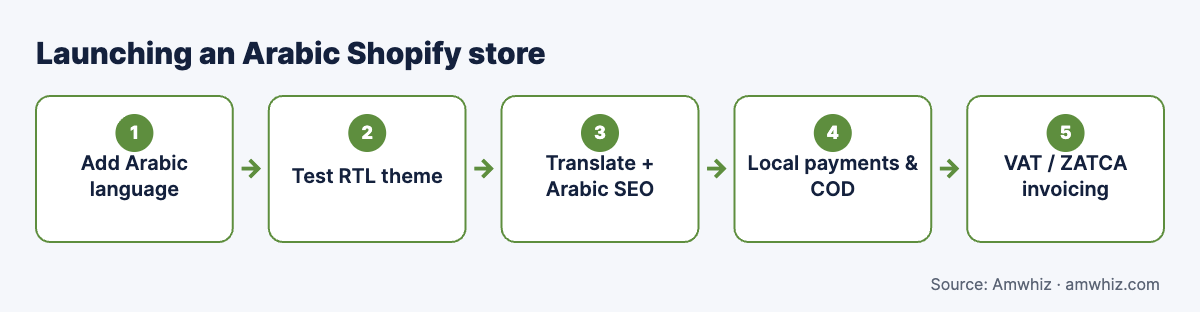
Launching an Arabic Shopify store.
Step 1: Add Arabic as a language
In Shopify admin, go to Settings → Languages, add Arabic and publish it. With Shopify Markets, assign Arabic to UAE and KSA markets and use subfolders such as /ar-ae/ and /ar-sa/ for SEO.
Step 2: Choose an RTL-ready theme
When Arabic is active, Shopify's modern themes switch to RTL direction. Before you commit:
- Test header, menu, product gallery, cart drawer and checkout in Arabic
- Check icons and arrows point the right way
- Check sliders, carousels and custom sections from apps
- Check number and price formats
- Test on mobile, where most GCC traffic comes from
Custom CSS often needs [dir="rtl"] rules to fix padding, alignment and icons.
Step 3: Translate content properly
| Content | Approach |
|---|---|
| Product titles and descriptions | Professional or reviewed translation |
| Theme strings (buttons, cart, checkout) | Shopify translation tools + review |
| Collections and navigation | Translate with local keywords |
| Policies and FAQs | Human translation, legal review |
| Emails and notifications | Translate templates |
| Images with text | Arabic versions of banners |
Use Gulf-friendly Modern Standard Arabic and keep brand names consistent.
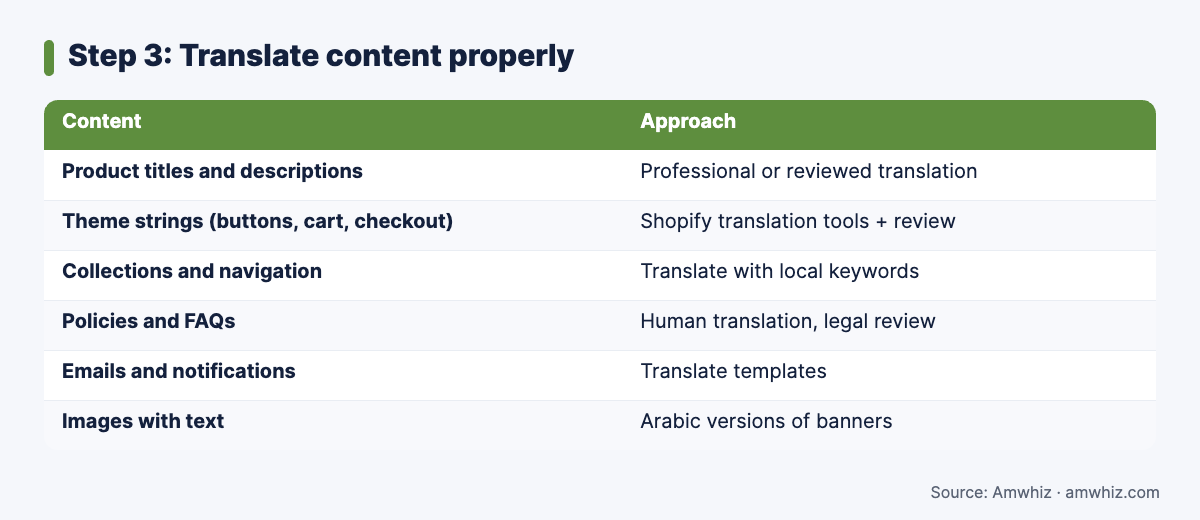
Step 3: Translate content properly
Step 4: Arabic SEO
- Translate meta titles and descriptions with Arabic keywords people actually search
- Use language subfolders with hreflang (Shopify handles this with Markets)
- Avoid duplicate English content on Arabic URLs
- Write Arabic alt text for key images
- Submit the sitemap in Google Search Console
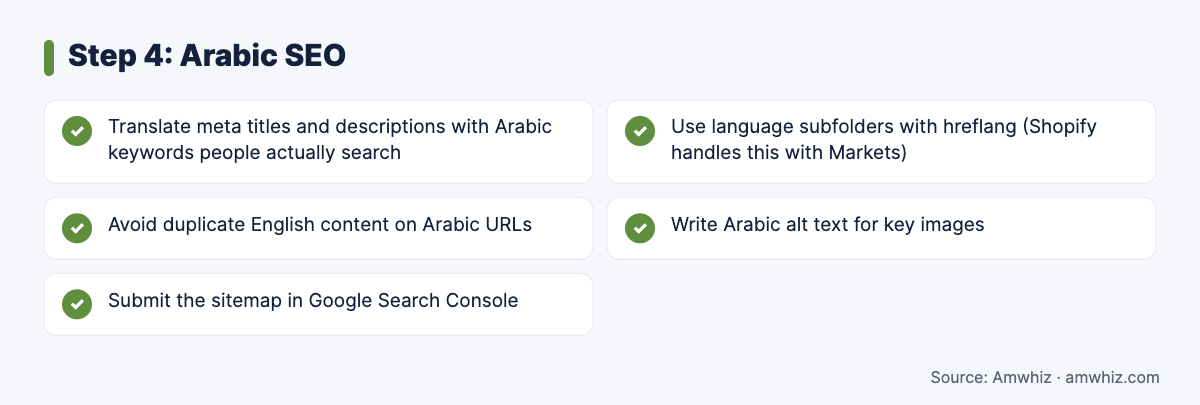
Step 4: Arabic SEO
Step 5: Local payments
| Payment method | Why it matters |
|---|---|
| Cards (Visa, Mastercard, mada in KSA) | Core payment method |
| Apple Pay / Google Pay | Fast mobile checkout |
| Buy now, pay later (e.g. Tabby, Tamara) | Popular for higher basket sizes |
| Cash on delivery | Still important, especially in KSA |
| Local gateways | Better approval rates and settlement |
Check which providers are currently supported for your store's country.
Step 6: COD and order confirmation
COD increases conversion but raises return risk. Confirm COD orders through WhatsApp in Arabic before dispatch and offer an incentive to switch to prepaid.
Step 7: VAT and invoicing
- UAE: 5% VAT; prepare for the e-invoicing rollout (guide)
- KSA: 15% VAT; ZATCA e-invoicing Phase 2 applies by wave (guide)
- Show prices including VAT and issue Arabic/English tax invoices
Step 8: Shipping and duties
- Local couriers for same-day or next-day delivery in major cities
- Cross-border duties and taxes if shipping from outside the GCC
- Clear delivery timelines in Arabic on product and cart pages
Launch checklist
- ☐ Arabic language published and assigned to markets
- ☐ RTL tested on all templates and devices
- ☐ Translations reviewed by a native speaker
- ☐ Arabic SEO metadata complete
- ☐ Payments tested in AED and SAR
- ☐ COD rules and WhatsApp confirmation live
- ☐ VAT settings and invoices correct
- ☐ Shipping rates and zones set
- ☐ Analytics tracking by language and market
Why choose Amwhiz?
Amwhiz builds and localises Shopify stores for the UAE and Saudi Arabia, including RTL fixes, bilingual content, local payments, COD workflows on WhatsApp and Zoho Books VAT/ZATCA integration. See our guide to launching a Shopify store in the UAE and KSA.
Want help with this? Book a free GCC Shopify launch call with the Amwhiz team.
Related guides
- Zoho Books ZATCA Phase 2 Setup for Saudi Businesses
- Shiprocket vs Delhivery vs Custom Shipping Integration for Shopify Stores in India
- Best WhatsApp Business API Providers in India (2026): Interakt vs AiSensy vs WATI vs Custom
Frequently asked questions
Does Shopify support Arabic and RTL?
Yes. Shopify supports Arabic as a store language, and many themes switch to right-to-left layout automatically. Test custom sections and apps carefully.
Can I run an Arabic and English store on one Shopify account?
Yes. Use Shopify's languages and Markets features to serve both languages from one store with separate URLs.
Is machine translation good enough for Arabic stores?
It's a starting point, but reviewed or professional translation converts better and avoids errors.
Which payment methods matter in Saudi Arabia?
Cards including mada, Apple Pay, buy-now-pay-later options and cash on delivery are all widely used.
Do I need ZATCA e-invoicing for a Shopify store in KSA?
If you're VAT-registered in Saudi Arabia, yes, under ZATCA's phased rollout. Connect your store to compliant invoicing software.
Leave a comment
Your email address will not be published. Comments are reviewed before they appear.