
-1.png?width=134&height=66&name=amwhiz-logo%20(1)-1.png)


Neither HubSpot CMS nor WordPress is objectively "better", they trade off differently on cost, maintenance burden, and how tightly marketing tools integrate with the content itself. Amwhiz builds on both platforms, and this comparison lays out where each one genuinely wins so you can match the platform to your team's situation rather than a marketing claim. If you want the deeper look at HubSpot's side specifically, see our HubSpot content management system page.
HubSpot CMS vs. WordPress in 2026: Which Is Actually Better?
The Short Answer
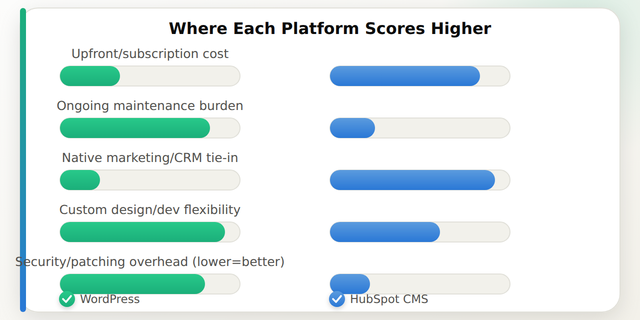
Neither wins outright, it depends on what you're optimizing for. WordPress is typically cheaper upfront and more flexible for highly custom or content-heavy sites, especially with an established plugin/developer ecosystem, but it carries ongoing maintenance, security, and plugin-compatibility overhead. HubSpot CMS costs more upfront (it's licensed software, not free like WordPress core) but bundles hosting, security, and native marketing/CRM integration, which typically lowers total operating effort for marketing-led teams. The right choice depends on your team's technical resourcing and how central CRM/marketing personalization is to the site.
Licensing and Total Cost of Ownership
WordPress the software is free and open-source, but "free" understates the real cost: hosting, a theme, plugins (many premium), security monitoring, and developer time for updates and troubleshooting all add up. A well-maintained WordPress marketing site commonly runs $50-$300+/month in hosting and plugin fees, plus periodic developer hours for updates and fixes. HubSpot CMS Hub is a paid tier of HubSpot starting in the low hundreds of dollars per month and scaling up with the Professional and Enterprise tiers, but that price typically includes hosting, a CDN, SSL, and security patching as part of the subscription, so the comparison isn't really "free vs. paid," it's "pay in developer/maintenance time vs. pay in subscription fee."
Marketing and Personalization Features
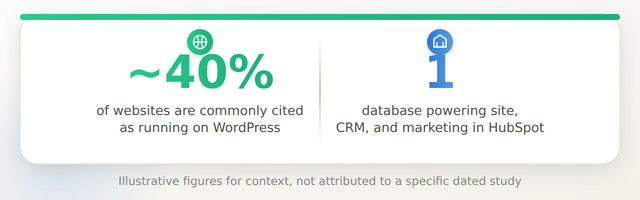
This is the category where the two platforms diverge most. HubSpot CMS is built on top of the same CRM database that runs HubSpot's marketing, sales, and service tools, so a page can personalize content by contact lifecycle stage, list membership, or deal status natively, with no plugin required. WordPress can absolutely do personalization and marketing automation, but it requires stitching together plugins (or a separate marketing platform) and keeping the integration maintained as each piece updates independently, which is a real, recurring maintenance cost, not a one-time setup task.
Customization and Developer Flexibility
WordPress generally wins on raw flexibility. Its plugin ecosystem is enormous, the theming system is well documented, and there's a large global talent pool of WordPress developers, which typically makes bespoke functionality cheaper to build and easier to find help for. HubSpot CMS uses its own templating language (HubL) and a smaller, more specialized developer pool, which can mean higher hourly rates for custom development, though HubSpot's built-in modules cover a lot of common marketing-site needs without custom code at all.
Security and Maintenance Responsibility
WordPress's openness is also its main maintenance liability: core, theme, and plugin updates need to be applied regularly, and outdated plugins are a common attack vector. Someone, you, an agency, or a maintenance retainer, has to own that on an ongoing basis. HubSpot CMS shifts platform-level security, patching, and uptime to HubSpot as part of the subscription, which is a genuine advantage for teams without dedicated technical staff, though it also means you're dependent on HubSpot's infrastructure and pricing changes rather than owning your own hosting stack.
Migration Considerations
Moving from WordPress to HubSpot CMS (or the reverse) is a real project, not a plugin toggle, content, URL structure, SEO redirects, and any custom functionality all need to be planned for. It's worth reading a realistic account of what a comparable ecommerce migration involves in Amwhiz's SEO-safe migration case study before assuming either direction is a quick swap.
How Amwhiz Helps
Amwhiz builds and migrates sites on both WordPress and HubSpot's content management system, and we'll tell you honestly which one fits your team's resourcing and marketing needs rather than defaulting to whichever we prefer to sell. If HubSpot CMS is the right fit, we handle build, migration, and the marketing integrations that make it worth the subscription.
Frequently Asked Questions About HubSpot CMS vs. WordPress
Is HubSpot CMS more expensive than WordPress?
In subscription terms, yes, WordPress core is free while HubSpot CMS Hub has a monthly fee. But WordPress's real cost includes hosting, plugins, security, and maintenance time, which for many marketing-led teams ends up comparable to or higher than the HubSpot subscription once developer hours are counted.
Which platform is better for SEO?
Both can perform well for SEO. WordPress has a larger ecosystem of SEO plugins and more granular technical control; HubSpot CMS has SEO recommendations and reporting built into the same platform as the content, which some marketing teams find easier to act on without developer involvement.
Can I migrate an existing WordPress site to HubSpot CMS without losing search rankings?
Yes, with proper planning, this typically requires a full URL mapping and 301 redirect strategy, along with careful content migration, done before and during launch rather than as an afterthought.
Do I need a developer to run a HubSpot CMS site day-to-day?
Not usually for content updates, HubSpot CMS is built for marketers to edit pages and modules without code. Custom module development or complex design changes still typically require developer involvement, similar to WordPress theme work.
Is WordPress less secure than HubSpot CMS?
WordPress isn't inherently less secure, but its plugin-based model puts more of the ongoing patching responsibility on you or your agency. HubSpot CMS includes platform-level security and updates as part of the subscription, which reduces (but doesn't eliminate) the maintenance burden.
Which platform is better for a small business with no in-house developer?
HubSpot CMS is often a better fit for teams without dedicated technical staff, since hosting, security, and updates are bundled in. WordPress can still work well for small businesses that have a reliable agency or freelancer handling maintenance.
Conclusion
HubSpot CMS and WordPress solve overlapping problems from different angles, WordPress trades subscription cost for flexibility and DIY maintenance, HubSpot CMS trades a higher subscription for bundled infrastructure and native marketing integration. The right pick depends on your team's technical resourcing and how much personalization your marketing strategy actually needs.
Amwhiz helps businesses evaluate and build on the right CMS platform for their team, including full HubSpot content management system builds and migrations. Visit amwhiz.com or email sales@amwhiz.com to get started.



