
-1.png?width=134&height=66&name=amwhiz-logo%20(1)-1.png)


Choose an off-the-shelf Shopify app when a standard, one-to-one workflow already exists in the App Store and your systems match its assumptions; choose a custom integration when your data model, business rules, or combination of systems doesn't fit any existing app's scope. Amwhiz works through this decision with merchants regularly as part of its Shopify custom app integration services, and the honest answer is usually "start with the app store, but know the signs that you've outgrown it." This post lays out the tradeoffs on cost, flexibility, and speed so you can decide with confidence instead of guessing.
Off-the-Shelf Shopify App vs. Custom Integration: Which Should You Choose?
The Short Answer
Pick an off-the-shelf app when your workflow is common (basic email sync, standard shipping labels, simple loyalty points) and a listed app already supports it, it's cheaper upfront and live in hours. Pick a custom integration when you need multi-system sync, non-standard business logic (tiered pricing, complex tax rules, B2B workflows), or when every app you try requires workarounds that create new manual work. The deciding factor isn't budget alone; it's whether your requirements are standard or specific to how your business runs.
Comparing the Two Approaches
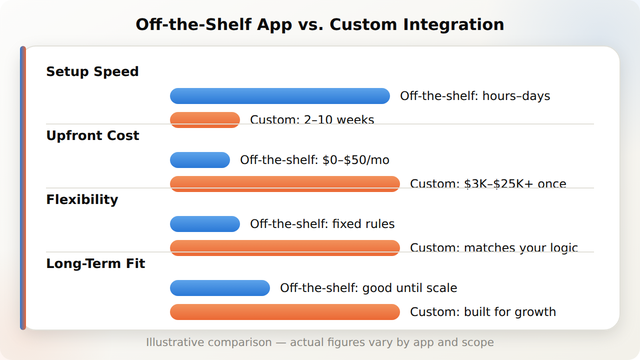
The two paths trade off against each other in predictable ways. Amwhiz's custom app vs. public app guide goes deeper on this, but the core comparison looks like this:
When Off-the-Shelf Is the Right Call
An off-the-shelf app is usually the smarter choice when:
- Your workflow is common, reviews, basic email marketing sync, standard label printing, and multiple apps already do it well.
- You need something live today, not in weeks.
- Your budget is a recurring monthly fee rather than a project cost.
- You're pre-launch or early-stage and requirements may still change.
- The app's existing configuration options (not custom code) cover your edge cases.
When a Custom Integration Pays Off
A custom build tends to make more sense when:
- You're syncing 2+ systems together (ERP, WMS, CRM, carrier) with business logic between them.
- Your pricing, tax, or fulfillment rules are non-standard (B2B tiers, multi-currency, regional logistics).
- You've tried 2-3 apps already and each required a manual workaround that undoes the automation.
- Data accuracy matters enough that a generic mapping isn't good enough (inventory sync, financial reconciliation).
- You expect to scale past what a single app's rate limits or plan tier supports.
For a deeper look at what a custom build actually involves once you decide it's the right call, see Amwhiz's custom Shopify app development guide.
A Quick Decision Checklist
Can You Switch Later?
Yes, many stores start with an off-the-shelf app and migrate to a custom integration once they hit its limits, without disrupting operations. The key is treating the app-store phase as a temporary bridge and keeping data exports/backups clean, so the eventual custom build has good source data to map from rather than a mess to untangle first.
How Amwhiz Helps
Amwhiz helps merchants make this call honestly, sometimes the right answer is "don't build custom yet." When a store has outgrown the App Store's options, Amwhiz's Shopify custom app integration services scope and build the specific sync your business rules actually require, drawing on patterns from projects like the custom shipping app with price and currency rules case study.
Frequently Asked Questions About Off-the-Shelf vs. Custom Shopify Integration
What's the real difference between an off-the-shelf Shopify app and a custom integration?
An off-the-shelf app is a pre-built, one-size-fits-many tool you install and configure. A custom integration is built specifically around your systems and business rules, so it can handle logic (multi-currency pricing, multi-system sync, non-standard tax rules) that a generic app can't.
When is an off-the-shelf Shopify app the better choice?
When your workflow is common, a listed app already supports it, and you need something running quickly on a monthly-fee budget rather than a project budget. This covers the majority of single-purpose needs like email sync or basic shipping labels.
When should I invest in a custom Shopify integration instead?
When you're syncing multiple systems with business logic between them, when your rules are non-standard, or when you've already tried a couple of apps and each required a manual workaround that broke the automation.
Can I start with an off-the-shelf app and move to custom later?
Yes. Many merchants start with an app-store tool and migrate to a custom integration once they hit its limits. Keeping clean data and export backups during the app-store phase makes that later migration smoother.
Does a custom integration cost more than a Shopify app subscription?
Upfront, yes, a custom build is typically a one-time project cost of roughly $3,000-$25,000+, versus $0-$50/month for most app subscriptions. Over time, the comparison depends on how much manual work the app subscription still requires versus a fully automated custom sync.
What questions should I ask before deciding?
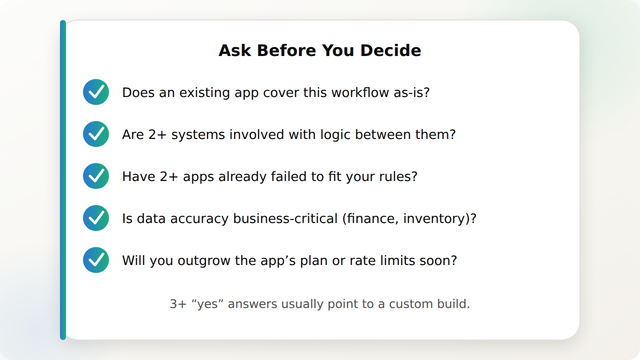
Ask whether an existing app already covers the workflow as-is, whether 2+ systems are involved with logic between them, whether you've already tried apps that didn't fit, whether the data is business-critical, and whether you'll outgrow the app's plan limits soon. Multiple "yes" answers point toward a custom build.
Conclusion
There's no universally right answer between off-the-shelf and custom, only the right answer for your current systems, budget, and how standard your workflow really is. Start simple where you can, and treat the signs above as your cue to move to a custom integration before workarounds start costing more than the build would.
Amwhiz helps Shopify merchants evaluate this decision and, when custom is the right call, builds the integration end to end. Visit amwhiz.com or email sales@amwhiz.com to get started.



